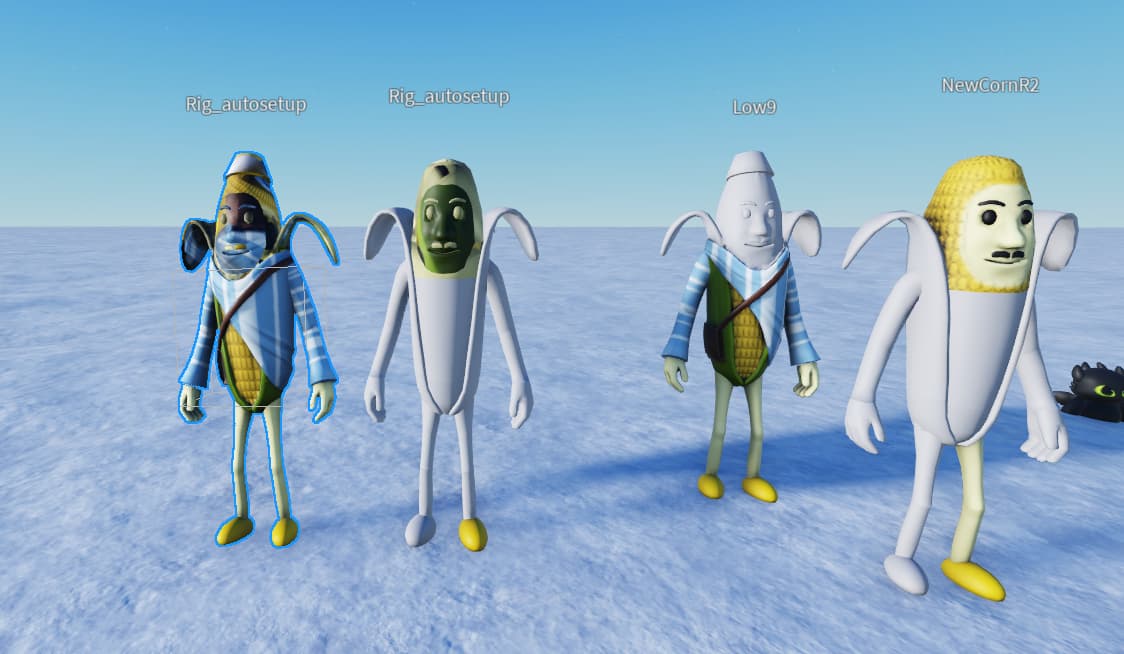
I guess today or yesterday UI update become permanant. Before that update I was trying my new avatar mesh and there was no problem with textures after avatar setup
But after the update as you can see Avatar setup basically change UV Map. I looked at the mesh in blender and it seems setup moves the uv part of the particular mesh to another position. I tried my old one and new one, same problem. It was not like that before UI update.
But if you already use the texture in blender and export to studio like that, nothing happens, maybe quality decrease but I am not sure.
Here is how roblox export the color texture of the mesh

Hello There! I hope you’re doing well.
Thank you for taking the time to submit this issue and for reading our message.
To help us move forward, we’d appreciate your support with a few questions:
-
Is this issue still occurring on your device?
-
If so, could you please send us a Repro Place file?
Don’t worry — we’ve got you covered!
You can find step-by-step instructions on how to generate and send the Repro place file How to post a Bug Report - Bug Reports - Developer Forum | Roblox
Following these steps will help us better understand the issue and work on a solution more efficiently.
Thank you again for your cooperation!
Just to expedite the troubleshooting, which UI changes are you talking about? Is it the Platform/Development Avatars setting or is it something else?
General Icons and everything. It was already on beta features I think so it’s not exactly new.
I see, so it’s more about the overall Studio UX. This one shouldn’t impact auto setup. If you could share a place with a model that’s having texture issues after auto setup with me that would be super helpful, because I can’t reproduce it locally yet. Thank you!
1 Like
Very interesting, now it seems the problem is solved. I tried it in another place and it was ok then re try in my first place it was ok there too. Thanks for your attention to this matter!
1 Like