Billboard Leaf Foliage Idea
Note: The concept and work were done by @HarpyaNSX.
I’m just posting this on their behalf since they don’t currently have
access to the DevForum.
I was experimenting with a different way to make tree foliage using
BillboardGui instead of meshes or planes.
The idea is pretty simple:
- Use a part as the center of the canopy
- Generate attachments around it in a sphere
- Each attachment holds a BillboardGui with a leaf texture
Since billboards always face the camera, it creates a volumetric canopy
effect while staying pretty lightweight.
Not sure if this is actually a good approach or not, but I thought the
idea was interesting enough to share.
Example
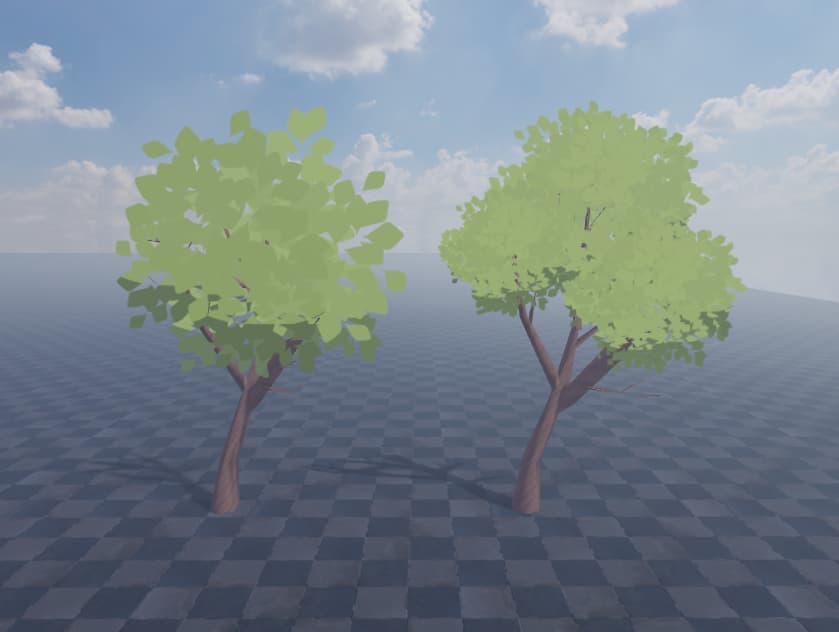
Structure
Each leaf looks like this:
Attachment
└ BillboardGui
   └ ImageLabel
The attachments are distributed around the canopy using a Fibonacci
sphere distribution, which helps spread them evenly.
Small things I added
Just a few simple things to make it look a bit more natural:
- random rotation on each leaf
- slight brightness variation
- darker leaves on the bottom to fake shadow
- shadow leaves slightly smaller
Quick Settings
These are the main values you might want to tweak:
LEAF_COUNT→ number of leavesRADIUS→ canopy sizeBILLBOARD_SIZE→ leaf sizeSHADOW_CUTOFF_Y→ where shadow leaves startSHADOW_SIZE_MULT→ size difference for shadow leaves
Script
-- LEAF TREE GENERATOR (Run in Command Bar)

local Selection = game:GetService("Selection")
local parts = Selection:Get()

if #parts == 0 then
    warn("Select one or more Parts first.")
    return
end

-- ===== SETTINGS =====

local LEAF_COUNT = 25
local RADIUS = 6
local ATTACHMENT_PREFIX = "LeafAtt_"

local LEAF_TEXTURE = "rbxassetid://17354373559"
local SHADOW_TEXTURE = "rbxassetid://137871535448828"

local LEAF_COLOR = Color3.fromRGB(143,168,85)

local BILLBOARD_SIZE = 3
local LIGHT_INFLUENCE = 0.05

local RANDOM_ROTATION = true
local ROT_MIN = 0
local ROT_MAX = 360

local RANDOM_BRIGHTNESS = true
local BRIGHTNESS_BASE = 1
local BRIGHTNESS_VARIATION = 0.2

local ENABLE_SHADOW = true
local SHADOW_CUTOFF_Y = 0
local SHADOW_SIZE_MULT = 0.9

-- =====================

local function clamp(x,a,b)
    return math.max(a,math.min(b,x))
end

local function spherePoint(i,n,r)
    local golden = math.pi * (3 - math.sqrt(5))
    local t = (i-0.5)/n
    local y = 1-2*t
    local radius = math.sqrt(1-y*y)
    local theta = golden*i

    local x = math.cos(theta)*radius
    local z = math.sin(theta)*radius

    return Vector3.new(x*r,y*r,z*r)
end

local function createLeaf(att)

    local billboard = Instance.new("BillboardGui")
    billboard.Name = "LeafBillboard"
    billboard.Size = UDim2.new(BILLBOARD_SIZE,0,BILLBOARD_SIZE,0)
    billboard.AlwaysOnTop = false
    billboard.LightInfluence = LIGHT_INFLUENCE
    billboard.Brightness = BRIGHTNESS_BASE
    billboard.Parent = att

    local img = Instance.new("ImageLabel")
    img.Name = "Leaf"
    img.BackgroundTransparency = 1
    img.Size = UDim2.fromScale(1,1)
    img.Position = UDim2.fromScale(0.5,0.5)
    img.AnchorPoint = Vector2.new(0.5,0.5)
    img.Image = LEAF_TEXTURE
    img.ImageColor3 = LEAF_COLOR
    img.Parent = billboard

    return billboard,img
end

local function clean(part)
    for _,c in ipairs(part:GetChildren()) do
        if c:IsA("Attachment") and c.Name:sub(1,#ATTACHMENT_PREFIX) == ATTACHMENT_PREFIX then
            c:Destroy()
        end
    end
end

for _,part in ipairs(parts) do
    if part:IsA("BasePart") then

        clean(part)

        for i=1,LEAF_COUNT do

            local pos = spherePoint(i,LEAF_COUNT,RADIUS)

            local att = Instance.new("Attachment")
            att.Name = ATTACHMENT_PREFIX..i
            att.Position = pos
            att.Parent = part

            local gui,img = createLeaf(att)

            if RANDOM_ROTATION then
                img.Rotation = math.random(ROT_MIN,ROT_MAX)
            end

            if RANDOM_BRIGHTNESS then
                local b = BRIGHTNESS_BASE + ((math.random()*2-1)*BRIGHTNESS_VARIATION)
                gui.Brightness = clamp(b,0,10)
            end

            if ENABLE_SHADOW and att.Position.Y < SHADOW_CUTOFF_Y then
                img.Image = SHADOW_TEXTURE
                img.Rotation = 0

                gui.Size = UDim2.new(
                    gui.Size.X.Scale * SHADOW_SIZE_MULT, 0,
                    gui.Size.Y.Scale * SHADOW_SIZE_MULT, 0
                )
            end

        end
    end
end

warn("Leaf system generated.")
Questions
I’m curious what people think about this approach.
- Would performance become a problem with many BillboardGuis?
- Is there a better way to handle depth/overlap with billboards like
this? - Would something like an LOD system make this more practical?
Any feedback or suggestions would be appreciated.
