I’m making a plot placement system and the orientation is off no matter what I do. I’m using CFrame.Angles to rotate the object, and the model has no rotation applied when it’s sitting in ReplicatedStorage
This is the code I use to like “place” the object, and it moves it around. I’ve tried using math.pi, instead of 90 degree increments but it still doesn’t work.
print(Rotation) -- 90, 360, eg, goes up by 90 increments or down by 90.
local cf = CFrame.new(cast.Position) * CFrame.Angles(0, math.rad(Rotation), 0)
ModelClone:PivotTo(cf)
I’ve tried such as
Rotation += math.pi / 2
but it produces the same problem.
When I actually look at the model in workspace, when it should be 90, its slightly off

or when it should be 90 again it’s

And yes, I do use math.ABS, to make sure it’s positive!!!
Then when I do 180 degrees, just 180, no matter what when I put in 180 I get

Like these two objects should ALIGN with each other, its 90 degree increments yet there is still a rotational gap between them. What is happening?
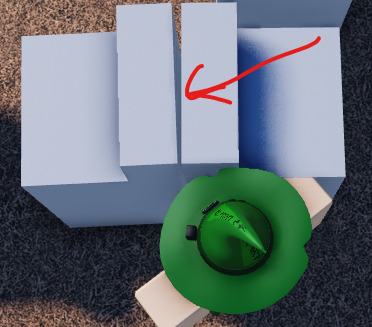
This is the object

This is how I actually place it finally,
local response = MyEvent:Fire(CurrentModelID, ModelClone:GetPivot())
This seems to be the problem, because the PREVIEW model is fine, but the placed model is not fine, and when I do ModelClone:GetPivot(), it seems off. in the place model event, all I do is set the cframe to the cframe that i send here on the client.