
Hello!
I’ve created a module that makes working with RichText in Roblox simple and powerful.
Getting Started
Enable the RichText property on your TextLabel, TextBox, or TextButton.
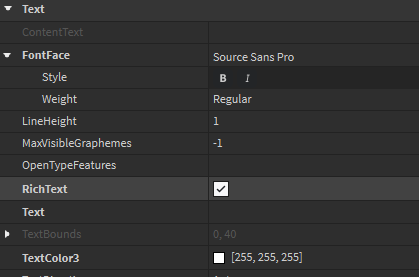
Create a LocalScript and set its source to the following:
local EZRichText = require(path.to.EZRichText)
local EZRichTextObject = EZRichText.New("TEXT")
Escape forms (like <, >, &) are automatically handled safely.
Modifying Text
You can update the text at any time:
EZRichTextObject:ChangeText("NEW TEXT")
Adding Tags with Properties
Add tags like <font> or <stroke> with optional properties:
EZRichTextObject:Add("font", {color = "rgb(255,0,0)"}) -- The <br/> tag is also supported.
You don’t have to manually format RGB values:
-- Auto-converts to rgb(255, 0, 0)
EZRichTextObject:Add("font", {color = Color3.new(1, 0, 0)})

-- Supports BrickColor and Enum too
EZRichTextObject:Add("font", {color = BrickColor.Red()})
EZRichTextObject:Add("font", {face = Enum.Font.FredokaOne})
EZRichTextObject:Add("font", {weight = Enum.FontWeight.Heavy})
EZRichTextObject:Add("stroke", {joins = Enum.LineJoinMode.Miter})
Checking Tags and Properties
Check if a tag exists:
EZRichTextObject:HasTag("font") --> true/false
Check if a property exists in a tag:
EZRichTextObject:HasProperty("font", "color") --> true/false
Removing Tags and Properties
Remove entire tags:
EZRichTextObject:RemoveTags({"font", "stroke"})
Remove specific properties from a tag:
EZRichTextObject:RemoveProperties("font", {"color", "face"})
Getting the Final Text
Once your text and styles are ready, retrieve the full RichText string:
local Result = EZRichTextObject:Get()
You can now apply this to your
TextLabel,TextBox, orTextButton.
Destroying
EZRichTextObject:Destroy()
Destroys and cleans the object.
Gradients
Predefined gradients:
RainbowRainbowOutlineFireFireOutlineGhostGhostOutlineSunsetSunsetOutline
Gradient Example:
local Result = EZRichText.Gradient("TEXT", {"Rainbow", "RainbowOutline"}, false)
- First argument: the text
- Second: a table of gradient names
- Third: whether the effect is dynamic (
trueorfalse)
Dynamic Gradients
You can animate text using RunService.Heartbeat like this:
local RunService = game:GetService("RunService")
local EZRichText = require(path.to.EZRichText)
local TextLabel = path.to.TextLabel

RunService.Heartbeat:Connect(function()
	TextLabel.Text = EZRichText.Gradient("TEXT", {"Rainbow"}, true)
end)
Dynamic gradients can be performance-intensive, especially with long text or multiple instances.
Configuration
You can customize default settings via the Configuration module:
MaxCharacters = 100, -- Caps length for performance
Speed = 1, -- Controls animation speed for dynamic gradients
OutlineThickness = 3 -- Outline thickness for gradients
Why It Exists
Manual RichText gets messy fast.
This module makes it clean, dynamic, and easy to manage tags and properties.
Also, read:
- Yes
- No
- Excellent
- Good
- Decent
- Needs Improvement
- Not Useful
Let me know your thoughts, feedback is always appreciated!