Hello!
I’m currently working on a voxel destruction physics game. I came across Voxel Destruction Physics 2, which has a really cool decal projection technique like CSG. I tried to implement something similar myself, but I’m having trouble getting it to even get it work on non-grid-aligned parts.
Here’s it working correctly on grid-aligned parts (1x1x1 voxels):
Here on non grid parts (multiple sizes)
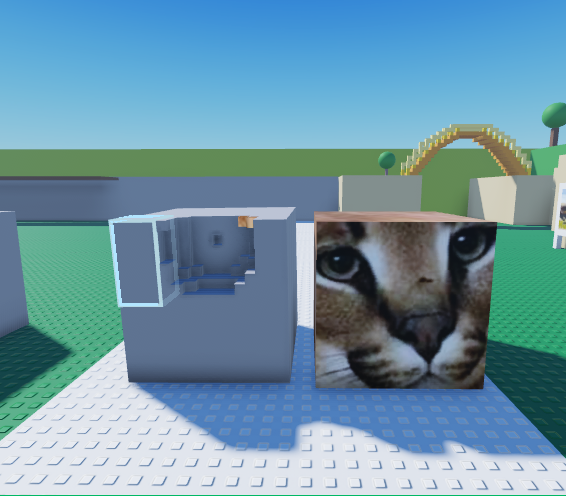
and I can’t really figure this out
Here the code
local projectedDecal = {}

function projectedDecal.Process(originalPart,parts)
	if originalPart:GetAttribute("ProjectedDecal") then return end -- skip if already get projected!!!

	local decals = {} :: {Decal}
	for _, descendant in ipairs(originalPart:GetDescendants()) do
		if descendant:IsA("Decal") then
			table.insert(decals, descendant)
		end
	end

	if #decals == 0 then
		return
	end

	local size = originalPart.Size
	local position = originalPart.Position
	local cframe = originalPart.CFrame

	local xCount = math.floor(size.X)
	local yCount = math.floor(size.Y)
	local zCount = math.floor(size.Z)

	local orginalSize = size
	local calculateSurface = {}

	local x = orginalSize.x * 50
	local y = orginalSize.y * 50
	local lastX = 0
	local lastY = 0

	table.sort(parts, function(a, b)
		if a.Position.X == b.Position.X then
			return a.Position.Y > b.Position.Y
		else
			return a.Position.X < b.Position.X
		end
	end)

	local function round(num, decimals)
		local mult = 10^(decimals or 0)
		return math.floor(num * mult + 0.5) / mult
	end

	local columns = {}

	for _, part in ipairs(parts) do
		local xPos = round(part.Position.X, 3)
		if not columns[xPos] then
			columns[xPos] = {}
		end
		table.insert(columns[xPos], part)
	end

	local maxY = -math.huge
	for _, part in ipairs(parts) do
		if part.Position.Y > maxY then
			maxY = part.Position.Y
		end
	end

	local yPositions = {}
	for _, part in ipairs(parts) do
		table.insert(yPositions, part.Position.Y)
	end
	table.sort(yPositions, function(a, b) return a > b end)

	local stepY = 1
	local minDiff = math.huge
	for i = 1, #yPositions - 1 do
		local diff = yPositions[i] - yPositions[i+1]
		if diff > 0 and diff < minDiff then
			minDiff = diff
		end
	end
	if minDiff ~= math.huge then
		stepY = minDiff
	end

	for xPos, colParts in pairs(columns) do
		table.sort(colParts, function(a, b)
			return a.Position.Y > b.Position.Y
		end)

		local filledColumn = {}

		for i = 1, yCount do
			local expectedY = maxY - (i - 1) * stepY
			local matched = false

			for j, part in ipairs(colParts) do
				if math.abs(part.Position.Y - expectedY) < 0.01 then
					filledColumn[i] = part
					table.remove(colParts, j)
					matched = true
					break
				end
			end

			if not matched then
				filledColumn[i] = 0xFFFFFF
			end
		end

		columns[xPos] = filledColumn
	end

	local xKeys = {}
	for xPos in pairs(columns) do
		table.insert(xKeys, xPos)
	end
	table.sort(xKeys, function(a, b)
		return a > b
	end)

	local stepX = x / #xKeys

	for idx, xPos in ipairs(xKeys) do
		if idx == 1 then
			calculateSurface[idx] = { x = x, y = y, posX = 0, posY = 0 }
		else
			lastX -= stepX
			calculateSurface[idx] = { x = x, y = y, posX = lastX, posY = lastY }
		end
	end

	for idx, xPos in ipairs(xKeys) do
		lastY = 0

		local columnParts = columns[xPos]
		local data = calculateSurface[idx]

		for idx2, part in ipairs(columnParts) do
			if idx2 ~= 1 then
				lastY -= stepX
			end

			if part == 0xFFFFFF then continue end

			for _,decal in pairs(decals) do
				local surfaceGui = Instance.new("SurfaceGui")
				surfaceGui.PixelsPerStud = 50
				surfaceGui.SizingMode = Enum.SurfaceGuiSizingMode.PixelsPerStud
				surfaceGui.Face = decal.Face
				surfaceGui.ClipsDescendants = true
				surfaceGui.Adornee = part
				surfaceGui.Parent = part

				local imageLabel = Instance.new("ImageLabel")
				imageLabel.BackgroundTransparency = 1
				imageLabel.Image = decal.Texture
				imageLabel.Size = UDim2.fromOffset(data.x, data.y)
				imageLabel.Position = UDim2.fromOffset(data.posX, lastY)
				imageLabel.Parent = surfaceGui
			end
		end
	end
end

return projectedDecal


