You can write your topic however you want, but you need to answer these questions:
-
What do you want to achieve? Keep it simple and clear!
I am trying to get this custom tool to be picked up with a Proximity Prompt and not when I touch it goes into my backpack
-
What is the issue? Include screenshots / videos if possible!
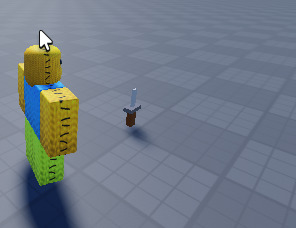

-
What solutions have you tried so far? Did you look for solutions on the Developer Hub?
After that, you should include more details if you have any. Try to make your topic as descriptive as possible, so that it’s easier for people to help you!
-- This is an example Lua code block
Please do not ask people to write entire scripts or design entire systems for you. If you can’t answer the three questions above, you should probably pick a different category.
From your unfinished draft, i can see that the touchinterest is messing you up.
Remove the touchinterest associated with the handle, this will not allow you to pick it up when stepping over it.
Where do I find touchintrest is that in the tool
It’s inside the “Handle”. . . . . . . .
I got rid of the touchintrest but when I join the game the touchintrest is still in the handle
Ok, new method. Clone the tool. Take the sword out of the tool, Group the sword, put the proximityprompt inside a part in the sword model.
Make a new script and put it inside the proximityprompt
Put the other TOOL inside of “ServerStorage”
Paste this code inside the script in the sword model
local dbc = false
local Tool = game.ServerStorage.(put tool name here)

script.Parent.Triggered:Connect(function(plr)
if dbc then return end
dbc = true
local NT = Tool:Clone()
Tool.Parent = plr.Backpack
script.Parent.Parent.Parent:Destroy()
end)
Thank you it works but do you know why the tool is not showing
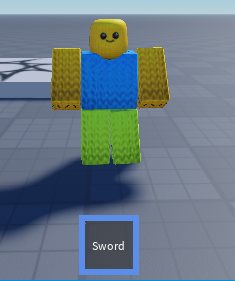
Nevermind I figure it why it was not showing
I know I said i knew why the tool is not showing but can you tell me why it not showing
