Hi Creators,
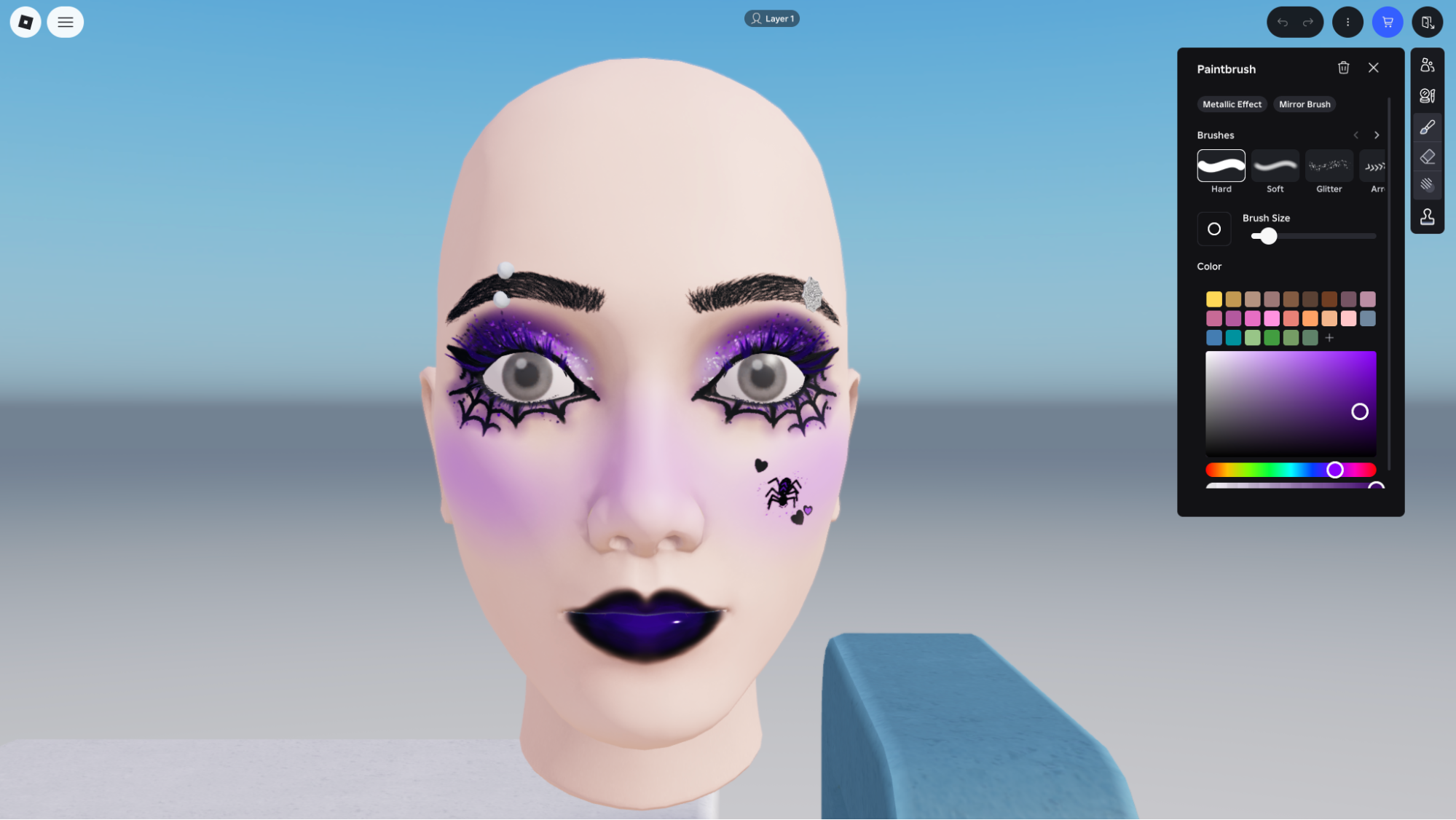
Today, we’re launching In-Experience Creation (IEC) for Makeup to enable makeup-creation games. You can now allow your users to create, pay for, and save custom eye makeup, lip makeup, face makeup, eyelashes, and eyebrows directly to their inventory from within your game. By allowing players to author makeup directly on their own avatars, we provide 1:1 visual feedback in real-time, like applying makeup in front of a mirror. This solves the pain point of unpredictable asset fits.
Unlocking New Creator Value
- Powerful Creation Tools: Use
EditableImage,EditableMesh,WrapDeformer, andWrapTextureTransferto give players full mesh and texture customization capabilities. - Monetization: When a player makes a purchase, you will receive 70% of sales (30% as the item creator and 40% as the game creator) after recouping the creation advance.
- Portability: Finished looks are saved directly to the user’s inventory just like UGC makeup and can be seamlessly transferred across other R15 heads they own.
- Guardrails and Validation: All created assets must pass UGC validation and moderation. Creations are for personal use only and cannot be sold or traded.
Try It Out
You can try out the new features right now in our uncopylocked place, Roblox Avatar Creator, to see how these APIs work. In it, you’ll find makeup alongside a hat, shirt, and full avatar, and each can be mixed and matched for your experience.
You can also download the placefile from GitHub.
Highlights include:
- Advanced Brushes: Allow players to paint with soft brushes for blush and eyeshadow, a glitter brush, and metallic effects to create the ideal makeup look.
- Multiple Assets and Layers: Create multiple assets at once and utilize horizontal layering to composite several effects together cleanly.
- Real-time Fit: Players can see what makeup looks like on their current avatar head before checking out and saving it to their inventory.
How to Enable In-Experience Creation for Makeup
Check out our detailed documentation for more step-by-step instructions, and take a look at the high-level overview below:
-
Meet Creator Requirements: Game owners must have a Roblox Plus or Roblox Premium subscription (Premium 1000 or 2200), similar to our UGC marketplace requirements.
-
Purchase Avatar Creation Tokens: Navigate to the Creator Dashboard and purchase tokens for the specific item type you want to enable (FaceMakeup, LipMakeup, EyeMakeup, EyebrowAccessory, or EyelashAccessory). Note that you can select ‘Makeup’ and then choose which assets you want to purchase Avatar creation tokens together.
-
Prepare Projection & Space Transfers: Call
WrapTextureTransfer:PrepareProjectionMeshDataAsync()to cache projection data on heads. If working between cage and target reference spaces, useWrapTarget:CreateTextureInTargetSpaceAsync()andCreateTextureInCageSpaceAsync()to convert UV spaces. -
Compile Editable Textures: Convert your painted
EditableImagetextures into an uploadable IEC makeup asset format usingAssetService:CreateDecalAsync(), parenting the correspondingWrapTextureTransferto the decal. -
Implement the APIs: Call
AvatarCreationService:PromptCreateAvatarAssetAsync()for a single, individually-authored asset. To composite two or more makeup layers into a single outfit, use the newPromptCreateMakeupAsync()API. -
Handle Moderation: Listen for
AvatarAssetModerationCompleted(andAvatarOutfitModerationCompletedfor multi-asset makeup creations to know when the makeup finishes moderation and is safe to use in-experience.

Next Steps and Feedback
We can’t wait to see the incredible makeup creation games you’ll build with these new APIs!
If you have any feedback on the API structure, the creation flow, or any other aspect of in-experience creation for makeup, please let us know below.
FAQs
Can users sell their makeup creations?
- Currently, in-experience creations are for personal use and cannot be sold on the Marketplace, traded, or resold to other users.
Which avatars support in-experience makeup creation?
- Makeup is currently only supported on R15 avatars.
If a makeup asset fails moderation, does the user get a refund?
- No, if the asset violates Roblox community standards, it will not be refunded. Users may appeal the decision if they believe their creation was incorrectly moderated.
Can makeup use emissives in In-Experience Creation?
- Currently, emissives are not supported in In-Experience Creation, but we’re working on providing this capability in the future.
Big thanks to the team that made this possible: @MountainBird404, @YoungAla132, @vk_rObl0x, @misterpebblez, @peaze4ly, @cryptizone, @gcheck14552, @KarRic22, @tofu_taco, @CackleAtGrackle, @havingakii, @thetibash, @GeneralRelish, @OlympicPumpkins, @gelkros, @Bluff_006, @Buhlaine_CM, @DucVroom, @FarazTheGreat, @timetopretend8


 ABOUT
 CREATIVE


 ENERGY!!!

 ON ROBLOX!?


 ABSOLUTELY
 UNHEARD OF
 THE
 TO
 IMPRESS

 AVATARS

 ARE LITERALLY
 SERVING
 EVERY. SINGLE. GAME.


 THE CREATIVITY


 ANYTHING
 THIS ICONIC


 JUST SLAY!

