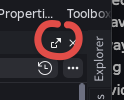
Allow easy fullscreening/maximizing of the currently hovered over window. I frequently find myself working on something and rarely using other windows but they still need to be opened. Being able to maximize and then quickly unmaximize to use another window for a second or two and then coming back onto the main window would greatly improve many workflows. You might be able to use the specific window’s hotkey to do something similar but this requires knowing each keybind of each window and also can only toggle one window at a time, where as my suggestion would only require knowing a single keybind and can apply to the same or more usecases.
(The toolbar is excluded from being hidden/removed)
Examples:
- You are coding but need to create a new script/folder or edit some properties for a bit. This only requires you to have the Explorer and Properties window open for a few seconds but currently I have to always have those windows open.
- You’ve been debugging and your Output is filled with prints. You want to analyze the outputs in full detail, this is obviously hard to do when the Output window is so small.
- You are building and really locked in, no need for all the other windows cluttering right now. You just want to build in peace : ).
- You simply want to see your scene in full view, maybe for a screenshot or just seeing how it looks currently.
This feature would be especially useful for devices with smaller screens where it feels very cramped with all the windows open.
The usecases may seem little but I think that it is worth just 1 keybind and feature!
 .