This is about all numbers in Properties tab: number values, number attributes
I have a drop chance system that is essentially based on this:
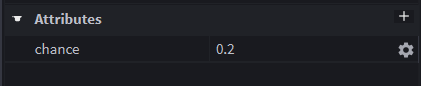
This method allows me to easily change things without having separate modules for drop lists, or whatever like that. But very rarely, I want something to be really rare, like 0.0005. Around that number the problem starts. When I type it, it changes to nearest thousandth part:

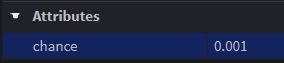
However, it still actually is 0.0005, despite showing 0.001. I can print the actual value:
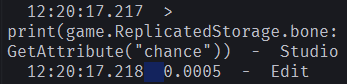
If I reselect that value, it will still show 0.001, and when I deselect it, it actually becomes 0.001, and I essentially lose whatever I typed in before.
Even worse thing happens for values lower than 0.0005, they appear as 0:

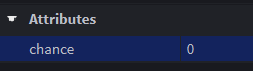
But they still are actually that value:

This is very bad, catastrophic even, for small fractions in which I can’t see the significant figures.
All beta features and system information seem irrelevant, but:
UIDragDetectors, Dragger QOL, Improved Find All, Improved UIStrokes, Next Gen studio preview
Happens both with and without Next Gen studio enabled.
System: Intel(R) Core™ i5-7300HQ CPU @ 2.50GHz, 24GB, SSDPR-CL100-480-G3, Intel(R) HD Graphics 630, NVIDIA GeForce GTX 1050
Expected behavior
I expected the actual value of a property to appear, especially when it’s a fraction and the hidden digits are very significant.
I could even say there’s no need to round it at all, because the studio is for developers and we should see correct numbers and not nicely rounded ones.
Please, it seems like it’s easy and quick to fix and would really save me a lot of time.


