local Humanoid = script.Parent:FindFirstChild("Humanoid")
local HRP = script.Parent:FindFirstChild("HumanoidRootPart")
local target= game.Workspace.Base.Target

print("Creating path")
local path = PathFindingService:CreatePath()
print("1")
path:ComputeAsync(HRP.Position,target.Position)
print("2")
local waypoints = path:GetWaypoints()


for index,Waypoint in pairs(waypoints) do
	print(Waypoint.Position)
	Humanoid:MoveTo(Waypoint.Position)
	Humanoid.MoveToFinished:Wait()
end```Issue is you didn’t get “PathFindingService” so you cannot use it’s :CreatePath() Method.
local PathFindingService =game:GetService("PathfindingService")
It is not still working
local PathFindingService = game:GetService("PathfindingService")
local Humanoid = script.Parent:FindFirstChild("Humanoid")
local HRP = script.Parent:FindFirstChild("Torso")
local target= game.Workspace.Base.Target

print("Creating path")
local path = PathFindingService:CreatePath()
print("1")
path:ComputeAsync(HRP.Position,target.Position)
print("2")
local waypoints = path:GetWaypoints()

print(waypoints)


for index,Waypoint in pairs(waypoints) do
	print(Waypoint.Position)
	Humanoid:MoveTo(Waypoint.Position)
	Humanoid.MoveToFinished:Wait()
end
Are you sure that you are sure that you are parenting this script to correct object since it runs perfectly ?

local HRP = script.Parent:WaitForChild(“HumanoidRootPart”)
try this
Sadly, no. I tried It before but It was the same.
Can you add print statements to the code to see which line doesn’t run? Also do you have any errors on the output
There is no error in the output and It doesn’t prints the for loop.
Try this:
local PathFindingService = game:GetService("PathfindingService")
local Humanoid = script.Parent:FindFirstChild("Humanoid")
local HRP = script.Parent:FindFirstChild("UpperTorso")
local target= game.Workspace.Base.Target

print("Creating path")
local path = PathFindingService:CreatePath()
print("1")
path:ComputeAsync(HRP.Position,target.Position)
print("2")
local waypoints = path:GetWaypoints()

print(waypoints)


for index,Waypoint in pairs(waypoints) do
	print(Waypoint.Position)
	Humanoid:MoveTo(Waypoint.Position)
	Humanoid.MoveToFinished:Wait()
end
It worked for me, there’s probably something wrong with your variables
Is there any thing to open like you need to open roblox studio api service for datastores
Make sure that you use :WaitForChild() when you’re assigning variables that in the DataModel.
local target= workspace:WaitForChild("Base"):WaitForChild("Target")
This insures that the needed part is loaded before the script continues
No, you don’t need to use waitforchild in server scripts most of the time. The script is already in the server, no replication to wait for
print(target.Name)
print(target.Position)
print(target:GetAttribute("Thing"))
I printed these lines and It works
Also make sure that you wrap the ComputeAsync in a pcall function also. So if there is no path available it will give you an error
You can find more info in the [Character Pathfinding | Documentation - Roblox Creator Hub]
local success, errorMessage = pcall(function()
	path:ComputeAsync(character.PrimaryPart.Position, destination)
end)
if not success and errorMessage  then
error(errorMessage)
end

if path.Status == Enum.PathStatus.Success then
	--Loop waypoints
else
print(path.Status)
end
I tried It and the error message is:

I updated the script. I believe it was because errorMessage was nil
How there isn’t a path?
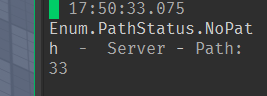
It depends on where the 2 positions are. If its impossible for a player/NPC to walk there then it will say NoPath