Ronaldo Signal | First Fully Type Annotated Signal

Ronaldo Signal

Pastebin

Problem

Currently, all implementations of typed signal have their own problems. Let’s look into the most popular typing methods of signals in order to see this problems.

Sleitnick’s Typed Remote (not a signal actually, but the problem is the same)

type Signal<T...> = {
	Connect: (self: Signal<T...>, fn: (T...) -> ()) -> RBXScriptConnection,
	ConnectParallel: (self: Signal<T...>, fn: (T...) -> ()) -> RBXScriptConnection,
	Once: (self: Signal<T...>, fn: (T...) -> ()) -> RBXScriptConnection,
	Wait: (self: Signal<T...>) -> T...,
}

export type Event<T...> = Instance & {
	OnClientEvent: Signal<T...>,
	OnServerEvent: PlayerSignal<T...>,
	FireClient: (self: Event<T...>, player: Player, T...) -> (),
	FireAllClients: (self: Event<T...>, T...) -> (),
	FireServer: (self: Event<T...>, T...) -> (),
}

  • All semantics are lost (we don’t know what we logically should use in :Fire(), we don’t know what purpose have values that would be given to function that we connect using :Connect(), we only see types.

Standard method of typing signal (if you just take GoodSignal or any other and don’t add typing inside of it)

It looks like this:

export type Signal = {
	Connect: (self: Signal, callback: (...any) -> ()) -> Connection,
	Once: (self: Signal, callback: (...any) -> ()) -> Connection,
	DisconnectAll: (self: Signal) -> (),
	Wait: (self: Signal) -> ...any,
	Fire: (self: Signal, ...any) -> ()
}

  • Same as before, all semantics are lost.
  • We don’t even have hints what types should variables have when we pass arguments to :Fire() or when we connect function using :Connect()

Wish

As we can see, when we try to use any of Roblox’s RBXScriptSignal we have a hint: what arguments should our function that is connected have and also we see meaning of this arguments:

Solutions

Key idea: let’s pass a type of function as a generic argument!

Weak Ronaldo

export type RonaldoSignal<T> = {
	Fire: (self: RonaldoSignal<T>, ...any) -> (),
	Connect: (self: RonaldoSignal<T>, func: T) -> Connection,
	Once: (self: RonaldoSignal<T>, func: T) -> Connection,
	DisconnectAll: (self: RonaldoSignal<T>) -> (),
	Wait: (self: RonaldoSignal<T>) -> ...any
}

As you can see, now are able to typecheck function which is being connected. Also we can see meaning of arguments (like Roblox does for us):

Unfortunately, there are some cons:

  • We don’t have typechecking in :Fire() and we don’t have any meaning of arguments that we should pass
  • We don’t have typechecking in :Wait() meaning that if it returned anything, we don’t know types of returned data

As you can see, I was able to easily pass into :Fire() some invalid numbers that are not related to function we connect

Here we can apply another key idea: let’s make Fire be called with a . instead of :!

Impatient Ronaldo

export type RonaldoSignal<T> = {
	Fire: T,
	Connect: (self: RonaldoSignal<T>, func: T) -> Connection,
	Once: (self: RonaldoSignal<T>, func: T) -> Connection,
	DisconnectAll: (self: RonaldoSignal<T>) -> (),
	Wait: (self: RonaldoSignal<T>) -> ...any
}

We can do it 2 ways:

  • create local function Fire inside of .new() and set self.Fire = Fire. With that we would be able to use self in implementation of Fire and we also catch a call of Fire, so metatable will not be indexed
  • change implementation of metamethod __index and make local function Fire for the whole script. In metamethod we will call this function since from __index we have a table which was used for a call of Fire

Now we get typechecking even on .Fire!

Unfortunately, our Impatient Ronaldo is not able to get typing on :Wait() and will always think that ...any is being returned. If you want, you can remove method :Wait() and already get full typechecking.

Final idea: let’s add variadic argument!

Strong Ronaldo
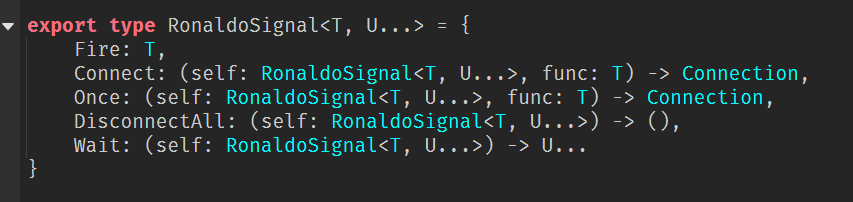
With that we are able to add typing even when we use :Wait()!

The only con of Strong Ronaldo is that now we should duplicate types of arguments:

  • First time we write them when we describe arguments of functions which should be connected
  • Second time we write them to be able to fix :Wait() return

But now we get fully typed signal!

With that approach we can also get typing for RemoteEvents and RemoteFunctions that will make our life easier when we do any networking.

Hope it helps!

(P.S: code which is provided on Pastebin is just an example of how you can do it and in fact it is just a GoodSignal with added typing. Main idea of this topic is to explain how you can get typing for signal that you currently use)
3 Likes

type cast :: should be your last resort. use generic type packs instead.

--!strict
export type RonaldoSignal<T...> = {
	Fire: (self: RonaldoSignal<T...>, T...) -> (),
	Connect: (self: RonaldoSignal<T...>, func: (T...) -> ()) -> Connection,
	...
}
local signal: RonaldoSignal<string,number> = {
	Fire = function(self, arg1, arg2) end,
	Connect = function(self, func) return ... end,
	...
}
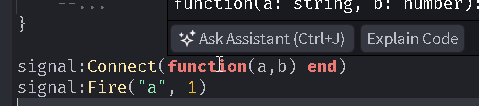
signal:Connect(function(a,b) end)
signal:Fire("a", 1)

Hi.

honestly i would rather do :: than 3-4 lines with empty functions just for declaration of variable

and also the problem of what you did is that the goal was to be able to see on :Connect() (arg1: string, arg2: number), but currently if you write :Connect() you will see just (string, number) which is kinda sad that you have to guess what this string and number meant when you were creating your Signal. The thing that you have sent is just a result when you hover over a function which you wrote as an argument of :Connect(), but not a suggestion of :Connect() what function to connect to it

what we can actually do is make .new() return any but the problem with that is that you would be able then to use a value without explicitly telling what type it has, because of that i decided to go with unknown in the code

autocomplete and that kind of stuff are secondary. the main goal of typing is to keep your code safe. But if you prefer to use it that way, you should make it clear in the title that it’s about editor helpers. That way, everyone will know what it’s really about.

did anybody call me?

9 Likes

I think you can have typed fire arguments

--!strict
export type signal<F = (...any) -> any, A... = ...any> = {
  connect: (F) -> (),
  fire: (A...) -> (),
}

local function new<F, A...>(): signal<F, A...>
  return {} :: any
end

local signal: signal<(t: { number }, b:string) -> (), { number }, string> = new()
signal.connect(function(t: {number}, b: string)  end)
signal.fire({}, "")

using :: is just my personal preference in this case. if you want to use all benefits of Ronaldo but at the same time you don’t like ::, you can simply make .new() return RonaldoSignal<(...any) -> (), ...any)>

thank you for your message!

as I stated before, our goal was also make :Fire() to be able to give name-hints of what parameters should be used in it.

with what you did, you will see just {number}, string. with approach from post, .Fire() will hint you something like t: {number}, b: string which I find to be better since you also get names for your arguments that you decided to go with when you were creating signal

1 Like

Woah I didn’t realize that, that actually ways better than what am currently doing atm

you have a wrong shirt buddy why do you wear liverpool one

suiii ‎ ‎ ‎ ‎ ‎ ‎ ‎ ‎ ‎ ‎ ‎ ‎ ‎ ‎ ‎ ‎ ‎ ‎ ‎ ‎ ‎ ‎ ‎ ‎ ‎ ‎ ‎ ‎ ‎ ‎ ‎ ‎ ‎ ‎ ‎ ‎ ‎ ‎ ‎ ‎ ‎ ‎ ‎ ‎ ‎ ‎ ‎ ‎ ‎ ‎

4 Likes

Really unfortunate that I have to assert things. Really makes it suck for Type Safety.

However, I must give props: This is probably the only fully typed Signal module out there. Thanks a lot for this implementation.

1 Like

there is a kinda of approach also for remotes and with type safety, but it has it’s own problems:
you will need to always fire a table, you have to write a lot to just define a remote and maybe something else, i don’t exactly remember

in a few words lets imagine we have our module. then we make module.string return empty string, module.number return 0 and so on.

and after we write a class the way that constructor looks something like this:

local a = module.new({
fiedl1 = module.number,
field2 = module.string,
field3 = module.optional(module.number)
}

something like this

and after that we save this data-example table into our remote, we will use it in order to check types both in runtime and in solving time. your fire will look something like

:FireServer({
fied1 = 4,
field2 = "abc",
field3 = nil
})

If youre using the new solver it can be simplified down into this

type function _get_wait_fn(self: type, t: type)
    local params = t:parameters()
    local fn = types.newfunction({head = {self}}, params)
    return fn
end
type Signal<T> = {
     Connect: (Signal<T>, T) -> Connection,
     Once: (Signal<T>, T) -> Connection,
     Wait: _get_wait_fn<Signal<T>, T>,
     Fire: T
}
2 Likes

great solution. didn’t know about this