been tryna figure this out for 2 days now but how do i create a skybox changer that relocates a skybox from a folder and moves the old one into the folder, if there’s any other easier way please tell me! Im relatively new to scripting

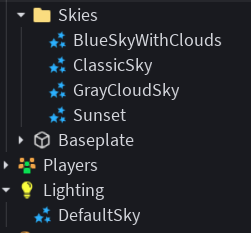
All you do is put your sky in ReplicatedStorage and put a local script in a button and when you click the button delete the current sky and move the other one to lighting
I don’t have any code to work with so I’ll leave it at that
You can relocate Instances by modifying their Parent property!
local Skies = workspace.Skies
local Lighting = game:GetService("Lighting")

local function changeSky(sky: Sky)
	-- Clear any existing skies
	for _, object in Lighting:GetChildren() do
		if object:IsA("Sky") then
			object:Destroy()
		end
	end

	local newSky = sky:Clone() -- Clone the sky object, creating a new instance with idential properties
	newSky.Parent = Lighting -- Set new sky's parent to Lighting
end

changeSky(Skies.Sunset)
changeSky will clean any existing skies, clone the specified sky, and set the current sky to the clone. It creates a clone so it doesn’t the instances in your Skies folder. You can bind this function to a button like so:
local button: ImageButton -- set the button here
local sky: Sky -- set the desired Sky object when clicked

button.MouseButton1Click:Connect(function()
	changeToSky(sky)
end)
Exactly what they said.
Adding onto this, you could also create a new Sky under Lighting and put all of your skies in the Skies Folder, then change all of its properties like in the following example:
local Lighting = game:GetService("Lighting")
local ReplicatedStorage = game:GetService("ReplicatedStorage")
local skiesFolder = ReplicatedStorage.Skies
local sky = Lighting.Sky

local function changeSky(skyInstance: Sky)
	sky.CelestialBodiesShown = skyInstance.CelestialBodiesShown
	sky.MoonAngularSize = skyInstance.MoonAngularSize
	sky.MoonTextureId = skyInstance.MoonTextureId
	sky.SkyboxBk = skyInstance.SkyboxBk
	sky.SkyboxDn = skyInstance.SkyboxDn
	sky.SkyboxFt = skyInstance.SkyboxFt
	sky.SkyboxLf = skyInstance.SkyboxLf
	sky.SkyboxOrientation = skyInstance.SkyboxOrientation
	sky.SkyboxRt = skyInstance.SkyboxRt
	sky.SkyboxUp = skyInstance.SkyboxUp
	sky.StarCount = skyInstance.StarCount
	sky.SunAngularSize = skyInstance.SunAngularSize

	-- Optional: Change the name of the Sky
	sky.Name = skyInstance.Name
end

-- Example usage:
while task.wait(3) do
	-- Get a random Sky from the Skies folder
	local randomSky = skiesFolder:GetChildren[math.random(1, #skiesFolder:GetChildren()]
	changeSky(randomSky)
end
This involves a little more work though. I would recommend using their method. Still, this is another way to approach it if you want to keep all the Sky Instances in one place at all times and have a constant Sky Instance.