TLDR Version:
When not in Instance Picker Mode. The circle button is also there, that is true. But when you click on it, it will also select the Instance, and you can just press ESC to close the “Insert Object” window.
But for the Instance Picker Mode it’s an entire different story. It cancels the Picker Mode and selects the Instance you clicked on, instead of assigning it. And it also brings you away from the property you were editing.
Description
This here is the Instance Picker Cursor when you’re in Instance Picker Mode.

When in Instance Picker Mode, you can select an Instance using the Explorer to assign an Instance to a property that you’re editing through the Properties Window.
Now, what is going to happen here, if I click the left mouse button?

Surely, I just wanted to assign the instance to a property. But there was one problem.
There’s an obstacle. I don’t like that there is an obstacle. It’s a circle button with a +. Why is that there during Instance Picker Mode? Or more important, why does it cancel the attempt to “pick” the Instance?
I don’t remember this being an issue in the Old Explorer, but maybe it was one as well, I don’t know.
So, when I click the left mouse button exactly where it is currently aiming at on the screenshot. Instead of “picking” the Instance, it is going to open the window to insert an Instance and select the Instance instead. It never assigned it to the property that I was editing.
I don’t want to insert an Instance when I am in Instance Picker Mode.
If I wanted to, I’d just press ESC or the red “X” button, to cancel the Instance Picker Mode.
Re-production Steps
- Create an
ObjectValue - Create any
Partor whatever you like, give it any name, like one letter or anything. - Select the
ObjectValuethat you created and click on theValueproperty

- Now, aim on this button here with the
+sign, and click the left mouse button.
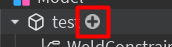
- Observe
Expected Result
I was in Instance Picker Mode. I wanted to quickly assign an Instance to a property. That’s what I was expecting when I am in this Instance Picker Mode. No obstruction, no obstacles, no precision in aiming.
So, when I am in Instance Picker Mode. A button, like the “Insert Object” button, should not act as an obstacle and cancel my attempt to assign an Instance.
It doesn’t matter that a circle button is being rendered. What mattered is that when clicking the left mouse button, even while on that button. It should assign the Instance…
Actual Result
This circle button is in front of the way. All I wanted to do, is to assign an Instance, but my experience was ruined because the “Insert Object” button is infront of the way.
When I clicked on it while trying to assign an Instance. Instead of assigning the Instance, it will just select it and cancel the Instance Picker Mode, and even brings me away from the property I was editing in the Properties Window.
Because of this, everytime I want to pick an Instance now, I have to be +1% more schizophrenic about it.