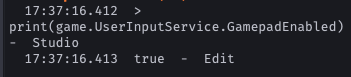
On macOS, UserInputService.GamepadEnabled is returning true all the time, despite not having a gamepad connected to the computer.
This means that features in my game which dynamically display keybinds based on device for people playing on consoles are thinking I have a gamepad connected even though I’m playing on keyboard on macOS. I checked with a team member and this is not occurring on their Windows machine.
This issue is occurring in all my games when I play in Studio as well as all games on the Roblox app. The only device I have connected to my computer is a Logitech MX Keys S keyboard. I have noticed this start happening in the past 24 hours.
I have confirmed this is the issue by running a quick line of code in Studio: