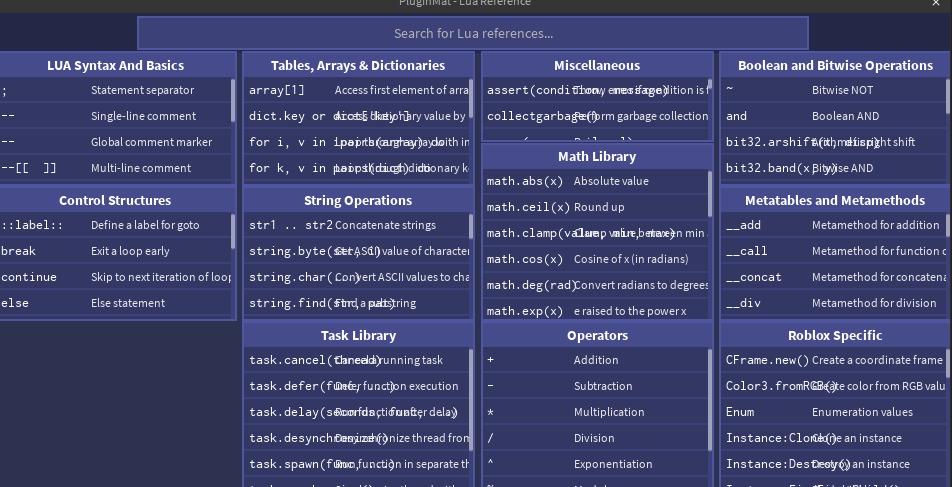
PluginMat is a free and beginner-friendly Roblox Studio plugin that acts like a virtual deskmat—bringing a full Lua and Roblox API cheat sheet directly into Studio. Perfect for new scripters, PluginMat keeps all the essential syntax, functions, and code patterns at your fingertips, so you can stop tabbing out to Google or the DevHub.
Whether you’re learning Lua, building your first simulator, or just need a quick reminder of how TweenService, loops, or metatables work—PluginMat makes scripting faster, smoother, and easier to learn.
 Features
 Full Lua & Roblox Syntax Reference – Covers variables, functions, tables, operators, math, events, metatables, and more
 Search Bar – Instantly filter 50+ syntax terms and definitions as you type
 Beginner-Focused Layout – Clean, scrollable, organized like a real coding deskmat
 Dockable Panel – Always available while you work inside Studio
 How to Use
- Open the plugin via the PluginMat icon on your toolbar
- The reference panel will appear—scroll, search, and explore
- Use the search bar to instantly filter terms
- Click the toolbar icon again to hide the panel
 PluginMat is now Open Source!
You can now view the full source code, contribute, or download it directly from GitHub:
 https://github.com/SilverLaw99/PluginMat
Feel free to suggest improvements or fork it to make your own versions!
 Feedback Welcome!
PluginMat is version 1.0 and actively being improved. If you have suggestions, new topics to add, or bugs to report—feel free to reply to this thread!
Stop Googling basic syntax. Just PluginMat it.
https://create.roblox.com/store/asset/110493192876141/PluginMat