I’d say, have an option for instance-based and scripting-based COULD work. I think Proximity Prompts have something like that, I can’t remember fully. Do that, and you might be able to satisfy both crowds.
Is this an action that could live at a specific context above other contexts? For example all your contexts require jump so you have a jump context at priority 1,000. Then sprint/dive/crouch in another context ctx2, and say drive/shoot/boost in another ctx3. You would swap between the ctx2 and ctx3 without disabling the jump context? Does this flow make sense for you?
This unfortunately has a lot of issues that are not currently solvable in the engine.
1 Like
Hmm, not exactly sure what you’re asking… I think those other benefits are good, they’re useful conveniences and help us get stuff working faster and easier. I wouldn’t want them fully removed in order to make a more concise API.
I’m kinda curious about why you decided to hardcode Left/Right/Up/Down into a single InputBinding rather than the more generalized ability to have an arbitrary directional value associated with an InputBinding (e.g. InputBinding for KeyCode.W with direction (0, 1), InputBinding for KeyCode.S with direction (0,-1)). But I like how it reduces code verbosity for the common case of typical 4-directions movement, so I’m not complaining!
I was thinking that CreateBindings() would automatically create the InputBinding instances, set their KeyCodes, parent them to the InputAction, and return an array of them to the caller.
So it’s not doing anything new, it’s just making the existing API more convenient if you don’t have lots of small details to configure. The bindings would still be editable at runtime. If you needed to configure a binding in more detail, you could grab it out of the array and modify it, or you could switch to creating the binding manually yourself.
As for studio edit mode, even if the binding instances are made completely in code, IAS makes it easier for me to view/edit bindings in edit mode if I wanted to, because all I would need to do is copy the instances from the test running in studio and paste them into studio edit mode. (Then update my code to get the instances from the DataModel rather than create them from scratch.)
Yep, it’s not a priority. I have the following reasons for preferring to create instances in code rather than in edit-mode:
- Deduplication of repeated instance work, and of big changes to lots of instances which may happen later on (I only need to edit one piece of code, not go and change 500 instances manually or with a command bar script).
- Easily keep references to / track instances with high certainty (whereas if they were created in edit mode they have lower certainty which increase the complexity/verbosity of the code). In bad cases, the code for retrieving an instance from the DataModel is larger and more complicated and buggier than the code for creating it from scratch.
- I can visually see all the properties and other relevant factors at once just by looking at the code
- I can search & replace in the code
- I can write comments around things
- Track instance changes in script diffs / external version control
- Make instance changes atomic with script draft commits, so they always happen at the same time
Of course the exception is if someone on my team specifically needs edit-mode access. But that’s an opt-in thing, not an opt-out thing, if that makes sense, so I generally start with code.
3 Likes
Any chance you can return what Binding activated an Action? I’d like to know if an Action was activated by my keyboard binding instead of my controller one, so I can do different behavior.
Stuff under StarterGui doesn’t appear in PlayerGui if Players.CharacterAutoLoads is set to false until the load character method is called. In my game the load character method is never called, but the input instances can just be put under ReplicatedStorage so I don’t see this being an issue for me I just think it’s a little strange. I made this as an example of StarterGui children not appearing in PlayerGui:
IAS-repro.rbxl (62.0 KB)
2 Likes
Didn’t think of that. This would indeed help! I’d imagine this would work for most of my use cases so I’ll adopt this approach.
I say most because there’ll of course be more specific cases where a simple priority hierarchy wouldn’t work or would be extremely complicated (letting a player wield two guns at once, where the combination of keybinds between each unique pair wouldn’t allow for a simple priority hierarchy)
Other than those specific cases, I think that’ll work. Would of course still prefer proper referencing so even those specific cases would work out, but engine limitations are engine limitations. I can work around it.
Thanks a bunch though! Starting to become more open to switching to IAS as soon as possible. Always appreciate when staff are active under announcements :)
2 Likes
Those words seem very interesting but I need pictures of how the service actually looks like, alongside frametime comparisons cause I don’t trust that it’s gonna be resource efficient
Yeah it’s just a beta rn but much crappier features like the topbar got a whole heads up preview post with visual examples way before it went live
No, I don’t mean UIButton, which is a GuiButton used to detect clicks.
What I’m referring to is input actions that behave differently depending on the region of the screen the mouse is in.
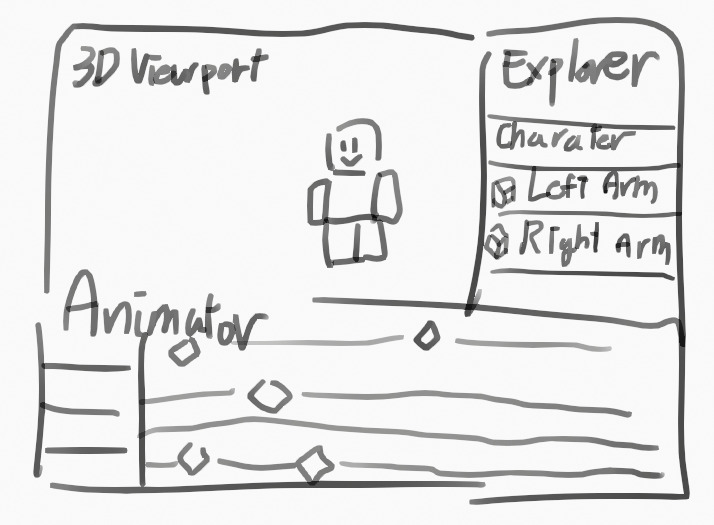
Let’s say there’s an animator experience where users can create animations during live gameplay:
- If the mouse is over the 3D viewport, pressing
Homeshould reset the camera’s position and rotation. - If the mouse is over the animation editor, pressing
Homeshould set the current frame to 1. - If the mouse is over the explorer, pressing
Homeshould select the top-most ancestor in the hierarchy.
This kind of behavior is also important for plugin development, where actions should only trigger when the mouse is inside a specific widget.
Right now, this kind of control is hard to implement.
Even though we have APIs like GuiBase2D.InputBegan, InputChanged, and InputEnded, they don’t integrate with CAS, meaning we can’t build a priority-based system based on mouse region.
You might suggest: “Just check if the mouse is inside a UI region and enable the corresponding ActionContext”
But the issue is:
Events like InputBegan, MouseEnter, and MouseLeave don’t respect rendering order.
Even if a GuiBase2D is visually behind another element, it still receives those events — which is not what most developers expect.
For example: When clicking on overlapping GuiButtons, only the front-most button receives events like MouseButton1Down, MouseButton1Click, and InputBegan (with an InputObject where UserInputType == MouseButton1). But with regular GuiBase2D elements, all of them receive the input — regardless of visual layering.
This makes it hard to detect which UI is actually on top.
And when floating widgets overlap, using InputBegan to implement region-specific actions can lead to input conflicts.

If the mouse is over both the floating explorer and animator, and they each handle Home using their own GuiBase2D.InputBegan,
then pressing Home will cause both to trigger, even if only the explorer is supposed to.
These are just some of the issues I’ve run into while trying to build floating widgets.
It’s definitely a bit complex and messy to handle right now,
but I think this is one of those areas Roblox will eventually need to improve.
4 Likes
I hate the push to adding more instances as a way to control stuff that should be done in a script. Why should my simple UIS.InputBegan:Connect be replaced with 7 Instance.new and setting properties, that just a nightmare to maintain. If you have to connect to the input action anyway, why not just have a better way to make it via code. So frustrating, I will definitely not implement this into my workflow unless we see a proper API for creating these that doesn’t require 20 lines of code to equal 1 on UIS.
2 Likes
My number one reason for the hate of these sorts of instances is that this system is trying to desperately use instances that emulate the way most people would program an input system. They serve nothing other than bloating our places with a million instances that ultimately still require code to actually do anything.
But look, I’m not entirely opposed to this approach but this approach being the absolute only way (one true way since it’s likely both UIS and CAS will be deprecated in the future) is not it. The last thing I would want to waste compute time on would be managing input instances.
3 Likes
Jackpot. Dude this is the perfect way to summarize this unnecessary update.
4 Likes
Great system! Simplifies a lot of things, and I assume would make native client rebindings a possibility down the line.
While testing it out, I’ve found a bug with it tho: Some InputActions stop working if you disable other InputActions under the same InputContext.
In the place file that I’ve attached below I have a noclip function that activates with N / Gamepad Y, and it can be controlled with WASD / Left Joystick once entered. The problem is that there is a InputAction named “Modifier” under “NoClipContext” that is activated with Left Shift / R1, which quadruples the noclip speed.
Now, there is also InputActions “ChangeSpeedUp” and “ChangeSpeedDown”, which, when disabled, makes “Modifier” InputAction stop accepting input (No pressed/release event fire), despite that InputAction being enabled. Hope that would be fixed in the release version!
IAS Noclip.rbxl (59.0 KB)
Also a bit of a feedback: I’ve noticed that Mouse inputs are being added in the future update
But is there any plans to add Mobile on-screen joystick as part of the Direction2D KeyCode? So far it seems like it only supports gamepad ones, with Composite Directions acting as a different way to bind it, but no way to connect it to mobile native on-screen controls. Same thing with mobile jump button, no way to access that either. Hope that is being considered too!
5 Likes
I’m pretty happy with CAS, and i’m not a fan of the new instances, nor the fact CAS/UIS will likely be deprecated in favor of this, so here’s a dirty drag-n-drop CAS replacement I made for myself in a couple hours in case anyone finds it of use, it’s basically CAS but slightly more compact:
Binder.rbxl (82.8 KB)
Showcase:
3 Likes
Will the previous systems end up getting deprecated?
1 Like
There should be a way to get the Input Glyphs
like this
binding:GetGyph()
binding.GlyphChanged
and should call on the “StateChanged” event
there could also an API to replace all the default glyphs aswell
3 Likes
Haven’t tried this out yet but I can already tell this is going to be amazing and save me the time of having to do a input rebinding system each project. THANK YOU 
1 Like
I absolutely love this new instance-based input system.
It’s far better and easier to use than the module I had written for it and I no longer need that messy code now.
Apologies if it’s been asked before but any ideas on when it’ll be released?
Oh and, should we still use UIS for getting mouse position relative to screen or mouse position in the world or shall we get a feature for that as well?
Current documentation still feels a tiny bit vague or lacking in some regards.
I’d love to see some code samples where GUI buttons on mobile for instance are used to pass directional info through an InputAction.
The new IAS reminds me a bit of how players work in Unreal Engine.
In Unreal you got this pawn system where only the current possessed/active pawn will trigger input events.
I can very easily recreate that in Roblox now with InputAction instances and parenting them to models which is just lovely, just have to disable them if a player is currently not in control of a model.
Thanks Roblox team.
This feature is awesome and something I’ve wanted long-time.
I don’t know what the negative comments are complaining about honestly, UIS and CAS isn’t even deprecated and still usable.
3 Likes
No.
1 Like
Hopefully It’s still an optional way though. So we can disable certain actions to rebind. For game balancing and etc.
1 Like
Okay, looking back. I feel I might’ve been a little too negative.
Still though, is it worth me migrating to this new system or should I stay with UIS?