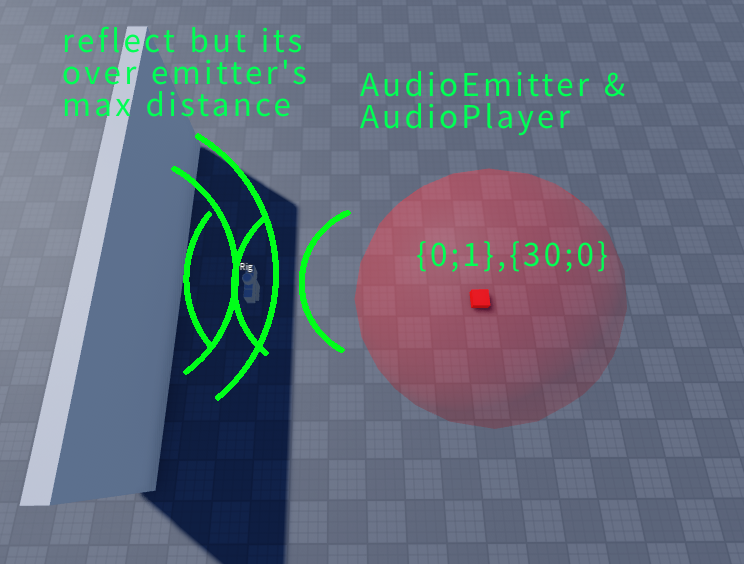
Sound is reflected even after exceeding the maximum distance of AudioEmitter, AudioCollide On/Acoustic Audio On
Expected behavior
If the distance is exceeded, it should no longer be heard through reflection
Expected behavior
If the distance is exceeded, it should no longer be heard through reflection
I think (judging from the grid texture) the size of your visualization sphere is 30, 30, 30 instead of 60, 60, 60. Max distance of 30 is the radius of the sphere, not the diameter, while the part size is the diameter.
These are parts for example purposes. In reality, it would be double.
Hi @idus_7 thanks for the report - do you have a minimal place file that exhibits the behavior? (It looks like you do from your screen shot.  If you could send it as a private message on this thread I think it would help us repro the behavior. Thans
The same thing happens if you select Linear sound attenuation while the Game Sound Service’s AcousticSimulationEnabled is true and the audio emitter and audio player are wired inside the part.
Hi @idus_7, we tested this and it appears to work properly, please see attached video. If you are still experiencing an issue, please send a minimal place file that reproduces the problem.
One thing to note: the DefaultListenerLocation in SoundService defaults to Camera - if you want sounds to be heard from your avatar’s location you can change it to Character (as we did for this video).
It seems to be an issue where playback starts at 0,0,0 even if the parts are far apart, or a problem occurring with cloned parts. I am not sure of the exact cause, but it appears that the issue is affecting parts duplicated by the script.
report1.rbxl (162.5 KB)
It seems like the sound is either reflected and heard even though it is more than 10,000 distance away, or it is heard from 0,0,0. It occurs only when AudioEmitter’s AcousticSimulationEnabled is true.
Thanks for the place file @idus_7 we’ll check it out!