I have a grab system script that works, but only for r15. Although i have a special script that changes the character model, it should still work since the character model is r6
the grab script that only works for r15:
local model = script.Parent.Parent
local prompt = script.Parent
local animation = script.Animation

local distanceZ = -2.7--Model distance from character/ how far the model will be from the character
local distanceY = -0.5--Model distance from the ground

local animationTrack = nil
local owner = nil

prompt.Triggered:Connect(function(player)
	local character = player.Character
	local humanoid = character:FindFirstChild("Humanoid")

	if not animationTrack then
		animationTrack = humanoid:LoadAnimation(animation)
	end

	if not model:FindFirstChildWhichIsA("WeldConstraint") and owner == nil and not player:FindFirstChild("Carry") then
		local CarryValue = Instance.new("BoolValue", player)
		CarryValue.Name = "Carry"

		local weld = Instance.new("WeldConstraint", model)
		model.CanCollide = false
		model.CFrame = character.HumanoidRootPart.CFrame * CFrame.new(0, distanceY, distanceZ)
		weld.Part0 = model
		weld.Part1 = character.HumanoidRootPart
		owner = player.Name
		animationTrack:Play()
	elseif model:FindFirstChildWhichIsA("WeldConstraint") and owner == player.Name and animationTrack and player:FindFirstChild("Carry") then
		animationTrack:Stop()
		model:FindFirstChildWhichIsA("WeldConstraint"):Destroy()
		player:FindFirstChild("Carry"):Destroy()
		model.CanCollide = true
		owner = nil
		animationTrack = nil
	end
	--<<Death Detector>>--
	humanoid.Died:Connect(function()
		pcall(function()
			player.Carry:Destroy()
		end)
	end)
end)
so this is the arrangement:
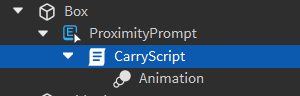
this is the special script (it gets the player hats and puts it into a custom character):
local Players = game:GetService("Players")
local ReplicatedStorage = game:GetService("ReplicatedStorage")
local player = Players.LocalPlayer
-- Function to get all accessories of a character
local function getAccessories(character)
	local accessories = {}
	for _, accessory in ipairs(character:GetChildren()) do
		if accessory:IsA("Accessory") then
			table.insert(accessories, accessory)
			local handle = accessory.Handle
			handle.TextureID = ""
			handle.Material = Enum.Material.SmoothPlastic
			handle.BrickColor = BrickColor.new("Institutional white")
		end
	end
	return accessories
end

-- Function to replace the player character with a custom one
local function replaceCharacter(player)
	local character = player.Character or player.CharacterAdded:Wait()
	local accessories = getAccessories(character)

	-- Clone your custom character
	local customCharacter = ReplicatedStorage:WaitForChild("StarterCharacter"):Clone()
	customCharacter.Name = character.Name

	-- Set the custom character's CFrame to the original character's CFrame
	customCharacter:SetPrimaryPartCFrame(character:GetPrimaryPartCFrame())

	-- Attach accessories to the custom character
	for _, accessory in ipairs(accessories) do
		accessory.Parent = customCharacter
		local attachment = accessory:FindFirstChildOfClass("Attachment")
		if attachment then
			local parentAttachment = customCharacter:FindFirstChild(attachment.Name, true)
			if parentAttachment then
				attachment.CFrame = parentAttachment.CFrame
			end
		end
	end

	-- Set the custom character as the player's character
	player.Character = customCharacter
	customCharacter.Parent = workspace

	-- Destroy the original character
	character:Destroy()
end

-- Replace the character when the player joins or respawns
player.CharacterAdded:Connect(function(character)
	character:WaitForChild("HumanoidRootPart")
	wait(1)  -- Wait for the character to fully load
	replaceCharacter(player)
end)

-- Initial replacement in case the player character is already loaded
if player.Character then
	replaceCharacter(player)
end
arrangement:
special script in starterCharacterScripts
custom character model (normal r6 block rig) in replicated storage
(everything in the special script works except the grab system)
any way to fix this?