
Compo & Compo Inspector
Compo is an open-source, Unity-like component framework for Roblox that works just like magic ✨.


Currently, Compo is in a very early phase, so I honestly DO NOT recommend using it in production just yet. There’s still a lot of work to do to make Compo the tool you all need, but I wanted to share this little project with y’all🙈
 What is Compo?
Compo was created to simplify Roblox game development by replacing the chaos of duplicated scripts with a clean and modular approach. It’s designed so you can write reusable pieces of behavior called components —works exactly as Unity!— and assign them easily across your game, making your projects easier to maintain, update, and scale.
At its core, Compo has two main parts that work together:
-
Runtime — this runs inside your game and takes care of loading, managing, and updating all your components.
-
Compo Inspector (a plugin built with
 using
using rbxts). It scans your project for.componentmodules, lets you attach them to instances effortlessly, and provides editable fields so you can customize behavior per object without touching code.
But… less talk, more action, right?
 Using Compo
- Launching Compo
Compo needs to be loaded on both the server and the client to run your components at runtime, so let’s make a quick script to do that:
local compo = require(game.ReplicatedStorage.compo)

-- launch() returns a promise that resolves when the main loop starts!
compo.launch():andThen(function()
    print("Hi, everything works fine ^.^")
end)

-- That's all!
Now we’re almost done, but we’re forgetting the most important part:
- Making a component
To create a component, you need to make a new ModuleScript as a descendant of either StarterPlayerScripts or ServerScriptService.`
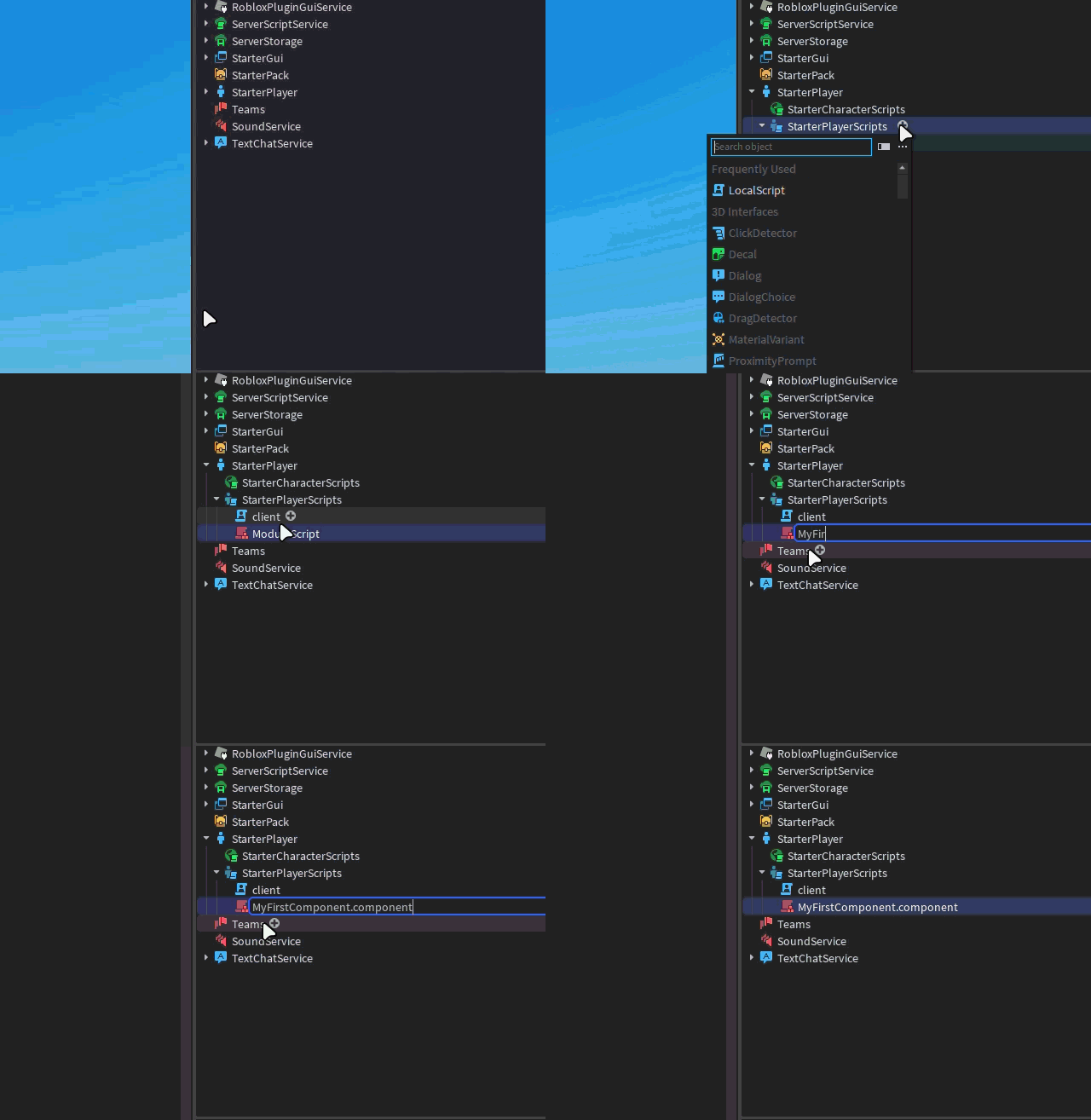
Once you create a module with the
.componentsuffix, Compo Inspector automatically registers it — you only need to focus on your component’s logic!
Now, you can need to define your component:
local compo = require(game.ReplicatedStorage.compo)

return compo.createComponent(function(component)
    function component.start()
        print("Hello world c:, from: " .. component.instance.Name)
    end

    function component.onDestroy()
        print("Goodbye world :c, from: " .. component.instance.Name)
    end
end)
easy, right?
- Go to the repository to learn more about each component’s lifecycle.
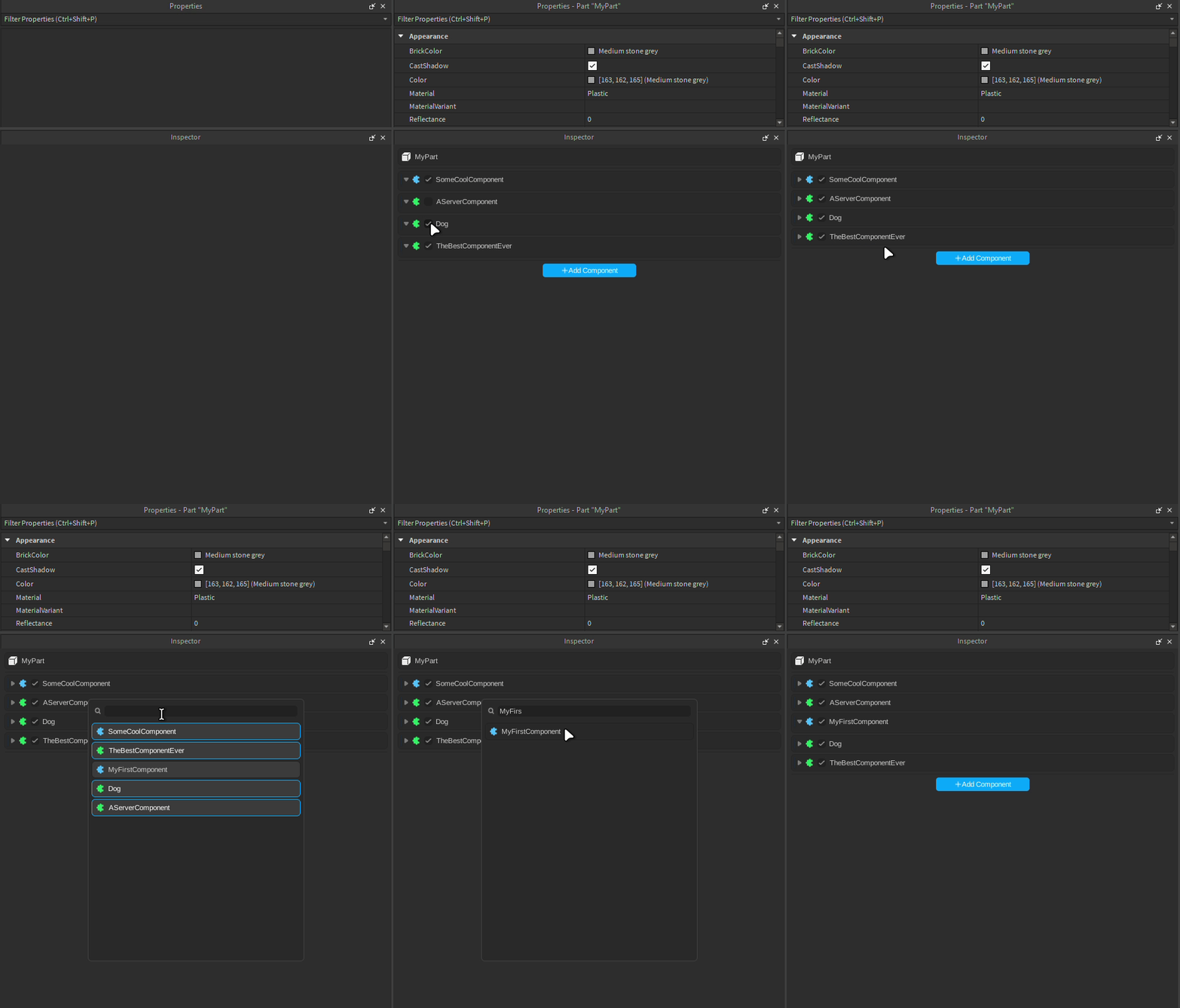
Now that we have our component, let’s add it to an instance. Just select your instance and attach it:
- Exposing fields
If you want your component to expose fields, you can pass them as a second argument:
return compo.createComponent(function(component)
  -- ...
, {
	number = compo.fields.number(),
	string = compo.fields.string(),
	boolean = compo.fields.boolean(),
	vector3 = compo.fields.vector3(),
	vector2 = compo.fields.vector2()
})
and — voilà! —

If you try it, let me know your thoughts or report issues on GitHub!
Things to keep in mind 
- To reload a component’s fields, you need to close its script window—this signals Compo Inspector to refresh the fields.
- Currently, Compo Inspector doesn’t automatically detect changes made through Rojo: this will be added in a future version.
- If you find any errors, please let me know and I’ll fix them as soon as possible!
This was, in essence, Compo! If you want to learn more, check out the GitHub repository.
— Thanks for reading!  —
—
- Yes
- No