[Cooldowns] The Ultimate Cooldown/Debounce Management Module System

Get From The Creator Store | Demo [Uncopylocked]

v1.0.1

Hey Robloxians!

I’ve just finished rewriting my old cooldown module from scratch, and I’m excited to share Cooldowns, a massive upgrade over my previous system. The old module is now officially deprecated (but still stable) as this new version is faster, scalable, more reliable, and packed with features that modern games need. Four years have passed, and my development skills have grown significantly since then, so this was a bit of a personal challenge!

What’s New?

  • Frame Accuracy - Heartbeat-driven updates

  • Precision Timing - No large inaccuracies (>0.01s, after initial load)

  • Time Scaling - Perfect for slow-mo/fast-forward abilities or engagement tricks

  • Thread Safe Callbacks - No more random errors breaking your game

  • Bulk Adjustments - Modify hundreds of cooldowns at once

  • Automatic Cleanup - Maid compatible

What Is This For?

  • MMO/RPG games - Handle thousands of player cooldowns smoothly

  • Competitive games - Frame accuracy for ability timings

  • Server systems - Prevent exploits with server-side debounces

What This Isn’t For

  • Client-side UI - Use simple checks instead

Documentation on v1.0.1

Installation:

local Cooldowns = require(game.ReplicatedStorage.Cooldowns) --Provide the path or require(102608563980648)
local cooldown = Cooldowns.new()

API Reference:


Cooldowns Module Constants

Constant Default Description
MAX_UPDATES_PER_FRAME 10000 Caps how many cooldowns to process per frame to avoid lag spikes
PRECISION_FACTOR 0.01 Switches to high-precision mode at 1% of the remaining duration
MIN_PRECISION_TIME 0.25 Minimum seconds left before os.clock() precision kicks in (overrides PRECISION_FACTOR if longer)
DEFAULT_TIME_SCALE 1 Baseline speed multiplier (1 = real time)
MIN_TIME_SCALE 0.01 Hard limit for slow-mo (1% speed) to prevent unwanted behavior


Cooldowns Methods

Method Description
Cooldowns.new(name?) → CooldownInstance Creates new instance (or returns existing ones)
Cooldowns.get(name) → CooldownInstance? Retrieves existing instance (else nil)


Cooldown Instance Properties

Property Description
useScaledTime (bool) When true, durations are auto-scaled by timeScale (defaults to true)
timeScale (number) Current time scaling factor (write via SetTimeScale method)
cooldownData (table) Contains keyNames with their respective cooldown entry


Cooldown Instance Core Methods

Method Effect
:Set(key, duration, callback?, ...) → bool Forces new cooldown (overwrites)
:Add(key, duration, callback?, ...) → bool Only sets if key doesn’t exist
:Check(key, scaled?) → (ready, timeLeft) Checks status, if exists returns false (scaled returns adjusted time)
:Remove(key) → bool Removes specific cooldown
:Reset() → bool Removes ALL cooldowns from cooldown instance


Cooldown Instance Advanced Methods

Method Effect
:Pause(key) → bool Freezes cooldown
:Resume(key) → bool Unfreezes cooldown
:SetTimeScale(scale) → bool Cooldown instance speed modifier (0.5 = 50% speed
:AdjustDuration(key, amount) → bool Modifies single cooldown
:AdjustAllDurations(amount, predicate?) → bool Bulk-modify cooldowns

Note that most bool return values tell whether the method effect was successful or not unless stated otherwise.


Usage Examples:

1. Basic Ability Cooldown
local Cooldowns = require(game.ReplicatedStorage.Cooldowns)
local abilities = Cooldowns.new(player.Name)

--Check if the ability is available
local ready, remaining = abilities:Check("Fireball")
if ready then
    --Add a fireball ability with 5 second cooldown
    abilities:Add("Fireball", 5, function()
        print("Fireball ready to cast again!")
    end)

    castFireball()
else
    warn(string.format("Wait %.1f more seconds", remaining))
end
2. Weapon Reload System
local weapons = Cooldowns.new("Weapons")

function reloadWeapon(player)
    if weapons:Add(player.UserId.."_Reload", 2.5) then
        --Reload starts
        playReloadAnimation()
    else
        --Already reloading
        local _, timeLeft = weapons:Check(player.UserId.."_Reload", true)
        player:SetAttribute("ReloadPct", (2.5 - timeLeft) / 2.5)
    end
end
3. Slow-Mo Game Mode
local gameCooldowns = Cooldowns.new("GameEvents")

--Enable slow-mo (50% speed) for ALL cooldowns
gameCooldowns.useScaledTime = true
gameCooldowns:SetTimeScale(0.5)

--Boss attack that should run at normal speed
local bossAttacks = Cooldowns.new("BossAttacks")
bossAttacks.useScaledTime = false --Critical line!
bossAttacks:Set("Ultimate", 10, launchAttack)
4. Economy Throttling
local economy = Cooldowns.new("Economy")

function sellItem(player)
    if not economy:Add(player.UserId.."_Sell", 1.0) then
        return
    end

    --Process sale
end
5. Pause All Cooldowns
local function togglePauseAll(state)
    for _, cooldown in pairs(Cooldowns.instances) do
	if not cooldown.cooldownData then return end

        for key in pairs(cooldown.cooldownData) do
            if state then
                cooldown:Pause(key)
            else
                cooldown:Resume(key)
            end
        end
    end
end
6. Haste Potion Cooldown Reduction System
local Cooldowns = require(game.ReplicatedStorage.Cooldowns)
local abilities = Cooldowns.new("PlayerAbilities")

--Setup ability cooldowns
abilities:Set("Fireball", 10, nil, {tags = {"basic"}})
abilities:Set("Dash", 6, nil, {tags = {"basic"}})
abilities:Set("MeteorStrike", 20, nil, {tags = {"ultimate"}}) --Excluded from reduction

--Predicate: Identifies abilities affected by Haste Potion
local function isHasteEligible(entry)
    local args = entry.arguments or {}
    local tags = args[1] and args[1].tags or {}
    return not table.find(tags, "ultimate") --Only reduce non-ultimate abilities
end

--Applies Haste Potion effect
local function applyHastePotion()
    --Reduce eligible cooldowns by 3 seconds
    local success = abilities:AdjustAllDurations(-3, isHasteEligible)
    
    if success then
        print("Haste applied! Basic abilities cooldowns reduced.")
        
        --Verify Fireball's new cooldown
        local _, remaining = abilities:Check("Fireball")
        print("Fireball now has", remaining, "seconds remaining")
    end
end

applyHastePotion()
GET MODULE HERE (v1.0.1) and say goodbye to cooldown headaches.

v1.0.0 Feedback
  • Me likey :slight_smile:
  • Me no likey :frowning:
0 voters

Feedback Welcome! (v1.0.1)

Found a bug or got a suggestion? lmk! (I haven’t tested it much yet)
Drop a comment if you have found use for it in your game :smile:

  • Me likey :slight_smile:
  • Me no likey :frowning:
0 voters
15 Likes

how is 0.5 x2 slower?

30wordlimityes

Great question!

I’ll admit I worded it a bit wrong (that is now changed). When I said 0.5 means x2 slower is that it’ll be at 50% speed. For instance, a real time 1 second cooldown at 50% speed now will last 2 seconds in game time.

1 Like

0.5 scale = 50% speed → x2 longer (1s real = 2s game) :slight_smile:

1 Like

Added a constants section to the documentation and an example for AdjustAllDurations method with predicate utilization.

im having an issue. so i used the code for the “Basic Ability Cooldown” example in a localscript inside a tool, and everything works flawlessly for that tool. but once my character gets a duplicate of the same tool (with the same localscript mentioned previously), the “ready” variable is false (even after the cooldown duration elapsed). anytime i try to use the duplicate tool, the Check function keeps returning false with the same remaining time value. i even call abilities:Reset() at the top of the script to clear out any cooldowns from the previous tool, and the Check function returns true once, but then returns false for every subsequent use of the tool.

to sum it up im having issues with the cooldown code once i get a duplicate of a tool, please help

From your explanation the behavior seems abnormal, however, since you didn’t provide any code for me to look at there’s not much for me to go off. I’d recommend either using unique name identifier or creating a cooldown instance using Cooldown.new() --don't pass the name param as this would ensure you’re not referring and using the same cooldown state across duplicates.

local Cooldowns = require(Lib.ClientModules.Cooldowns)
local Information = require(Lib.ClientModules.Information)


local player = Lib.Players.LocalPlayer
local abilities = Cooldowns.new(player.Name)

local tool = script.Parent

abilities:Reset()


tool.Activated:Connect(function()
	local ready, remaining = abilities:Check(tool.Name)
	print(ready, remaining)
	print(abilities.cooldownData)
	if ready then
		abilities:Add(tool.Name, Information["Cooldowns"][tool.Name])
		
		Lib.Remotes.Input:FireServer(tool.Name)
	end
end)

sorry this is the code. are you saying i shouldnt pass player.Name into Cooldown.new()?

The abilities:Reset() is only called once in your code during the localscript initialization? I think it’s unnecessary.

From my debugging with my code that is similar to yours I found no such issue, the module works properly and returns the correct time left across duplicated tools.

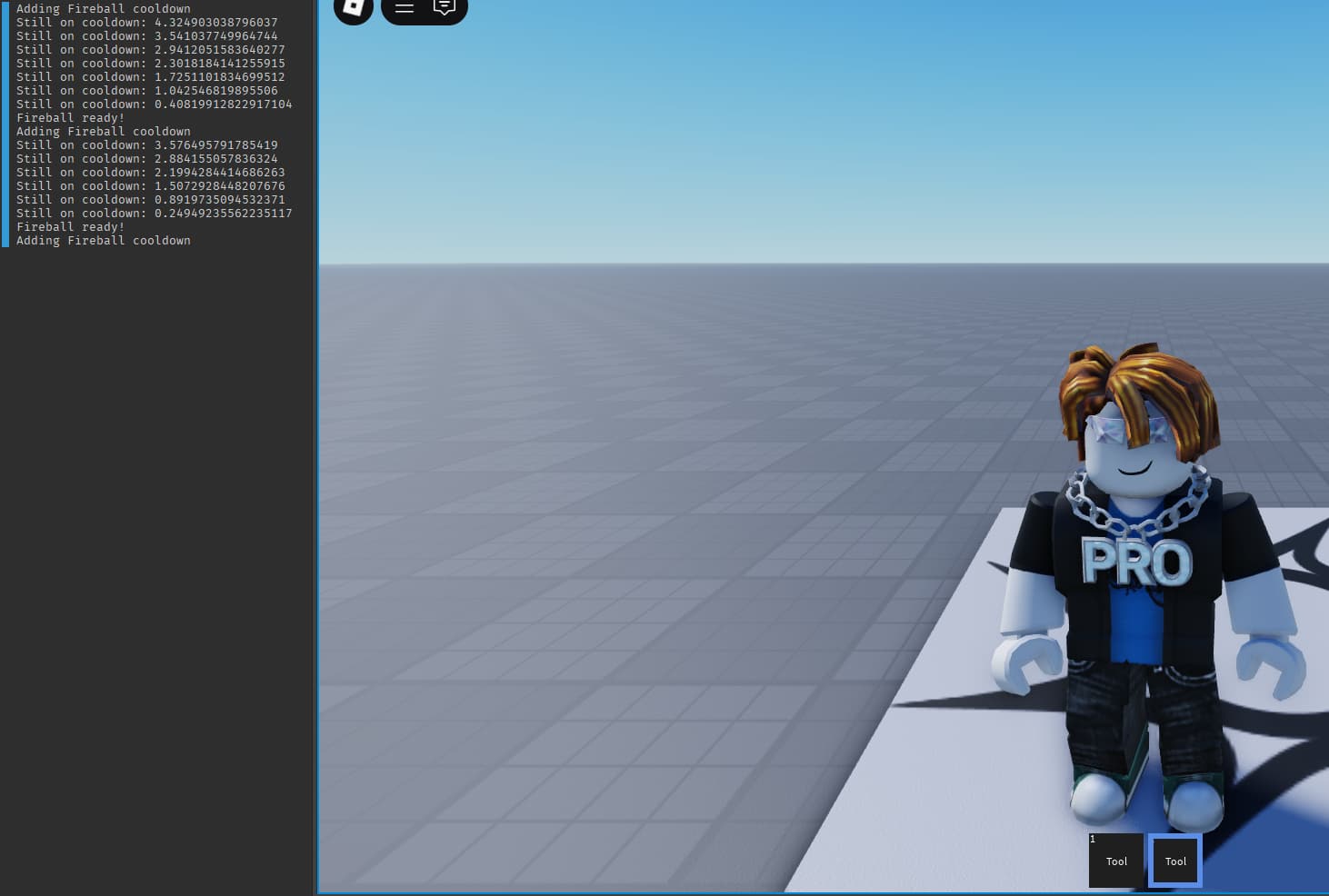
Code I used:

local player = game:GetService("Players").LocalPlayer
local tool = script.Parent

local Cooldowns = require(game.ReplicatedStorage.Cooldowns)
local abilities = Cooldowns.new(player.Name)

tool.Activated:Connect(function()
	local ready, remaining = abilities:Check("Fireball")

	if ready then
		print("Adding Fireball cooldown")
		abilities:Add("Fireball", 5, function()
			print("Fireball ready!")
		end)
	else
		print("Still on cooldown:", remaining)
	end
end)

And if your goal was to have the duplicated tools with separate cooldowns then:

I think the confusion here is that when calling the Cooldowns.new(tool.Name) method that it automatically creates a new cooldown instance. However, as documented it instead returns an already existing one under the same name.

Does this module do anything to have cooldowns on the client be near-identical duration to the server? Or is that left up to those who use the module?

A bit of extra context to what I’m asking is say a client sends a request to the server and it takes 0.1 seconds to reach the server then the response verifying that the input was successful takes 0.1 seconds to reach the client, the cooldown on the client would effectively have a 0.2 second longer cooldown.

In normal cases this is fine, but for cooldowns that are meant to be super short such as a quick fist swing combo bound to the player left click, it becomes very noticeable.

Hi,

I was going to check this out.

It might be nice if, 1 there was and example place editable with the different examples.

2 when you have script examples, if you said, are these local scripts or script , and where do they go in explorer…

No, this module does not handle client-server synchronization, so for now it’s left up to the developer. What you mentioned is the ping latency that depends on the client’s connection.

There is one solution I could think of on the spot, which is client authority with server verification. The client authority with server verification works by starting the cooldown on the client-side instantly and then having the server validate that timing and correct the client-side if necessary (the server would reject the input if the client cheats).

I’ll work on adding a place with multiple examples in the next week or so, feeling a bit under the weather atm.

Thanks for the great suggestion!

1 Like

can i use this for a Stunned status effect? so that my noob method of task.delays dont stack or interrupt with each other?

Yes!

Usage example:

local statusEffects = Cooldowns.new("PlayerStatus")

--Apply stun
statusEffects:Set("Stunned", 2, function()
    print("Stun wore off!")
end)

--Check if the player is still stunned
local notStunned, timeLeft = statusEffects:Check("Stunned")
if notStunned then
    --Player can move
else
    --Player is stunned for timeLeft more seconds
end

--Remove stun early (if needed)
statusEffects:Remove("Stunned")
Implementation Example
--Client just requests the action
remote:FireServer("Punch")

--Server decides if stun happens
remote.OnServerEvent:Connect(function(player, action)
    --Server logic determines if punch lands
    if punchLanded then
        --Server stuns the TARGET player
        local targetStatus = Cooldowns.new(targetPlayer.UserId.."_Status")
        targetStatus:Set("Stunned", 2)
        
        --Tell all clients to show stun effects
        remote:FireAllClients("Stunned", targetPlayer, 2)
    end
end)

--Client to handle VISUAL effects
local effects = Cooldowns.new("Effects")

remote.OnClientEvent:Connect(function(stunnedPlayer, duration)
    if stunnedPlayer == localPlayer then
        --Show GUI indicator or smth
	    local ping = player:GetNetworkPing()

	    --Client-side prediction adjustment
	    local adjustedDuration = duration - (ping * 0.5) --Compensate for one-way trip

	    effects:Set("Stunned", adjustedDuration, function()
    	    removeIndicator("Stunned")
	    end)
    else  
        --Show particle effects on them
        stunParticles(stunnedPlayer, duration)
    end
end)
1 Like

Cooldowns v1.0.1 is out with a demo!

What’s new?

Fixed time scaling calculations across all methods, and with this update duration scaling will be consistent. Also, zombie connection problem and missing return values fixes. The module should now function properly even with time scaling changes!