How to create a part in workspace using instance
Step1 – Go to Roblox Studio.
–This can be found here  in your roblox home page.
Step2 – Create a new place.
Note- This is just for beginners, as to make them understand if you already have a workspace open then you can use that.
 After that you wanna use baseplate, as that is what i normally use.

Then click on Create game.
Step3 – Insert a script in to your workspace
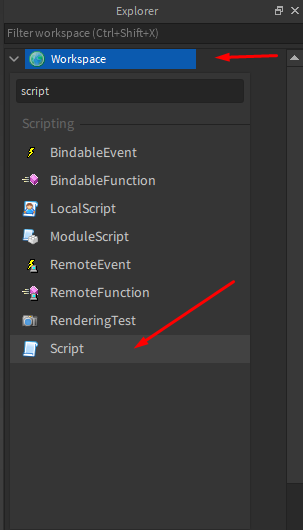
Right, now that we have that out of the way let’s start scripting.
- What most beginners get wrong in making instances is that they type it like this –
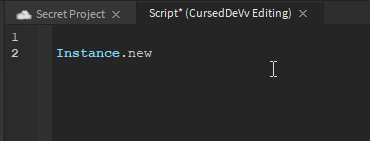
Now that won’t work since you will need it to be inside an object variable in which you do this
 As you can see here, put our instance inside an object variable, and what you can also see here is this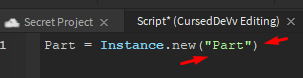
We created our instance by giving it an object variable, but some might be wondering what new is for…?
We’ll that’s simple as you are using instance you want to always say new as your creating something new inside where you want it do it.
Now that is how you use instance, all you do give it an object variable then write instance.new() and inside the brackets you put what you want to put inside your workspace or anywhere else.
We’ll hope this kind of gave you an understanding of what instances are and yea, have a good day. 