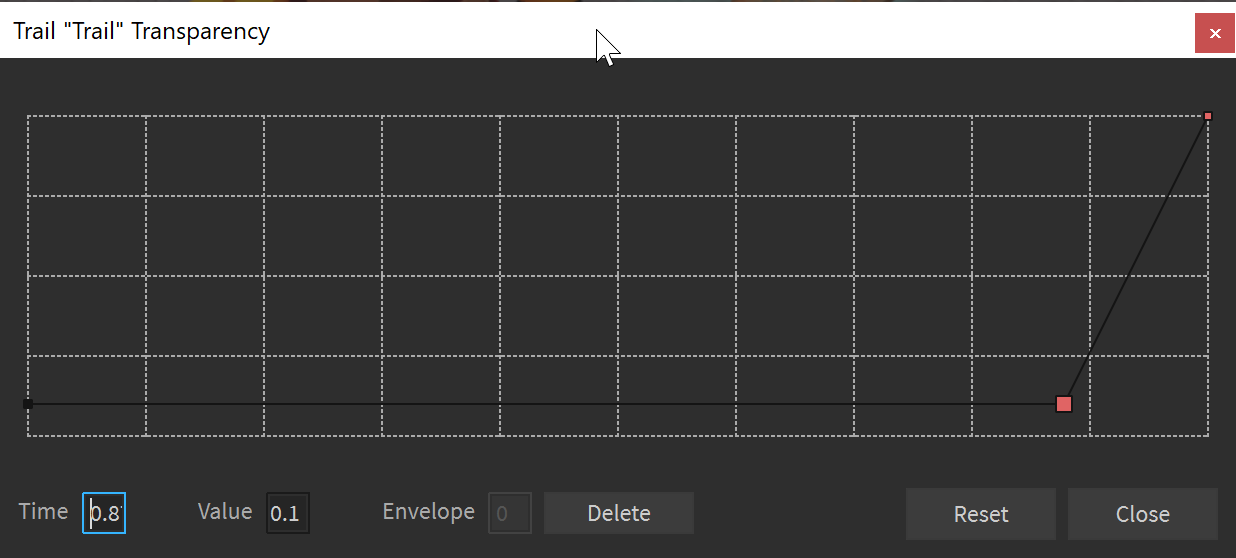
The little text boxes in the bottom left of the curve editor are very small and any value bigger than 2 digits will be hidden. It feels there’s easily a lot of room for them to have more horizontal spacing.
The curve editor widget is also in dire need of other quality of life features such as being able to resize the window and being able to set the min/max values of the curve instead of always having it clamped between 0 and 10. It creates many situations where I have to manually write out the NumberSequence by hand in the command bar to get the desired result because I end up wasting way more time trying to do it all by hand.
As a workaround i can suggest using a VFX editor Plugin. I use a free one, i don’t rememeber what its called but its the first free one in the plugin store. just type in VFX editor.
But yes, We definitely need some QoL improvements to the widgets, i think a good feature would be bezier curves and similiar interpolation modes to the keyframes.
hi! you can now edit the min/max values of number sequences in the latest version of studio. see: the boxes on the left side of the graph. it also looks like resizing the window and making the textboxes larger were addressed in previous years.
Hello,
I just noticed this reply. Firstly, I would like to thank whomever has made this addition to the curve editor, it’s such a small but incredibly useful change, I cannot thank them enough for this.
I’ve been messing around with it a bit and it seems stable.
Is there any particular reason the min/max is capped to -500/500 respectively? Using the command bar you can set values that are beyond that constraint. It’s not very likely that they’ll need to go beyond this range, I was just wondering why this specific constraint was chosen?
it is kind of an arbitrary value, do you have a strong preference for a higher min/max? a considered range was -200/200 since particle size can only go up to 200, but i wanted devs to be able to use a higher range if they wanted to store higher values for arbitrary purposes on attributes. we do need to have some cap on the range and it felt better to go smaller for now, rather than allowing too high of a value and needing to reign it back in once something broke.
having a nice round 1000 integer values felt good to me, though i did make a mistake in that 0 exists, so it’s actually 1001 integer values lol
It’s fine in practice at the moment, it’s just that potentially in the future if there’s a new property that uses a spline editor that has a use case for a very large number, devs will just end up feature requesting a higher cap.
So in my mind it seemed like it would be easier to just have the largest possible range the data type can store so it won’t ever need to be revisited.
Though I’m not familiar with the engine code, so this is just my current view of the situation.