When exporting a custom rig made in blender as FBX, roblox will import it with the wrong Motor6 rotations. This causes problems for animations made in blender.
Additionally animations cannot be imported via the Roblox animation editor as it seems to try to import the FBX as one big mesh rather than constituent pieces (which is how it is for my FBX) this pushes the whole mesh over the triangle limit and plug-ins must be used to import animations directly from blender as keyframe data.
The method used to import animations is by using the “Roblox Animations Importer-Exporter” blender and roblox plugins
https://create.roblox.com/store/asset/16708835782/Blender-Animations-ultimate-edition
Reproducible Steps:
- Make a custom rig in blender
- Make a pose to test each bone’s axis of movement
- Import your custom rig via normal methods
Export Process:
- Drag select mesh/armature rig

3. Export
Import Process:
- Use given 3D import
- Adjust scale to mm
- Import
Now use the plug in to test if the rig is animating correctly.
Expected Pose:

Result Pose:
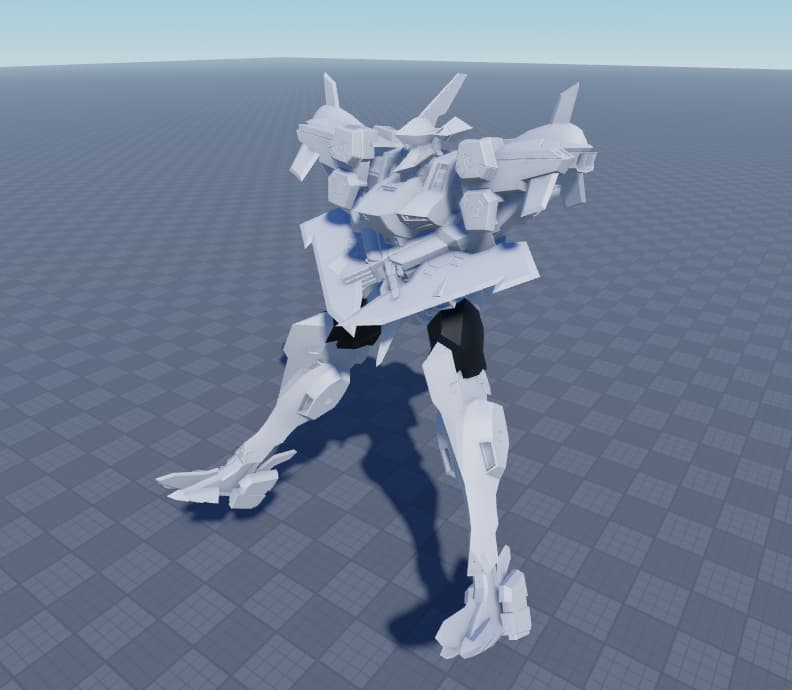
Note, this is with the animation applied, this is not a default pose!
As you can see the resultant pose is completely wrong.
Having done some digging, it appears this is because the Motor6D rotations are imported incorrectly.
I have tried to fix this by changing the Import/Export axis’ and also adjusting the bone’s “Roll” property in blender, unfortunately NONE of them help fully. Sometimes you can get away with adjusting a bone’s Roll but sometimes the bone imported is on the opposite axis which makes it impossible to correct (or if corrected, impossible to animate correctly in blender). Regardless I dont think this behaviour is expected and currently can only be changed manually from within studio. However, the animation of a complex rig like this is extremely inconvenient and tedious which completely negates the use having to use blender.
It also appears no one on the forum has a solution for this so I am reporting it as a bug. If this continues I will not be able to continue my project on roblox as animation is obviously a core part of this game.
Basic files are linked.
Expected behavior
I expect Motor6 rotations to be applied correctly and animations to play correctly.
A private message is associated with this bug report