Eye — Advanced Time Tracker for Roblox Studio | Free

Thumbnail


Eye is a plugin for learning about time spent in the studio.

With Eye you can find out everything in the smallest details about how much time you spent in different areas - scripting, building, designing ui, animating and even playtesting.

Eye doesn’t just record your time. Eye detects what you are doing and does not add time if you, for example, step away from the computer.


Widget

The widget is simple, concise and easy to understand. It contains all the information that Eye records about you.


Profiles

Easily switch between profiles and check your friends’ stats. IT’S NEVER BEEN THAT EASY!

Image Demo

Notice

Eye only displays profiles of players who have installed Eye on their computer and edited the current place at least once. You cannot see the stats of players not from the current place.


Categories

Categories provide basic info: time spent active. Click on them and next section will show statistics for clicked category.

Image Demo


Statistics

Depending on the category selected, it shows how much time you spent on each action type.


Detailed statistics

If you click on, for example, scripting you will get detailed statistics for it. Click on an object to select it in explorer.
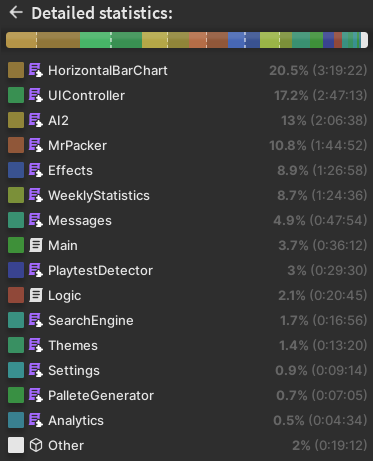

Weekly statistics

You can also get weekly statistics. Click on the arrows to move the current week. Click on any bar to see its stats in the statistics section. A small image highlights the longest action of each day. Plus, you can star a day to make it stand out from others.


Thats it!

And the cool thing is that this plugin is complitely free. “Eye” has been obtained 991 times!!! (accurate as of 25.12.2025 :christmas_tree::santa_claus::christmas_tree:) Have fun knowing your stats!

Important notice: the data of Eye can be easily manipulated. Take this into an account if you plan to use Eye as an employer! Do not trust other’s people stats, as well as your own! The data is stored in ServerStorage. See below’s category “Eye takes up space…” to learn how to clean memory in-game/in-run mode.


Get it on Roblox    Support

Huge thanks to everyone who supports me!

My previous plugin

Check out Switcher, a plugin that can change any instance's class

A little bit of technical info

Folder System

Eye creates a folder for each of opened places and automatically starts tracking your actions. For now this behavior is not editable, please reply on this post if you need it.

Eye uses Profiles, it means it creates a new profile for every user in-game. You need to be logged-in to use Eye.


How it works

Eye uses a set of algorithms to detect your actions, inspections of which include:

  • Input (mouse, keyboard)
  • Selection (in Explorer)
  • Changing objects
  • Camera (position, rotation)
  • CoreGui
  • Source of Scripts

States:

Here are a few unique states that don’t behave like others:

Idle

If you are inactive, Eye records your time internally, but it is not displayed in each meter. This means that if you are inactive, Eye will not display that time in the counters.

Edit this behavior in settings:
ServerStorage → RecPlugins → Eye → Profiles → (Your ID) → Settings → (Attributes) → “ignore_idle_time”
true: eye dosn’t accounts idle time in stats
false: eye accounts idle time in stats

Unknown

That means Eye sees that you’re active but cannot understand what you’re doing.

Playtesting

The playtest detector requires a DataStore, so you’ll have to enable it to get its details, although you can open a local place, Eye just won’t record data about playtest.

Eye updates Playtest stats every 30 seconds if not in idle state.

You can disable Playtest detector by going:
ServerStorage → RecPlugins → Eye → Profiles → (Your ID) → Settings → (Attributes) → “record_playtest”

Animating

Eye can detect the animation editor (by Roblox) and MoonAnimator.

Currently there is no way to know if the animation editor is open or not, as there is no way to access the RobloxPluginsGuiService, so Eye watches the humanoids ahead to determine if they are changing as if animated.

Detecting Moon Animator is easier since we have access to CoreGui.


Eye takes up space...

Eye stores data in ServerStorage, which consumes memory. To optimize your live game, you can destroy this data via script. Be careful to target the correct folder, as the Eye directory also contains data necessary for the Playtest Detector.

Insert the following script into ServerScriptService to automate cleanup during playtests and live sessions.

Warning: Do not run this script in Edit mode, as it will cause data loss.

game:GetService("ServerStorage").RecPlugins.Eye.Profiles:Destroy()

Ensure you use this exact path; other folders are used by the Playtest Detector. Eye will warn you if you remove any folders required by the Playtest Detector.

97 Likes

Cool! I do see one problem, I have studio open, and the animating statistic is going up, even though I have no form of animator open. So just thought I’d report that!

7 Likes

Thanks for bug report! Im going to investigate it.

But i think its probably because there is a humanoid in front. But im not sure.

3 Likes

Update: bug is now fixed!

The animation detection is still not perfect, but accurate enough.

Thanks again for reporting this issue! I probably would never have detected it myself :]

2 Likes

Is idle time in the time included?

2 Likes

I apologize for the silly explanation. Short answer: no, idle time is not incuded.

Long answer:
Eye sort of saves this time as Idle, but when it shows you the time it doesn’t count it. That is, it saves it internally, but when calculating the total time for some category it doesn’t add it to the counter.

For example, if you are idle for 5 minutes, it will save that time, but the display will show 0 minutes. In other words, you cannot find out the idle time through the widget, only by going into folders.

I hope I was able to explain it in an understandable way, if not, feel free to tell me to explain it better ;]

Edit: i added a setting for it in the new update:
ServerStorage → RecPlugins → Eye → Profiles → (Your ID) → Settings → (Attributes) → “ignore_idle_time”

2 Likes

Not sure if you are aware of this: But Eyes does not seem to work
grafik

I really cannot replicate the error, the error line is empty :[

Can you please tell me if this error pops up in all places or just some?

Also, try to do these things:

  1. Check if you’re using the lastest version of Eye (the error line is empty so it looks like this);
  2. Turn off the plugin, and then remove the “RecPlugins” folder in the ServerStorage. After that turn it on (this should clear all data collected by Eye).

It works now, turns out I forgot to update the plugin

2 Likes

Yay! I’m glad it’s all good :]

This is cool! Would it be possible to check someone else’s work time, like someone you’re working with? I want to make sure my teamate is meeting his quota (just kidding lol)

3 Likes

Thanks! :rofl:

There’s no easy way right now to do it so I will tell you a bit hacky method. Its basically switching data between you and your teammate.

And obviously, they need to install Eye to collect their data.

  1. Save TeamCreate place on your PC, and open it locally;
  2. Turn off Eye (PLUGINS → Manage Plugins);
  3. Go to ServerStorage → RecPlugins → Eye → Profiles;
  4. Now switch the names of your folder (named with your id) and your teammate’s folder (named with his id);
  5. Turn on Eye;
  6. Finish! Now your stats are basically his stats. Thats why I said to do it locally.

I want to notice that you can’t really rely on Eye’s data - your teammate can edit it easily.


I think I will probably add a new feature that will allow everyone to see other’s stats faster. Maybe soon or later, idk really Im lazy right now, hehe. But here’s a spoiler: top bar with buttons to check the stats of everyone who uses Eye at current place)

5 Likes

Thanks! Now I know my sweat stats!

4 Likes

Version 3.0.0 is here, with incredible new features.


Profiles Viewer

It’s never been easier to check your teammates’ stats. Learn about everything your friends have done in as much detail as you do about yourself.

Thanks to @Pish85 for an idea to create this feature.


Upgraded Playtest

A new message box allows you to change the behavior of the Playtest detector. Simplicity and functionality go together like butter and cheese.


This version of Eye is fully backwards compatible.
And since I don’t have any friends to fully test these features in TeamCreate, I’m very open to bug reports.

Problems with new version?

If you have problems with the new version, install the old version as a local plugin: (Don’t forget to disable the new version)
Eye v2.-.-.rbxm (105.4 KB)

How to install this file as a local plugin?
  1. Open this file by dragging it onto Roblox Studio shortcut;
  2. Right click on folder “Eye”;
  3. Click “Save as local plugin”.

Please provide a detailed response to this post, including a comprehensive description of the circumstances surrounding your incident with this software.


Let me know what you think of the new features, there is always room for improvement.

Enjoy! :]

2 Likes

BROKEN, DOES NOT WORK

Great update… but it took a lil bit to figure out how to add new profiles. For any new users, go to ServerStorage → RecPlugins → Eye → Profiles, then take the folder inside of that with your id and duplicate that folder, replacing the folder’s name with the userID of your choice.

You may need to close and reopen the game you’re working on to see the effect.

2 Likes

Bug @Recodetfort, the method above is broken because it duplicates stats too, is there a way to add new profiles with entirely new data?

2 Likes

 eye 

3 Likes

I think you have misunderstood the Profiles system. Sorry if I haven’t provided any resourses to learn about that system.

The Profiles system is designed to be used in TeamCreate, there is no need for manual data manipulation here.

To record their stats, your teammates should also install Eye. This plugin cannot record their data if they haven’t installed Eye on their devices :[

Please reply to me if you still have any questions.

3 Likes

Does it work if the game is a group experience?

did you forget to update the plugin or something