Hello, I am going to try to be as clear as possible.
I am making an anime game like anime fighters simulator or anime warriors 3 (or 2) to train my scripting skills, but I am encountering some problems when it comes to the summon UI since I need to use ViewportFrames.
Some notes: I mainly need help for the second problem, and appreciate if some people can give maybe another idea to fix the first and third problems
Here are the problems I encountered (each dots represent respectively the first, second, third problem):
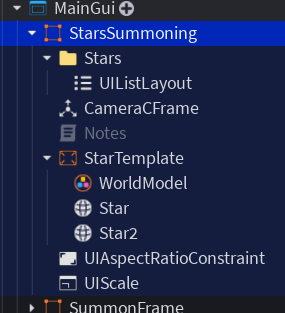
The ViewportFrame takes some times to load when I change the main frame visibility (the frame that is the parent of all the ViewportFrames).
When I wanted to rotate a star when I summon for example, it rotated the stars but it was unsynchronized, which mean like it was not really synchronized, there was a little delay, and it is weird.
Sometimes, for no reason, when I change the main frame visibility, some viewportframes can go invisible
Here is what I did to try to fix those:
So for this first problem, I tried to iterate inside all the descendants of the main frame and then change all the ViewportFrames Image Transparency from 0 to 1 to make it invisible, and 1 to 0 to make it visible. It worked, however I dont know if its really efficient, and I dont know if my code is organized like that, but anyways, I might still do this solution I guess since its better then nothing
For this one, it is not fixed and I dont have a single idea on how to, basically I like already tried to create some cameras inside the stars models and then change the orientation of camera but again it doesnt work, it doesnt work also if i change the cframe of the star.. also I even tried on a new game place, and each 0.25 seconds I make all the stars rotate but it was still unsynchronized..
To fix this, I must update a property of the viewportframe that went invisible, whatever is the property, I just need to change a value and it can works (so this problem is not really one since I solved it)
Now here is the code that handle those systems:
… (There is no really code to provide for this one since I have fixed it but I just need to understand if there is another way)
Now the code for the second problem:
RotateStar.Event:Connect(function()
	warn("Started")
	for _, Star: ViewportFrame in Stars:GetChildren() do
		local Camera: Camera = Star:FindFirstChild("Camera")
		if not Camera then continue end

		print(Camera.CFrame)
		Camera.CFrame = CameraCFrame.Value * CFrame.Angles(0, 0, math.rad(StarRotationDirection * 5))
	end

	StarRotationDirection *= (-1)
	warn("Finished")
  end)
(No need to provide code for this one too I think)
The characters taking a bit to show up is a matter of how you load them and the viewports themselves too. What I would do is try 2 pagination techniques: either replace the main frame (containing the viewports) with another by using the Visible property (I don’t recommend changing the ImageTransparency for viewports just for 0 and 1, use Visible instead) OR replace the characters with other pre-loaded ones at the same position. This one is case-dependant.
For this problem, please NEVER use ViewportFrames for stuff like icons. Icons should be images only, and it looks like your stars being 3D don’t make any impact to the look itself. ALSO, your graphics being low also reduce the specific FPS for each viewport, which is why they can fall out of sync.
This is also a cause of both low graphics and poor viewport management. Ideally you’d have as less as possible.
Hey! I am really sorry for my late answer I was a bit busy…
Anyways, I have read your advices, here is what I think:
I didn’t really understand what you meant here, like what do you mean by replacing the main frame by another frame ? I mean it’s the same thing no ? And also, when you say preloaded characters, you mean like ViewportFrames that are like visible but in a far position and so then I swap the positions ?
Ok I see, you are right, it looks like when the quality is higher, they don’t fall out of sync, however I am going to have to still display some characters with ViewportFrames (you can see what do I mean here: https://youtu.be/lfDksW8o_40?si=TeyscLiuvq7lAkzo), do you recommaend me to rotate the character’s model with the CFrame in the ViewportFrame ?
It is not a problem of graphics, since I just turned high graphics in my phone and I had still the invisible problem, but I guess it is not a big problem since I just have to actualize a property of the ViewportFrame that is disappearing
Also, why do you think I shouldn’t change the image transparency of a ViewportFrame ?
The sync issue is because you’re rotating off an event, and each ViewportFrame re-renders on the next render step after you touch its camera. Small timing differences = they drift apart.
Fix: set all the cameras inside one RenderStepped connection. That runs right before the frame is drawn, so they all render together.
local RunService = game:GetService("RunService")

local speed = 2
local maxAngle = 30
local baseCFrame = CFrame.new(0, 2, 5) -- your default cam offset

RunService.RenderStepped:Connect(function()
	local angle = math.sin(os.clock() * speed) * math.rad(maxAngle)
	for _, star in Stars:GetChildren() do
		local cam = star:FindFirstChild("Camera")
		if cam then
			cam.CFrame = baseCFrame * CFrame.Angles(0, angle, 0)
		end
	end
end)
The math.sin handles the back-and-forth swing for you, so drop the StarRotationDirection *= -1 — that flip is part of the jerkiness since it depends on exactly when the event fires. Want it to spin one way forever instead? Use a running angle += dt * speed.
For problem 1: your transparency fade is basically the standard fix, keep it. The delay is Roblox re-rendering each viewport as it becomes visible, not much you can do about that.
Problem 3: the “change any property to force a re-render” trick is the known workaround for that bug.

 I was a bit busy…