Hi!
Recently I started making a ChatSettings script.It s not work obviously as Roblox’s core looks for it in a folder.
How would my script find that script in this location
(  )
)
, and replace itself with the already existing one?
Maybe copy the whole folder that Roblox creates, and then replace ChatSettings with your module.
wait (0.1)
script.Parent.ClientChatModules.ChatSettings:Destroy()
That can be done by that code, but that’s only half. How would I get my module in there?
Nono I mean, play-test the game, copy the folder inside the Chat service, then stop the play-test and paste the folder you copied inside the Chat service, and then remove the Roblox’ module and put yours. This is probably one of the best options as it doesn’t require code, however, if Roblox updates their modules you’d have to redo everything. If you want to put your script there then you can simply clone it and parent it to the ClientChatModules.
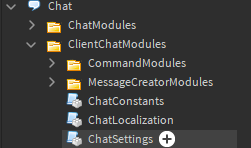
That won’t even work. It’s still there.
Oh, it doesn’t replace the default one?
Yes. But when it plays, it will insert the default ones again, ignoring mine.
Weird, I tried on a blank baseplate and it works fine for me.

You’ve done this too right? I put a print("Custom module test") inside of the ChatSettings module and it printed correctly. I also checked it in-game and the new line of code was there.
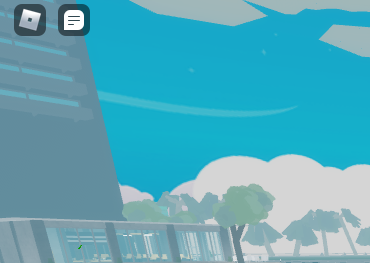
I replaced it, and got this.
I don’t understand, you mean the chat doesn’t work anymore?
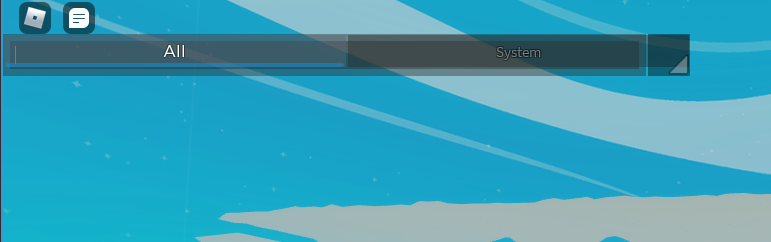
Did I make something wrong with the settings?
--	// FileName: ChatSettings.lua
--	// Written by: Xsitsu
--	// Description: Settings module for configuring different aspects of the chat window.

local PlayersService = game:GetService("Players")
local ChatService = game:GetService("Chat")

local clientChatModules = script.Parent
local ChatConstants = require(clientChatModules:WaitForChild("ChatConstants"))

local module = {}

---[[ Chat Behaviour Settings ]]
module.WindowDraggable = false
module.WindowResizable = true
module.ShowChannelsBar = true
module.GamepadNavigationEnabled = false
module.ShowUserOwnFilteredMessage = false	--Show a user the filtered version of their message rather than the original.
-- Make the chat work when the top bar is off
module.ChatOnWithTopBarOff = false
module.ScreenGuiDisplayOrder = 1 -- The DisplayOrder value for the ScreenGui containing the chat.

module.ShowFriendJoinNotification = true -- Show a notification in the chat when a players friend joins the game.

--- Replace with true/false to force the chat type. Otherwise this will default to the setting on the website.
module.BubbleChatEnabled = true
module.ClassicChatEnabled = false

---[[ Chat Text Size Settings ]]
module.ChatWindowTextSize = 18
module.ChatChannelsTabTextSize = 18
module.ChatBarTextSize = 18
module.ChatWindowTextSizePhone = 14
module.ChatChannelsTabTextSizePhone = 18
module.ChatBarTextSizePhone = 14

---[[ Font Settings ]]
module.DefaultFont = Enum.Font.Gotham
module.ChatBarFont = Enum.Font.GothamBold

----[[ Color Settings ]]
module.BackGroundColor = Color3.new(0, 0, 0)
module.DefaultMessageColor = Color3.new(1, 1, 1)
module.DefaultNameColor = Color3.new(1, 1, 1)
module.ChatBarBackGroundColor = Color3.new(0, 0, 0)
module.ChatBarBoxColor = Color3.new(1, 1, 1)
module.ChatBarTextColor = Color3.new(0, 0, 0)
module.ChannelsTabUnselectedColor = Color3.new(0, 0, 0)
module.ChannelsTabSelectedColor = Color3.new(30/255, 30/255, 30/255)
module.DefaultChannelNameColor = Color3.fromRGB(35, 76, 142)
module.WhisperChannelNameColor = Color3.fromRGB(102, 14, 102)
module.ErrorMessageTextColor = Color3.fromRGB(245, 0, 0)

---[[ Window Settings ]]
module.MinimumWindowSize = UDim2.new(0.3, 0, 0.25, 0)
module.MaximumWindowSize = UDim2.new(1, 0, 1, 0) -- if you change this to be greater than full screen size, weird things start to happen with size/position bounds checking.
module.DefaultWindowPosition = UDim2.new(0, 0, 0, 0)
local extraOffset = (7 * 2) + (5 * 2) -- Extra chatbar vertical offset
module.DefaultWindowSizePhone = UDim2.new(0.5, 0, 0.5, extraOffset)
module.DefaultWindowSizeTablet = UDim2.new(0.4, 0, 0.3, extraOffset)
module.DefaultWindowSizeDesktop = UDim2.new(0.3, 0, 0.25, extraOffset)

---[[ Fade Out and In Settings ]]
module.ChatWindowBackgroundFadeOutTime = 0.5 --Chat background will fade out after this many seconds.
module.ChatWindowTextFadeOutTime = 30				--Chat text will fade out after this many seconds.
module.ChatDefaultFadeDuration = 0.8
module.ChatShouldFadeInFromNewInformation = false
module.ChatAnimationFPS = 75

---[[ Channel Settings ]]
module.GeneralChannelName = "All" -- You can set to nil to turn off echoing to a general channel.
module.EchoMessagesInGeneralChannel = true -- Should messages to channels other than general be echoed into the general channel.
-- 																						Setting this to false should be used with ShowChannelsBar
module.ChannelsBarFullTabSize = 4 -- number of tabs in bar before it starts to scroll
module.MaxChannelNameLength = 12
--// Although this feature is pretty much ready, it needs some UI design still.
module.RightClickToLeaveChannelEnabled = true
module.MessageHistoryLengthPerChannel = 50
-- Show the help text for joining and leaving channels. This is not useful unless custom channels have been added.
-- So it is turned off by default.
module.ShowJoinAndLeaveHelpText = false

---[[ Message Settings ]]
module.MaximumMessageLength = 68934635968935
module.DisallowedWhiteSpace = {"\n", "\r", "\t", "\v", "\f"}
module.ClickOnPlayerNameToWhisper = true
module.ClickOnChannelNameToSetMainChannel = true
module.BubbleChatMessageTypes = {ChatConstants.MessageTypeDefault, ChatConstants.MessageTypeWhisper}

---[[ Misc Settings ]]
module.WhisperCommandAutoCompletePlayerNames = true

local ChangedEvent = Instance.new("BindableEvent")

local proxyTable = setmetatable({},
{
	__index = function(tbl, index)
		return module[index]
	end,
	__newindex = function(tbl, index, value)
		module[index] = value
		ChangedEvent:Fire(index, value)
	end,
})

rawset(proxyTable, "SettingsChanged", ChangedEvent.Event)

return proxyTable
The only thing wrong is how the chat looks cause everything else works fine, so you might want to mess around with the size and position of it.