Hey, I am just about to build a modern café, however, in the reference I have used, there is a complex curved shape. How may I create this shape? Please let me know!

7 Likes
Unions, Get a part then cylinder and negate them
2 Likes
Is there any other way you can possibly do it without unions?
Yeah, but Im not really a fan of blender 
I’d suggest using normal parts. I made a simple design that may be of use to you, so you can see how it’s done.

1 Like

Well… You can use archimedes plugin to achieve your goal
May I ask how you did the bendy parts with precise measurements? Did you use a tool or something, or a technique. 
I use Archimedes Two in order to achieve better curves: Archimedes (v3.1.9) - Roblox
1 Like
This is best way to make a scape like that (without unions:)
-
Firstly you need to install this plugin:
Link: Archimedes (v3.1.9) - Roblox -
Open Roblox Studio and insert a part into the Workspace:


-
Color the part(211, 190, 150) and use Wood as material. Secondly, make the length of the wood brick 1.2 and make a grey platform for the wood to stay on like the picture:
-
Put the wood brick a little bit underneath the grey part. Set up the plugin you installed and make sure to use 15 degrees angel. The wood brick I used has a size of(0.62, 0.28, 1.2).
-
After that press “Render Once” inside the UI on the plugin and press the button until you made it till 90 degrees up.
-
Continue using the plugin and, make a scape like this, (you can choose the hight you want the build to be):
-
Now fill in the wall with wood, you can choose how long the wall should be. After that, insert a really thin black part. Make sure to put the black part at the different degrees on the curved wall until you reach the upwards wall.
-
Now, you should have something like this:
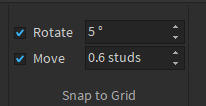
After this part, you will use the move tool and put it to (0.6). Fill in with black.
-
You got everything you need to know to finish the curved wall. Be creative and add as many details as you like:


17 Likes
