Currently, as of 1/7/2026, VoiceChatService:IsVoiceEnabledForUserIdAsync() will always return true for voice-eligible users, even if they have voice chat disabled.
For whatever reason, Roblox changed how you enable voice chat. Unlike all the other communication options, the toggle is no longer available in your account settings - instead, now you have to toggle it through the in-game esc menu, which is a bit confusing.
I’m unsure if this is an A/B test, or if it’s only available to specific age groups, but this is how it currently works for me.
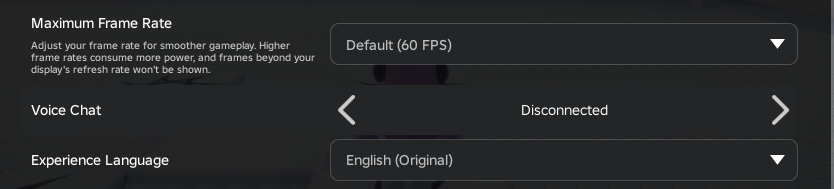
Ever since this change rolled out, it seems that calling IsVoiceEnabledForUserIdAsync on any user who is eligible for voice will always return true, even if they have voice disabled in the in-game esc menu. It will only ever return false if the user is not eligible for voice.
Another problem with this change is that, even if IsVoiceEnabledForUserIdAsync is updated to account for this new menu setting, nobody is expecting the user’s voice status to change at runtime. I would imagine most games which check voice status just check IsVoiceEnabledForUserIdAsync once and that’s it. Perhaps we should get some new event that fires if the user’s chat features are updated? Especially since you can now complete an age check in-game to gain access to chat features.
Repro
-
Have an account which is eligible to use voice chat.
-
Join any game, that you have edit access to, and allows voice chat.
-
Make sure “Voice Chat” is set to Disconnected in the in-game esc menu.
-
Open the developer console, go to the server log, and run
print(game:GetService("VoiceChatService"):IsVoiceEnabledForUserIdAsync(USER_ID))with your user ID. This should incorrectly printtrue, even though you have voice chat disabled.
System information
OS: Windows 10
CPU: Intel(R) Core™ i7-6700 CPU @ 3.40GHz
Memory: 16 GB
GPU: NVIDIA GeForce GTX 1660 Ti
Expected behavior
If voice chat is disabled, IsVoiceEnabledForUserIdAsync should return false.