Hello so i made a lootbox on my game and normally she give me an random item from 1-5 but my script doesn’t work…
local ProximityPrompt = script.Parent
local Anim = script:WaitForChild("PickUp")
local player = game:GetService("Players").LocalPlayer

ProximityPrompt.Triggered:Connect(function(plr)
	local hum = plr.Character:WaitForChild("Humanoid")
	local loadAnim = hum.Animator:LoadAnimation(Anim)
	script.Parent.Parent.ProximityPrompt:Destroy()

	hum.WalkSpeed = 0
	hum.JumpHeight = 0


	loadAnim:Play()


	wait(5.4)

	local tool = script.Parent:FindFirstChild("Value"..math.random(1,5))

	local clone = tool.Value:Clone()

	clone.Parent = player.Backpack

	hum.WalkSpeed = 16
	hum.JumpHeight = 7.2

	script.Parent.Parent:Destroy()
end)
Where is the script and Values :
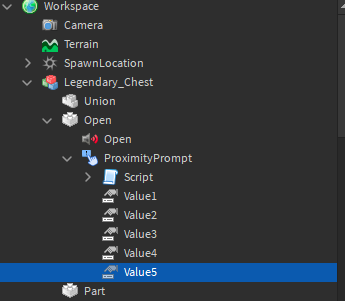
When I try this is what happens :
- Someone can help me ? -Thanks
DevRenix
(renix)
2
Try this
local ProximityPrompt = script.Parent
local Anim = script:WaitForChild("PickUp")
local player = game:GetService("Players").LocalPlayer

ProximityPrompt.Triggered:Connect(function(plr)
	local hum = plr.Character:WaitForChild("Humanoid")
	local loadAnim = hum.Animator:LoadAnimation(Anim)
	script.Parent.Parent.ProximityPrompt:Destroy()

	hum.WalkSpeed = 0
	hum.JumpHeight = 0

	loadAnim:Play()

	wait(5.4)

	local randomnum = math.random(1,5)
	local tool = script.Parent:FindFirstChild("Value"..tostring(randomnum))

	local clone = tool.Value:Clone()

	clone.Parent = player.Backpack

	hum.WalkSpeed = 16
	hum.JumpHeight = 7.2

	script.Parent.Parent:Destroy()
end)
Always the same message :
DevRenix
(renix)
4
Try getting rid of findfirstchild.
Yes, but I don’t know what to replace it with.
DevRenix
(renix)
6
local tool = script.Parent["Value"..tostring(randomnum)]
That workt ! But now the check up for the tools doesn’t work x)
DevRenix
(renix)
8
Thats probably because you’re trying to clone the Value of the Value and putting it in someones backback.
Maybe, do you have any idea to fix it?
DevRenix
(renix)
10
You actually need a tool, so you can change the value to a tool name and then it will find that toolname in serverstorage and it will clone that tool?
I changed my script to that :
local ProximityPrompt = script.Parent
local Anim = script:WaitForChild("PickUp")
local player = game:GetService("Players").LocalPlayer
local tool = script.Parent:FindFirstChild("Value"..math.random(1,5))
local clone = tool.Value:Clone()

ProximityPrompt.Triggered:Connect(function(plr)
	local hum = plr.Character:WaitForChild("Humanoid")
	local loadAnim = hum.Animator:LoadAnimation(Anim)
	script.Parent.Parent.ProximityPrompt:Destroy()

	hum.WalkSpeed = 0
	hum.JumpHeight = 0

	loadAnim:Play()


	wait(5.4)


	clone.Parent = player.Backpack

	hum.WalkSpeed = 16
	hum.JumpHeight = 7.2

	script.Parent.Parent:Destroy()
end)
But now i have this prob :
DevRenix
(renix)
12
You cant give yourself a tool through a local script, that’s why it isnt working. So it needs to be a server script.
this is not a local script look the image above
DevRenix
(renix)
14
You used LocalPlayer
local player = game:GetService("Players").LocalPlayer
Oh… Do you got with the server ? pls
DevRenix
(renix)
16
change
clone.Parent = player.Backpack
to
clone.Parent = plr.Backpack
1 Like
Nice that worked !! Thanks bro !


