Warning before start:
I didn’t make myself the scripts in here, I used Claude to update the deprecated scripts available in: Portal kit | Play on Roblox
I created this project which you can copy and see for yourself the scripts in roblox studio: https://www.roblox.com/games/112953622889166/Portal-Kit-updated
Video example:
Also checkout how it’s used in my game:

Requirements
fulldoc:
DocPortal.txt (15.1 KB)

How it works
-
Boot: PortalView reads
workspace.StaticPortals, validates each pair Model, clones the World models into viewports, links A↔B. -
Per frame: raycast of HRP movement against the portal part; crossing the front face (
dot ≥ 0.999) teleports — direction, position, and velocity remapped relative to the destination surface (180° mirrored). Directionality replaces cooldown. -
Heartbeat: within 5 studs, “physics hole” frame lets the character pass through the opening without falling off the edges.
How to set a new connection between portals
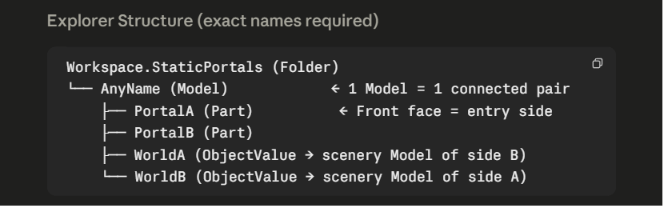
In-Game example:
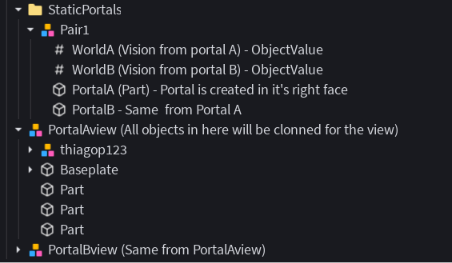
Portal will be created in the Right face of the part
Dependencies
5 ModuleScripts + CollisionGroups server script + PortalView LocalScript as seen below

Limitations
- No runtime enable/disable, no cooldown, no activation distance setting, no player filters, no sounds/particles.
- Portal removal only takes effect next session (pairs are built at boot).
- Cost scales per pair (2 world clones + 2 clones per character + per-frame render) — keep world Models small; lower
CanvasSize(1024→512) if needed.
Common Problems and Solutions
| Symptom | Likely cause | How to identify | Solution |
|---|---|---|---|
| Portal doesn’t render (empty/blue surface) | WorldA/WorldB.Value is nil |
Output: WorldA.Value is nil |
Reassign the ObjectValue; confirm the target Model exists in the workspace |
| Parts missing from the view | Parts with Archivable=false, or StreamingEnabled unloaded distant parts |
Compare clone × original | ModelStreamingMode = Persistent on the world Model, or increase streaming radius |
| Doesn’t teleport | Player crossed through the back face | Crossing from the other side works | Rotate the part 180° (Right face = entry side) |
| Teleports in a loop / multiple times | The pair’s two portals placed right against each other facing one another | — | Move the openings apart; make sure the exit doesn’t immediately cross the destination’s front face |
| Player collides with the portal’s air | CollisionGroups didn’t run or part is outside StaticPortals |
Part’s CanCollide still true |
Keep the parts inside StaticPortals; check the server script |
| Player falls off the edge while crossing | Physics hole smaller than the opening | Very large openings | Increase _createPhysicsHole(width, height, depth) |
| Exits at the wrong position | Different scale/size between PortalA and PortalB | — | Use same-size parts on both sides |
| Works in Studio, fails published | ObjectValue replication delay (the code already waits 10s) or StreamingEnabled | Output with PortalView warns | Persistent on the Models; confirm StaticPortals replicates |
| Camera “flickers” when touching the portal | Conflict with another script controlling the camera | — | The BindToRenderStep at Input-1 must run before the camera controller |
| Low FPS with many portals | Each pair = 2 world clones + 2 clones per character + per-frame render | MicroProfiler | Shrink the world Models; lower CanvasSize (512); fewer simultaneous pairs |