
Hello guys, so.. something i’ve noticed is how the animation system in roblox is laggy and difficult do sycronize…
So, i made my own “patch” to this!
It basically loads the animation in an invisible rig, and it transforms it from keyframes to JAFrames.
What is it you say? its basically a keyframe, but it detects the offset based on torso.
You can control the amount of frames it converts and how fast it converts, so you can optimize it better based on what you want.
Folder exported (SETTINGS: 30 FPS, ANIMATION SAME AS THE VIDEO UPWARDS)
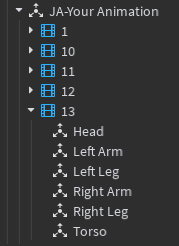
(It goes on until frame 31.)
The play system is basically the same as Roblox, but it does it in a more casual way and easier to control. You can get keyframes, JAFrames, and many more. You can control: Looping, EndTransition
if it pauses on the last frames.
**
The point on this project is for you to use it on cutscenes or npcs, so don’t use it for real player characters ingame. (although im planning in making that in the future)
At the moment the character clones into an anchored without any motor6Ds, so as i said,
i would prefer this be used for things that doesnt move without animation.
**
ALL OF THE FUNCTIONS AND ITS EXPLANATIONS:
local module = require(script.Parent.JotanimLoader)

local Character = script.Parent.ExampleRig -- Your Rig HERE!

local AnimationId = "rbxassetid://YOURANIMIDHERE" -- Your animation id here.

local FPS = 30 -- FPS is based on quality AND performance.
-- Don't put it too high to not suffer with lag and slowly converting your animation.
-- The more FPS, the more it feels fluid. The max you can put in is 120.
-- The way this is calculated works by: 0.12 - (FPS / 1000)

local Speed = 1
-- This adjusts the speed it gets detected.
-- The faster the speed, the less it detects new frames, but it will load a lot faster.
-- It's basically: > Speed = < Quality, < Speed = > Quality.

-- Make sure to combine your fps and speed in a way your animation doesnt look bad.


local JAnimExportedAnimation = module:LoadAnim("Your Animation",Character,AnimationId,FPS,Speed)
-- Here it will load the animation.
-- The loading may take some seconds to load depending in how long your animation is
-- so consider preloading your animations as soon as the game starts to not cause any problems.
-- this returns the object for the animation, which is a little "folder" filled with JAFrames
-- that has every cframe information of your roblox rig parts.

JAnimExportedAnimation.Parent = game.Workspace -- Optional.

-- Is your rig in R15 or anything outside of R6? don't worry, just use this function!

local parts = {"LeftUpperArm","RightUpperArm","LeftUpperLeg","LeftLowerLeg","RightLowerArm","LeftLowerArm","RightLowerLeg","RightUpperLeg","UpperTorso","LowerTorso","Head"}
-- Parts you want to detect in the animation.
-- for example, i put r15 parts there to make it r15.

local humanoidroot = "HumanoidRootPart" -- your HumanoidRootPart name.

module:DefineAnimationParts(Character,parts,humanoidroot)
-- If you want to only modify humanoidRootPart, set parts to {}, it will not affect the parts at all.

-- Now, my rig is r6 not r15 so i will change it back to r6.

local parts = {"Left Leg","Right Leg","Left Arm","Right Arm","Head","Torso"}
-- I changed it back to R6 parts.

local humanoidroot = "HumanoidRootPart" -- your HumanoidRootPart name.

module:DefineAnimationParts(Character,parts,humanoidroot)

-- Now, for playing, its very easy.

local DoesItLoop = true -- If it loops.
local StopOnLastFrame = true -- If it keeps the parts on the last frame. I've seen a lot of people
-- wanting to do this on real animations, so i added it.

local EndTransitionSeconds = 0.5 -- The seconds you prefer the fade out to the original positions happen.


module:PlayAnim(JAnimExportedAnimation,Character,DoesItLoop,StopOnLastFrame,EndTransitionSeconds)
-- This will play the animation.


module.AnimationLoaded:Connect(function(animation)
	print("animation has loaded: ".. animation.Name)
end)

module.AnimationStarted:Connect(function(animation,character)
	print("animation has started: ".. animation.Name.. " on: ".. character.Name)
end)

module.AnimationEnded:Connect(function(animation,character,forced)
	print("animation has started: ".. animation.Name.. " on: ".. character.Name.. " was it forced: ".. tostring(forced))
	-- FORCED is a boolean to check if the animation has ended with the :Stop command.
end)

module.KeyframeReached:Connect(function(animation,character,keyframe)
	print("animation ".. animation.Name .. " in ".. character.Name .. " reached keyframe ".. tostring(keyframe))
end)

module.JAFrameReached:Connect(function(animation,character,jaframe)
	print("animation ".. animation.Name .. " in ".. character.Name .. " reached jaframe ".. tostring(jaframe))
end)

module:SetSpeed(JAnimExportedAnimation,Character,4) -- sets the speed of the animation (CALCULATION OF THE SPEED MAY CHANGE DEPENDING IN THE LENGTH OF YOUR ANIMATION.)
-- so if your animation is super big you may need to put higher numbers for it to really make effect.
task.wait(2)
module:GetCurrentJAFrame(JAnimExportedAnimation,Character) -- Gets the JAFrame of a animation playing. (JAFRAMES are in order not in seconds)

module:GetCurrentKeyframe(JAnimExportedAnimation,Character) -- Gets the Keyframe of a animation playing. (in seconds)

task.wait(4)
module:StopAnim(JAnimExportedAnimation,Character) -- this stops the animation.
-- also remember that the fadeout is described when you start the animation.
Please note im not much of a expert in coding, so i may not know some stuff.
Before i’ve tried doing this with actual keyframes but it didn’t work.
trust me, i’ve tried..
Also send your ideas for this cool concept, as this can be insanely customizable.
Module script:
https://create.roblox.com/store/asset/101702382387345