Hi, I was making a Render for my friend and this happened. It appears to look like the PNG texture thingy how do I fix that? Comment down below any solutions to this problem.

1 Like
Did you try re-rendering it or no?
1 Like
I did, I restarted Blender but It still didn’t work.
1 Like
Did you use Cycles? or did you use Eevee?
He’s using Eevee, judging by the lack of noise.
I was thinking it was maybe a Cycles problem, but now I’m not sure
Have you made sure that the texture for the character is correct?
He said it was Blender in a previous comment
This is Cycles. You can tell by the way the light bounces off the mouth and the shadows under the glasses.
@Pokemoncraft5290 There is something called DeNoising. He used OpenImageDenoise
@HENS_THEDEV1 I think you have your light sample size too small. Look at the glasses. You see how the shadow is pixelated? You need to turn up your light bouneces. The way to do this is to go into the Simplify tab under the Scene section.
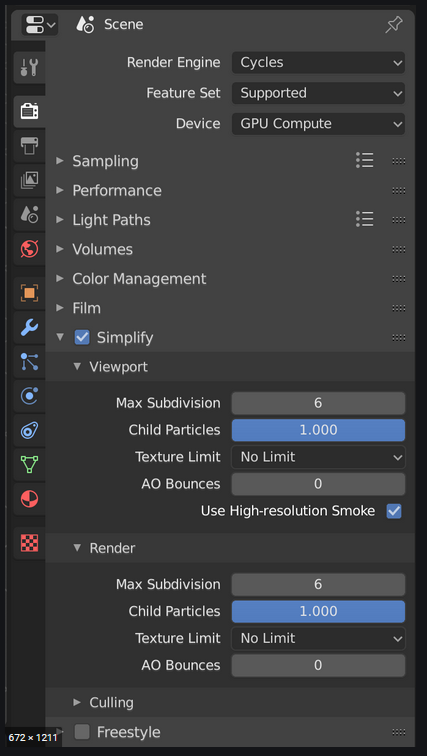
Under Render, make sure Max Subdivision is set to at least 5, and Child Particles is turned all the way up. Try rendering again. If the problem keeps happening, try this:
Turn on Background Transparency. In the same section as Simplify, look for Film. Then turn on Transparent.

2 Likes
