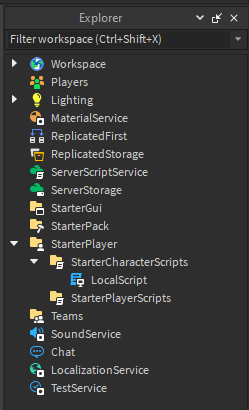
I am a very new script only starting 10 months ago i was just scripting for fun when i typed a script idk what i did wrong i put it in the player folder as a local script please help
local RunningSpeed = 30

local runService = game:GetService("RunService")

local player = game:GetService("Players").LocalPlayer

local humanoid = player.Character:WaitForChild("Humanoid")

local maxSpeed

local runTable

local part = humanoid:WaitForChild("HumanoidRootPart")
local speed = part:GetPropertyChangedSignal("Speed")
Made the sprint system for you and didn’t take long. So for this to work correctly:
Create a new local script inside of “StarterCharacterScripts”,
you can call the new local script what ever you like.
Then we move onto the script:
All you can do from here is, copy and paste
the the code into your newly found local script…
-- services
local userInputService = game:GetService("UserInputService")
local players = game:GetService("Players")

-- variables
local player = players.LocalPlayer
local defaultWalkspeed = player.Character.Humanoid.WalkSpeed

-- key
local keyToUseHere = Enum.KeyCode.LeftControl

-- speed
local speedAmount = 30

-- input event
userInputService.InputBegan:Connect(function(input, gameProcessed)
	if gameProcessed or userInputService.TouchEnabled then
		return
	end
	if userInputService.KeyboardEnabled and userInputService.MouseEnabled then
		if input.UserInputType == Enum.UserInputType.Keyboard and input.KeyCode == keyToUseHere then
			if player.Character.Humanoid.WalkSpeed == defaultWalkspeed then
				player.Character.Humanoid.WalkSpeed = speedAmount
			elseif player.Character.Humanoid.WalkSpeed == speedAmount then
				player.Character.Humanoid.WalkSpeed = defaultWalkspeed
			end
		end
	end
end)
If this worked then mark this post as the solution…