title says it
ive got a renderstepped and cameraPart is a part at 0,3,0 not welded to the character and it plays animations
local x, y, z = CameraPart.CFrame:ToOrientation()
Camera.CFrame *= CFrame.Angles(x,y,z)
this Kinda works but it exgrattes the animations alot and offsets the camera, making it not return the original point as it should
ive tried this too
Camera.CFrame = CameraPart.CFrame.Rotation + Camera.CFrame.Position
it copies over the cframes properly but it locks the camera in the direction of the cameaPart and the player cant move the camera with this
ive tried this aswell
Camera.CFrame = Camera.CFrame + CFrame.Angles(math.rad(CameraPart.CFrame.Rotation.X), math.rad(CameraPart.CFrame.Rotation.Y), math.rad(CameraPart.CFrame.Rotation.Z))
but it doesnt seem to do anything, no errors too
ive been stuck on this for a while
is there anyway copy the cameraParts rotation over ontop of the camera while staying in full control?
please let me know if something needs explaining
1 Like
Ive looked for a while i cant find anything
1 Like
Maybe try this:
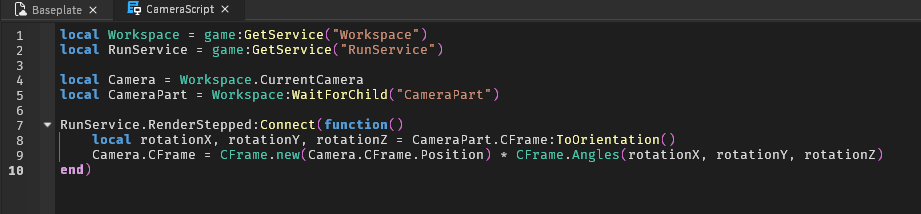
local Workspace = game:GetService("Workspace")
local RunService = game:GetService("RunService")

local Camera = Workspace.CurrentCamera
local CameraPart = Workspace:WaitForChild("CameraPart")

RunService.RenderStepped:Connect(function()
	local rotationX, rotationY, rotationZ = CameraPart.CFrame:ToOrientation()
	Camera.CFrame = CFrame.new(Camera.CFrame.Position) * CFrame.Angles(rotationX, rotationY, rotationZ)
end)
2 Likes
Is this what you wanted? If not can you elaborate
2 Likes
hi This is copying the cframes from the animation properly but it locks the camera in the direction of the cameraPart
Ill try show a video
I think that video is what Im going for, is that the same script being used?
Yes this is the script being used in the video:
local Workspace = game:GetService("Workspace")
local RunService = game:GetService("RunService")

local Camera = Workspace.CurrentCamera
local CameraPart = Workspace:WaitForChild("CameraPart")

RunService.RenderStepped:Connect(function()
	local rotationX, rotationY, rotationZ = CameraPart.CFrame:ToOrientation()
	Camera.CFrame = CFrame.new(Camera.CFrame.Position) * CFrame.Angles(rotationX, rotationY, rotationZ)
end)
It’s a Script in ReplicatedStorage with RunContext set to Client
1 Like
Oh i looked at it again, its a bit different from what am going for
i want it to copy the Parts cframe ontop of the cameras cframe, so the camera is still fully controllable and not locked
so if the part moves up, the camera will move up while the player still being able to control it fully
let me know if it needs more explaining i might be explaing bad
when you equip or use the tool a animation plays on your camera, but currently it locks the camera into the direction of the camerapart while copying the cframes over; is there anyway to have full control of your camera and the cframes copied over to your camera?
It looks like it keeps it locked until the player moves the camera? Is that what you want?
1 Like
No, that locks the camera entirely in one direction, it only lets go because the renderstepped doesnt turn on until the camerapart its moving
is there a way to have full control of the camera, not lock it in one direction but play the cframes ontop?
i apprecciate the help so far Btw
so lets say the camera is looking up and you equip the tool, the character stays looking up or wherever the player moves it, but the little animation is still played
Lmk if it needs explaining im still explaning bad i think
No Im trying to make it not lock it in a direction like that
the camerapart is playing an animation, this animation is just a bit of rotation, and Im trying to copy the camerapart’s rotation over to the camera so basically playing an animation on the camera,
The camera Shouldnt change like that, it just should rotate a bit because of the copying cframes
So like in my video the way it rotates, like that but not locking the direction in 1 way, letting the player look wherever
You mean like CameraShake? Because I don’t know what you mean by camera animation.
Camera Shake:
1 Like
Kinda I guess
By camera animation i mean copying the cframes over from the animated part onto the camera,
its subtle but the Yellow part is moving from a animation, thats the camerapart. I’d like to copy the cframes from the animation over to the camera causing it to have the same effect on the players camera.
an example is this https://youtu.be/GTYZJb3So8g?si=caHs9RXKz8343FXg&t=40
when the guns being inspected, you can the see the camera is animated, thats the effect im trying to get here – the Camera shouldnt be locked in any direction, it’ll just be slightly rotating because of the animation being copied over
Let me know if needs explaining, i rly appreciate help so far
Is the “animation” supposed to play once for a bit when equipping the flashlight or just play through out while having it equipped?
Here’s a exaggarated version of something I got working right now:
1 Like
the camerapart animation, is baked with the actual flashlight animations. Its apart of the flashlight animation; So itll be playing whenver the animation is playing and if it has keyframes. Its just a normal animation
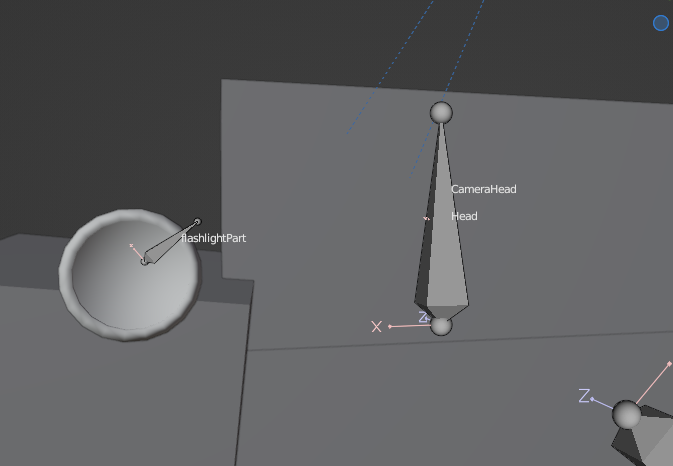
CameraHead is camerapart
Sorry I don’t know if I can help with that.
This is the closest thing I got working:
This is using the
EZ Camer Shaker Module
Script:
local Workspace = game:GetService("Workspace")
local RunService = game:GetService("RunService")
local Players = game:GetService("Players")
local ReplicatedStorage = game:GetService("ReplicatedStorage")

local CameraShaker = require(ReplicatedStorage.Modules.CameraShaker)
local CameraShakeInstance = require(ReplicatedStorage.Modules.CameraShaker.CameraShakeInstance)

local player = Players.LocalPlayer

local camera = Workspace.CurrentCamera
local origin = CFrame.new(0, 0, 0)

local camShake = CameraShaker.new(Enum.RenderPriority.Camera.Value, function(shakeCf)
	camera.CFrame = camera.CFrame * shakeCf
end)

camShake:Start()

player.CharacterAdded:Connect(function(character: Model)
	character.ChildAdded:Connect(function(child: Instance)
		if child.Name == "Flashlight" then
			local shakeInstance = CameraShakeInstance.new(2.5, 3, 0, 3)
			shakeInstance.PositionInfluence = Vector3.new(0, 0, 0)
			shakeInstance.RotationInfluence = Vector3.new(0.25, 0.25, 0.25)
			camShake:Shake(shakeInstance)
			--[[
			Camera "Locking":
			local rotationX, rotationY, rotationZ = origin:ToOrientation()
			camera.CFrame = CFrame.new(camera.CFrame.Position) * CFrame.Angles(rotationX, rotationY, rotationZ)
			--]]
		end
	end)
end)
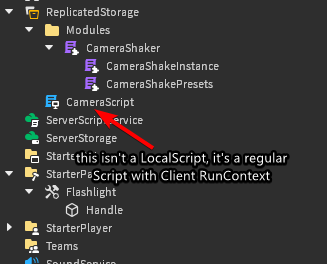
Instance Tree:
1 Like
Its ok thank you i appreciate the help
do you understand what kinda thing am going for? Just so if someone else sees this they understand what am talking about?
Like that video here but instead of the random shake, its the animation playing
Yea I understand what you’re going for. I wish you luck finding help with this.
1 Like