i tried to write some code for one of my games which would display an overhead gui, but the script didnt work
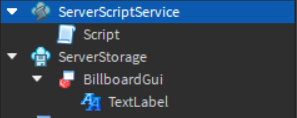
game.Players.PlayerAdded:Connect(function(player)
	player.CharacterAdded:Connect(function(char)
		if player and char:FindFirstChild("Head") then
			local gui = game.ServerStorage.BillboardGui

			local guiclone = gui:Clone(char.Head)
		else
			print("Loading")
		end
	end)
end)
Try setting the parent outside of the Clone method.
Like this:
local guiclone = gui:Clone()
guiclone.Parent = char.Head
Make sure to set the text etc so it fits the player (like their name and group rank or whatever you want it to show)
If it still doesn’t work, change your char:FindFirstChild(“Head”) to char:WaitForChild(“Head”)
it still didn’t work, i used your 1st and 2nd methods
BillboardGuis have an “Adornee” property that takes a part. The Adornee is the part where the billboard will be positioned relative to, so if you want it positioned relative to the head, you need to set it’s Adornee property to the characters head
@fghjkjhgtfrnhjj Did this solve your issue?
