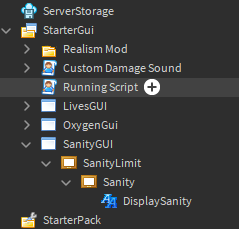
Hi
place this in `ServerScriptService´
game.Players.PlayerAdded:Connect(function(player)

	local RegenAtivado = false
	local ReducionAtivado = false


	local Sanity = Instance.new("NumberValue", player) -- Your default sanity
	Sanity.Name = "Sanity"
	Sanity.Value = 0

	local Max_Sanity = Instance.new("NumberValue", player) -- your max sanity, until where it can reach, the max, i would say
	Max_Sanity.Name = "Max Sanity"
	Max_Sanity.Value = 100


	-- Below you will see Sanity function, regen like an health bar, difference is none)


	local plrSanity = player:WaitForChild("Sanity")
	local plrMaxSanity = player:WaitForChild("MaxSanity")

	player:WaitForChild("Sanity").Changed:Connect(function(NewValue)

		print(player.Name .. " Actual Sanity: " .. " == " .. NewValue)

		if Sanity.Value <= 0 then
			print(player.Name .. "Recently Lost all Sanity... ")
		end


		if Sanity.Value > Max_Sanity.Value then
			print(player.Name .. "Testing purposes --- why sanity just bypass Maxsanity? lol")

		end


		if RegenAtivado == true then -- checks if sanity function is already running, if yes, then it will not repeat again, preventing spam
			print"Already Activated"
			return nil
		end


		if Sanity.Value < Max_Sanity.Value and RegenAtivado == false then --  if Player Sanity is lesser than Max Sanity -- then

			RegenAtivado = true -- activate regen
			repeat

				task.wait(1) -- you can adjust here, see how much time the playe will wait until he gets more sanity


				if Sanity.Value >= Max_Sanity.Value then -- checking if, somehow, sanity reached Max Sanity, it will stop regenering
					print"Breaked Sanity Regen"
					break
				end

				if Sanity.Value <= 0 then
					print"You lost all Sanity!"

					task.wait(2)
					print"the player died"

					break

				end

				Sanity.Value = Sanity.Value + 1 -- can adjust here too ( amount of sanity )


				print"Regenering Sanity..."
			until

			Sanity.Value >= Max_Sanity.Value -- repeat until Sanity is equal or Highter than Max Sanity

			RegenAtivado = false
			print"Regen Stopped"

		end


		if Sanity.Value > Max_Sanity.Value and ReducionAtivado == false then -- if somehow Sanity bypass Max Sanity then
			ReducionAtivado = true
			repeat
				task.wait(0.1)


				if Sanity.Value <= Max_Sanity.Value then -- if PHASE 1 was not activated, since it must be equal to 100, this will trigger, disabling reduction since this may remove player's sanity too much
					print"Fixed, Sanity is back to 100 or lesser"
					break
				end

				Sanity.Value = Sanity.Value -1

				print"Fixing Sanity..."


			until
			Sanity.Value <= Max_Sanity.Value


			ReducionAtivado = false

		else if Sanity.Value == Max_Sanity.Value then -- if Sanity is normal, then prints ok
				print"The Sanity is ok..."

				ReducionAtivado = false -- disables Reduction mode, since it was fixed

				--PHASE 1--
			end
		end
	end)

end)
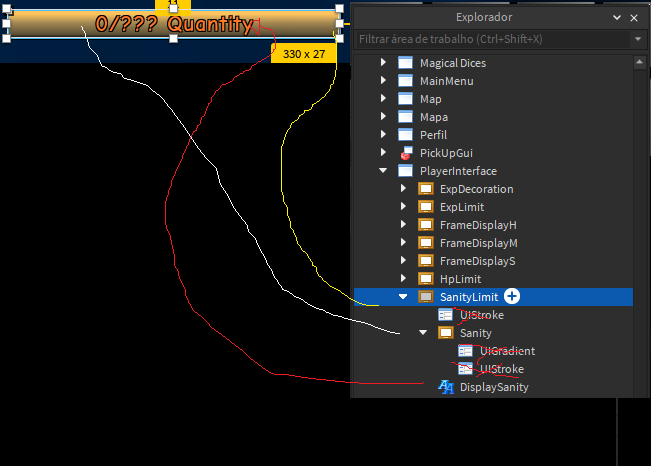
create frames, and put the names exactly as i did
Only sanity , ignore the other Frames like Experience, and etc
and don’t Forget to create ''SanityGUI" <<

then place everything inside, in order, otherwise nothing will work and will drop errors
alright now for the second part, client visuals:
search for ''StarterPlayer" >> StarterCharacterScripts
and place this here:
--First, create some LocalScript, then paste this:

task.wait(5)
print"Starting System"

local plr = game.Players.LocalPlayer
local playerGui = plr:WaitForChild("PlayerGui")
local TweenServc = game:GetService("TweenService")--Get Tween Service

local Character = plr.Character or plr.CharacterAdded:Wait() --Wait For The Player Humanoid to load
local Humanoid = Character:WaitForChild("Humanoid") --Get The Player Humanoid


local Sanity = plr:WaitForChild("Sanity")

local Max_Sanity = plr:WaitForChild("Max Sanity")

local Sanity_Frame = playerGui:WaitForChild("SanityGUI").SanityLimit.Sanity
local Sanity_Text = playerGui:WaitForChild("SanityGUI").SanityLimit.DisplaySanity

Sanity_Text.Text = Sanity.Value -- automatically updates to the current sanity the user has,


-- Will be 0, AS Default! can change in Sanity Main server script...


local function UpdateSanityBar()

	local sanityClamper = math.clamp(Sanity.Value / Max_Sanity.Value, 0, 1) --Maths

	local tween_information = TweenInfo.new(Sanity.Value / Max_Sanity.Value,Enum.EasingStyle.Linear,Enum.EasingDirection.InOut,0,false,0) --Tween Info

	TweenServc:Create(Sanity_Frame,tween_information,{Size = UDim2.fromScale(sanityClamper, 1)}):Play() -- Create The Tween Then Play It

	Sanity_Text.Text = Sanity.Value -- this is the Display Sanity Text, each time sanity is update, this will update too

end

UpdateSanityBar()

Sanity:GetPropertyChangedSignal("Value"):Connect(UpdateSanityBar) -- when Sanity changes, it will update texts and tween animation
Max_Sanity:GetPropertyChangedSignal("Value"):Connect(UpdateSanityBar) -- if you wish to increase more sanity, then this is useful, since this will notify and change the bar according to how much Max sanity the player has
the result:

Changing (Client-Side), if you change (Server-Side)
the Auto-Regen will start

Proof that this method works: