I implemented my rough idea. Note I’m not really a math guy so I am not 100% sure if this is entirely optimal… but oh well. I’ll try to explain everything entirely. To begin with my implementation uses something known as “vector projection.” If you don’t know it, I would suggest either looking for a video or my poor explanation below.
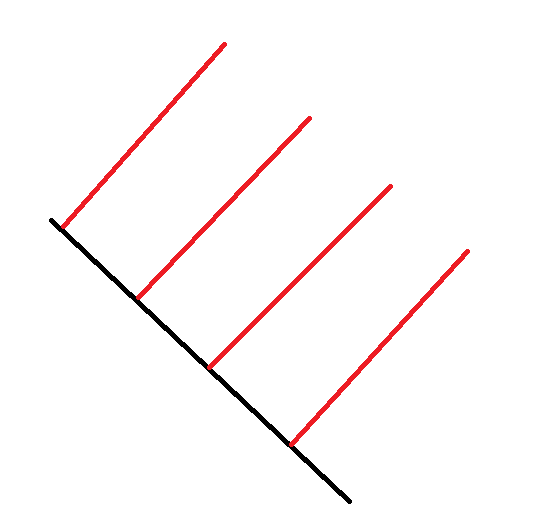
Vector Projection
where vector b is “mapped” onto a in order to find c.
To solve for c, we notice a few things, such as how the line between the head of b to c is perpendicular to a, and how c is pretty much just a scalar multiplied by a (as it is the same direction, but different magnitude). These can be written as:
c = a * t and (c - b):Dot(a) = 0 (a property of dot product on perpendicular vectors.)
Now the issue is solving for t, which if we rearrange the known formulas we can get:
(c - b):Dot(a) = 0
(a * t - b):Dot(a) = 0 substitute
a:Dot(a) * t - b:Dot(a) = 0 distribute
a:Dot(a) * t = b:Dot(a) add on each side
t = b:Dot(a) / a:Dot(a) divide on both sides
c = a * t
What I did first was insert the corners of the cuboid into a list,
local verticies = {
	cframe * Vector3.new(halfSize.X, halfSize.Y, halfSize.Z),    --> right up forward
	cframe * Vector3.new(halfSize.X, halfSize.Y, -halfSize.Z),   --> right up backward
	cframe * Vector3.new(halfSize.X, -halfSize.Y, halfSize.Z),   --> right down forward
	cframe * Vector3.new(halfSize.X, -halfSize.Y, -halfSize.Z),  --> right down backward

	cframe * Vector3.new(-halfSize.X, halfSize.Y, halfSize.Z),   --> left up forward
	cframe * Vector3.new(-halfSize.X, halfSize.Y, -halfSize.Z),  --> left up backward
	cframe * Vector3.new(-halfSize.X, -halfSize.Y, halfSize.Z),  --> left down forward
	cframe * Vector3.new(-halfSize.X, -halfSize.Y, -halfSize.Z), --> left down backward
}
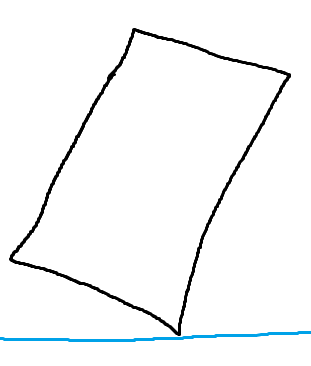
Then, I retrieved information from the raycast, such as the surface normal (.Normal) and intersection point (.Position). I looped through every vertex within the verticies table, and got the direction between them and the intersection. Now you may ask, “why can’t I just find the distance from the intersection and each vertex?” The reason is because what you are dealing with is finding the closest points onto a plane, not another point. It is the difference of
where the points compared to the intersection is on the left, whilst the points compared to the actual plane is on the right. This more accurately helps us find which vertex to focus on (the one that actually touches the plane without clipping and maintaining rotation) To compare the points to the plane, I projected the direction onto the surface normal, then compared its scalar value
t to the rest in order to find both the minimum and maximum projections.
for i = 1, 8 do -- where 8 is the size of #verticies
  local vertex = verticies[i]
  local direction = vertex - intersection
  --> the ratio is just `t`, or the scalar
  --> multiplied by the vector meant to
  --> be projected onto.
  --> you may notice that it lacks
  --> a divisor. this is because
  --> dot product is just
  --> ax * bx + ay * by + az * bz
  --> so n:Dot(n) where `n` is the
  --> normal and a unit vector, it
  --> is simply 1. (identity property)
  local scalar = direction:Dot(normal)

  if scalar < minimumScalar then
    minimumRatio = scalar
  elseif ratio > maximumScalar then
    maximumRatio = scalar
  end
end
An image of what you are trying to find is this:
Now you can simply compare the smallest/largest scalars.
Now you get the actual projections and get the part’s position.
local minimumProjection = minimumScalar * normal
local maximumProjection = maximumScalar * normal
part.Position = intersection + (maximumProjection - minimumProjection) * 0.5
Also tell me if there are any issues in the math, I’ll try to fix it.
Edit: somehow forgot to add the actual code lol.
local part = script.Parent

local cframe = part.CFrame
local halfSize = part.Size * 0.5

local verticies = {
	cframe * Vector3.new(halfSize.X, halfSize.Y, halfSize.Z),    --> right up forward
	cframe * Vector3.new(halfSize.X, halfSize.Y, -halfSize.Z),   --> right up backward
	cframe * Vector3.new(halfSize.X, -halfSize.Y, halfSize.Z),   --> right down forward
	cframe * Vector3.new(halfSize.X, -halfSize.Y, -halfSize.Z),  --> right down backward

	cframe * Vector3.new(-halfSize.X, halfSize.Y, halfSize.Z),   --> left up forward
	cframe * Vector3.new(-halfSize.X, halfSize.Y, -halfSize.Z),  --> left up backward
	cframe * Vector3.new(-halfSize.X, -halfSize.Y, halfSize.Z),  --> left down forward
	cframe * Vector3.new(-halfSize.X, -halfSize.Y, -halfSize.Z), --> left down backward
}

local function main()
	local raycast = workspace:Raycast(part.Position, Vector3.new(0, 0, 100))

	if not raycast then
		return
	end

	local intersection = raycast.Position
	local normal = raycast.Normal

	local minimumRatio = math.huge
	local maximumRatio = -math.huge

	for i = 1, 8 do
		local vertex = verticies[i]
		local direction = vertex - intersection
		local ratio = direction:Dot(normal)

		if ratio < minimumRatio then
			minimumRatio = ratio
		elseif ratio > maximumRatio then
			maximumRatio = ratio
		end
	end

	local minimumProjection = minimumRatio * normal
	local maximumProjection = maximumRatio * normal

	part.Position = intersection + (maximumProjection - minimumProjection) * 0.5
end

main()