Raycasting Issue

I don’t know why this isn’t working, how can I get the orange part to print out, it should.

local PartA = workspace.PartA
local PartB = workspace.PartB

local theRay = Ray.new(PartA.CFrame.Position,(PartA.CFrame.Position - PartB.CFrame.Position).Unit)
local HitPart,HitPos = workspace:FindPartOnRay(theRay)
print(HitPart)

local Distance = (PartA.Position - PartB.Position).Magnitude

local RayPart = Instance.new("Part")
RayPart.Anchored = true
RayPart.CanCollide = false
RayPart.BrickColor = BrickColor.Black()
RayPart.Size = Vector3.new(0.3,0.3,Distance)
RayPart.CFrame = CFrame.new(PartA.CFrame.Position,HitPos) * CFrame.new(0,0,Distance / 2)
RayPart.Name = "Ray"
RayPart.Parent = workspace

PartA: The blue part
PartB: The green part
PartC: The orange part

It keeps printing nil.

The ray you’re creating is too short! It only has a magnitude (distance) of 1 since you’re using .Unit. You can make it longer by removing the .Unit or multiplying the vector (the second argument) by the length you want the ray to be.

I the line of code where I defined the Ray, but it still prints nil.

local theRay = Ray.new(PartA.CFrame.Position,(PartA.CFrame.Position - PartB.CFrame.Position).Unit * 100)

Make sure you’re saving the script and testing it. If it still doesn’t work, then the ray may be pointing in the opposite direction as what you want. In that case, you could negate the vector (the second parameter) to turn it in the opposite direction. Other ways include switching the order of the two positions you’re subtracting or starting the origin of the ray at part B.
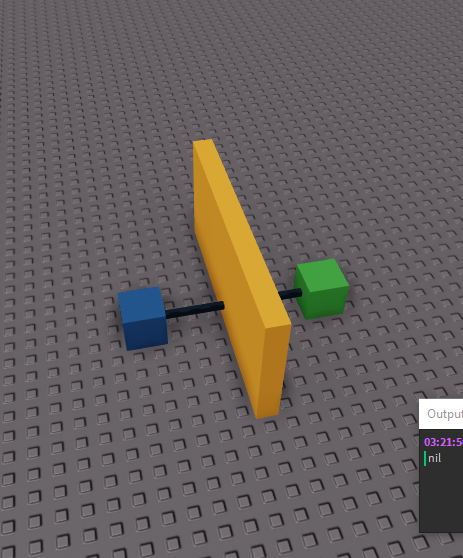
I got it to work by making Distance negative

RayPart.CFrame = CFrame.new(PartA.CFrame.Position,HitPos) * CFrame.new(0,0,-Distance / 2)

Thanks for your help!