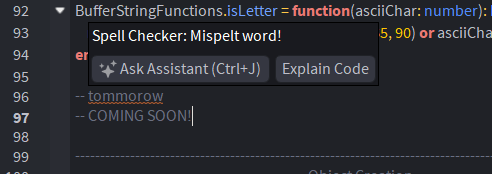
Roblox’s First Script Spell Checker Plugin!

About
If you’re anything like me, when you’re programming at 1 am you are not thinking very clearly and can make simple speling misteakes. This plugin will sift through your code while you write it and point out any spelling errors. It’s not capable of making spelling suggestions but will show any words spelled wrong. It can search for any words in many variable naming conventions such as:
local myCamelCaseVariable;
local MyPascalCaseVariable
local MY_UPPERCASE_VARIABLE
local my_snake_case_variable

-- Abbreviated Names, such as:
local UILibrary -- Will be interpreted as: "UI" and "Library"
-- And more
This module is well-optimized and works fluidly on large scripts (tested on scripts up to 15 000 lines). The plugin features a personal dictionary so you can add more words that you interpret as spelled right. The personal dictionary is stored locally on your computer (using plugin:GetSetting() and plugin:SetSetting()) so your personal dictionary will carry over between your Roblox places. This plugin is event based so it only runs when it’s needed and doesn’t use excess compute resources (no infinite loops).
This plugin will only ever READ from your scripts, it will never change or modify your scripts (except your personal dictionary, which is created and destroyed by the plugin)
How does it Work?
- The plugin will search the whole script when you open it. Once its open, it will only search lines that you changed.
- When searching the script, the plugin breaks down the script into individual lines, then splits the line into compound words by removing any non-letter characters
local myFunction = function(parameterA: number, myParameter2: string)
-- It broken down into:
{"local", "myFunction", "function", "parameterA", "number", "myParameter", "string"}
- The broken down line then splits each compound word
{"local", "my", "Function", "function", "parameter", "A", "number", "my", Parameter", "string"}
- It then removes any words shorter than 4 letters
{"local", "Function", "function", "parameter", "number", Parameter", "string"}
-
Repeats until every line is broken down, next step is to search the dictionaries. There are 3 dictionaries:
CommonDictionary,PersonalDictionaryandLinuxDictionary. -
CommonDictionary: common words used in programming and/or Lua/Roblox keywords
-
PersonalDictionary: Initially empty, any words the user declares as spelled correct.
-
LinuxDictionary: A large file taken from Linux with 70 000+ words, divided into 26 parts by first letter for optimization. Each of the 26 parts is divided into another 26 parts by second letter. 70 000+ word dictionary is broken into 676 pieces.
-
If a word is not found in any 3 of the dictionaries, then it will recorded as an incorrect word.
-
The user can toggle between all the incorrect words in the script, the plugin will show where the incorrect words are and will allow the user to add that word to their personal dictionary.

Performance
-
The plugin will search the whole script when you open it. Once its open, it will only search lines which you changed. Using the
CommonDictionary, the plugin will remove the most common words first such aslocal,function,then, etc. -
Let’s talk numbers, on massive scripts the startup cost can be a bit expensive but once the script is open, it runs in under a millisecond per change.
Large Searches
-
This occurs when you either: open a script or when copy-pasting code with
nlines (opening a script with 1000 lines is equivalent to pasting 1000 lines into an already open script).~150 Lines = 2.1ms
~800 Lines = 8.7ms
~2 400 Lines = 35.0ms (profile service module)
~10 000 Lines = 127.0ms
(Nonsensical) 74 532 Lines = 900ms (The plugin’s own linux dictionary)
General Typing and Editing a Script
~<0.85ms / change. (Usually under 0.85ms or 0.00085 seconds per change)
Generally ~15 changes / second are triggered depending on typing speed.
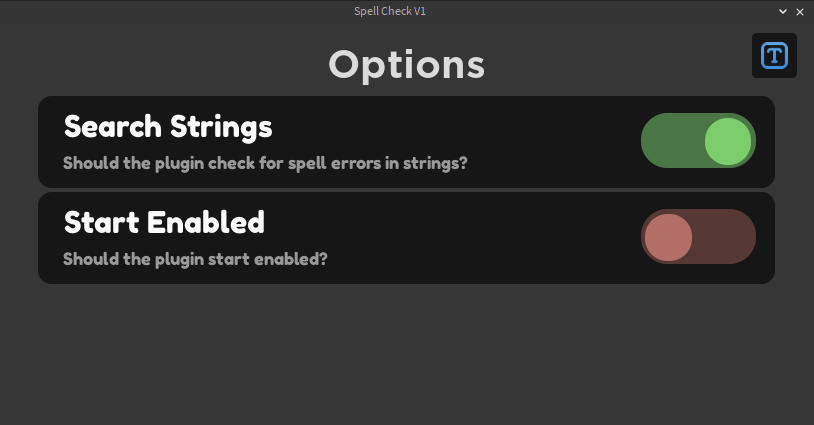

Disclaimer
- only works with English (Ascii characters 65-90 and 97-122)
- There is a possibility that there are words marked as incorrect when they are keywords. The Linux dictionary doesn’t cover some Roblox words such as “metatable”. These words needed to be added to the dictionary manually. I did my best to add many of these missed Roblox keywords but I assume I missed some. Add any necessary words to your personal dictionary or DM me and I’ll try my best to update the plugin with an updated dictionary as needed.
 V1.1 Update! PLUGIN NOW FREE !!