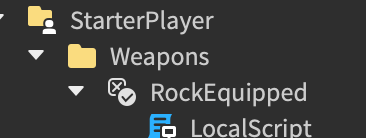
Hi I’m trying to make my script fire when a boolvalue changes
Script:
This is where I put the script
I’ve looked for solutions. I’ve tried changing “changed” to “getpropertychangedsignal”.
I tried using BoolValue.Changed event and placed the LocalScript in StarterPlayer container and the event fired just fine. Try using this event again. Can you tell us how you change the value of the BoolValue instance?
local function click2()
First, please indent your code. Secondly, can you please tell me what this script does?
it changes the bool value to true.
Which part of the script is not working? Here, I will just help format and indent your code:
local function click2()
	game.StarterPlayer.Weapons:GetChildren().Value = false
	print("Clicked Rock")
	game.Workspace.Lobby.Show.Rock2.Transparency = 0.7
	game.Workspace.Lobby.Show.RockShow.Beep:Play()
	game.Workspace.Lobby.Show.Rock2.Color = Color3.new(0,255,0)
	game.Workspace.Lobby.Show.Rock2.Position = game.Workspace.Lobby.Show.RockShow.Position
	wait(0.1)
	game.StarterPlayer.Weapons.RockEquipped.Value = true
	wait(0.3)
	game.Workspace.Lobby.Show.Rock2.Transparency = 1
	game.Workspace.Lobby.Show.Rock2.Position = Vector3.new(game.Workspace.Lobby.Show.Rock2.Position.X, game.Workspace.Lobby.Show.Rock2.Position.Y - 4, game.Workspace.Lobby.Show.Rock2.Position.Z)
end
local clicked = false
game.Workspace.Lobby.Show.RockShow.ClickDetector.MouseClick:Connect(function()
	if not clicked then
		clicked = true
		click2()
		–wait(1)
		clicked = false
	end
end)
This script is working fine. You told me how I changed the boolvalue to true. And that’s the script I used to change it. And it did change.
So that means your problem is resolved? You can close this topic by marking my reply as a solution.
No, this is the script that didn’t work.
Try using .Changed event instead of :GetPropertyChangedSignal().
Didn’t work. I also started out using that, but then I changed it.
Okay I see the problem now after I’ve conducted some testing in studio:
The problem is that the server can’t find the StarterPlayer folder under the Player instance, hence StarterPlayer folder is only visible on the client. So when the server tries to change the value of the BoolValue instance, it can’t.
If you wanna change this value, you could probably put this BoolValue instance inside ReplicatedStorage container where the client and the server can access this instance.
That didn’t work. Is it because it’s in a local script?
No, that can’t be the issue. I have tried replicating your situation in studio and it worked. How did you do it following my solution?
Idk if that explains anything.
Viscxse
January 29, 2023, 1:41pm
17
The most simple solution here was to change:
game.StarterPlayer.Weapons:GetChildren().Value = false
to:
game.Players.LocalPlayer.Weapons:GetChildren().Value = false
And its respective lines.
Now otherwise that we put the weapons in ReplicatedStorage, you would have to clone them, so there’s actually one Instance per player.
The thing is they wanted to change the value on server side, not client side.
Viscxse
January 29, 2023, 1:45pm
19
Wrong. StarterPlayer is simply a service that clones all instances which is descendant of to the Player. Changing anything in StarterPlayer would do so for the Instance that would be cloned to the player, and not what the Player has.
1 Like
@Viscxse So you are saying this whole script should be on local side? Please let me know if I understood your point correctly, because that script is the script that changes the value.