You can write your topic however you want, but you need to answer these questions:
-
What do you want to achieve? Keep it simple and clear!
Simple selection box on surfacegui -
What is the issue? Include screenshots / videos if possible!
the selection box size offsets when i stray from the top left corner
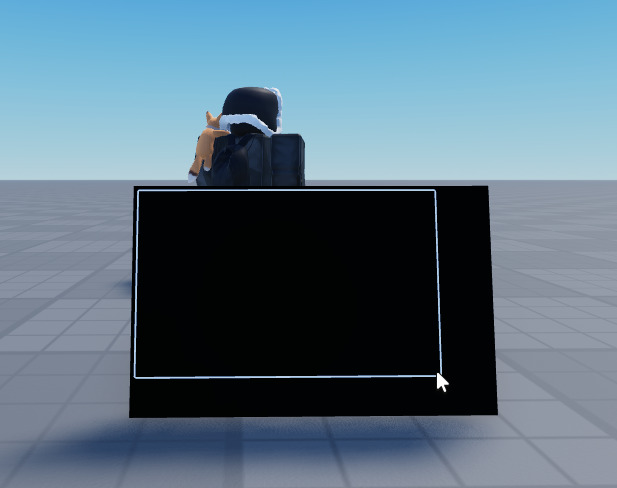

-
What solutions have you tried so far? Did you look for solutions on the Developer Hub?
I looked for solutions but nothing worked
After that, you should include more details if you have any. Try to make your topic as descriptive as possible, so that it’s easier for people to help you!
mact = false
local Mouse = game.Players.LocalPlayer:GetMouse()
local guiii = script.Parent.Frame
Mouse.Button1Down:Connect(function()
	mact = true
	local guipar = script.Parent.Adornee
	local topleftcframe = guipar.CFrame * CFrame.new(guipar.Size.X / 2, guipar.Size.Y / 2, guipar.Size.Z / 2)
	local mdtl = topleftcframe.Position - Mouse.Hit.Position
	local relloc = Vector2.new(math.abs(mdtl.X) * script.Parent.PixelsPerStud, math.abs(mdtl.Y) * script.Parent.PixelsPerStud)
	script.Parent.MF.Position = UDim2.new(0, relloc.X, 0, relloc.Y)
	while mact == true do
		wait()
		local guipar = script.Parent.Adornee
		local topleftcframe = guipar.CFrame * CFrame.new(guipar.Size.X * 2, guipar.Size.Y / 2, guipar.Size.Z / 2)
		local mdtl = topleftcframe.Position - Mouse.Hit.Position
		local relloc = Vector2.new(-math.abs(mdtl.X) * 50 , math.abs(mdtl.Y) * 50)
		script.Parent.MF.Size = UDim2.new(0, -relloc.X , 0, -relloc.Y)
		script.Parent.MF.AnchorPoint = Vector2.new(relloc.X, relloc.Y)
	end
end)

Mouse.Button1Up:Connect(function()
	mact = false
end)

guiii.MouseLeave:Connect(function()
	mact = false
end)
Please do not ask people to write entire scripts or design entire systems for you. If you can’t answer the three questions above, you should probably pick a different category.