So now that Server Authority Client Beta is “live”, I wanted to take some time to provide a follow-up to the last Server Authority Post. Think of this as a fun deep dive into the tech and how it works—a way to celebrate the herculean effort the engine team underwent to bring this to the platform.
Tech Shout-outs
Before I excitedly talk about how awesome the system we built is, I want to highlight that the core concepts behind Server Authoritative game engine models are well-documented, dating as far back as Quake 3 and as recently as this GDC Talk by the Overwatch team.
Normally, when Server Authority is built into an engine, it is highly specialized for a specific type of game. Usually, you decide you want your game to be Server Authoritative before you even start building it, before any gameplay logic exists.
The challenge with Roblox is that we couldn’t just build this for one specific game; we had to build technology that could be extended to every kind of experience. As you know, making generally applicable tech is hard. Additionally, we had to work on keeping the “feel” of the Roblox avatar consistent while fundamentally changing its underlying mechanics. As an aside, I believe the team at Bungie faced similar pains when making Marathon a Server Authoritative game after over a decade of Destiny 1 and 2 relying on Client-Authoritative character simulation—much like default Roblox!
So, Bungie, if you’re reading this, please tell me your deepest, darkest secrets!
Shoutout to Chickynoid as well! We used this extensively a few years ago to test how Roblox’s networking infrastructure handles Server Authoritative experiences.
Client Authoritative Physics Simulation
Normally, when you move your character in Roblox (unless the developer has re-implemented the character controller and changed network ownership), you are simulating the character immediately on your machine and sending the resulting positions to the server to accept. This is why it feels so responsive—it’s instant, it happens locally, and the client is the “source of truth.” Outside of Roblox, games like Destiny 2 share this fast, responsive quality because they don’t have to negotiate with the server before moving.

However, there are some weird interactions. Since you see other players in the past, collisions often involve lag and jitter because you don’t share a consistent view of the world. Every player is doing their best to simulate their own character, but they aren’t always in sync.
This is also why cheats are so prevalent. There are many ways to spoof this data:
- Find the memory where a value is stored? Mess with it!
- Intercept the packet on the way out? Edit it!
- Inject scripts into your local player? Fly and teleport!
Roblox developers try to detect these cheats, but it’s difficult. How do you distinguish between a malicious teleport and a player experiencing a massive lag spike? Do you fill your game with “kill bricks” in areas players shouldn’t reach? It’s insanity!
Naive Server Authority
The “easy” fix is to put everything on the server.

The only problem is that you have to wait for a round-trip to finish before your character starts moving. 50ms isn’t so bad, right? 100ms? 200ms? What’s 1/5 of a second, anyway? It’s fine… all in the name of security!
But honestly, this feels terrible. You notice the delay immediately. You can actually test this on Roblox right now without Server Authority tech: if you call HumanoidRootPart:SetNetworkOwner(nil) via a server script, it forces the character to become Server Authoritative. Try doing an obby at 200ms latency. I dare you.
Prediction - Ever the Optimist
To make Server Authority feel good, the character needs to start moving immediately when you hit “W” or push the joystick. This means you need to start simulating before the server does; this is called prediction.

If done correctly, and if you’ve synchronized the Server and Client timestamps while guaranteeing that scripts and physics play out exactly the same way on both ends, it just works. You move; later, the server moves; the server sends you the result; you check your history, and it matches. Awesome. You’re done.
Except you aren’t. Scripts can have slight deviations in behavior. Your Windows machine might compute floating-point math slightly differently than our Linux servers, causing you to drift apart. Next thing you know, on your screen you’re driving a car through Brookhaven, but on the server, you’ve crashed into someone’s garage.
Correcting Prediction
How do we fix the drift? Time Travel. That’s the answer. I’m not joking.

This is the final piece of magic: When the client receives a server-side update, it’s technically for a prediction that happened in the past. We go back in time and look at what we predicted for that specific timestamp.
If it matches, we keep moving. If it doesn’t, we use the server’s update to reset everything to the correct state and re-simulate everything that has happened since that moment. We are constantly looking back, re-checking our old predictions against the server’s “truth,” and rolling back if necessary.
Mispredictions
Mispredictions are a complex topic. Ideally, you want as few as possible, but they are 100% unavoidable. Due to the laws of physics and the speed of light, you will almost always have a misprediction if you and another player bump into each other.
The Roblox engine also occasionally causes mispredictions due to slight floating-point errors in physics results. Even if you are just jumping on a flat surface, some drift may eventually occur.
Resimulation
Resimulation is the primary reason why Server Authoritative games require more CPU on the client.
Normally, every frame requires 16ms of physics simulation for your character. however, if you mispredict on a server with 100ms of latency, once you receive a correction, you have to resimulate that entire 100ms of physics. That is 6.25x the simulation load of a standard Client-Authoritative game. This gets heavier as latency increases.
Because mispredictions are unavoidable, the safest approach when building these games is to assume you may have to resimulate every frame. This performance limitation is something we are very sensitive to, and we are looking at several ways to address it:
- Latency Injection
- Partial Prediction
- Alternative “Low-Fidelity” Resimulation (a research topic we’re exploring)
Scripts and Mispredictions/Resimulation
One of the most important things to know is that we do not run the usual stepping functions during resimulation. No Heartbeat, no RenderStepped—nothing except RunService:BindToSimulation. Because resimulation is so expensive, we had to keep the scope of scriptable side-effects simple.
This means that for predicted objects to behave correctly, they must run the same code on both the Client and Server, and that code must run via BindToSimulation. Since InputActions replicate from Client to Server, if the same control loop is running on both ends and reading from the same inputs, the system handles the rest—the time travel, the synchronization, everything.
Debugging Mispredictions
In Roblox Studio, we’ve exposed an internal debugging tool that we used throughout development. We figured it would be just as useful for developers. If you are testing a Server Authoritative game in Studio, pressing Ctrl (Cmd) + Shift + F6 will enable the base debugging tool.
Note: You may need to disable certain Studio shortcuts to prevent them from being intercepted.

If the shortcut was pressed correctly you should see it here:
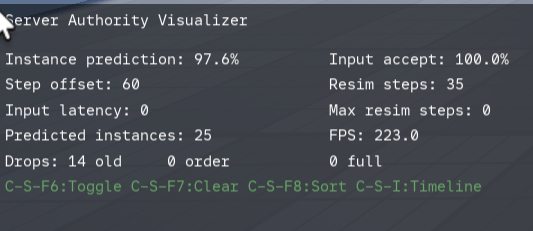
The most interesting mode is Timeline Mode (Ctrl (Cmd) + Shift + I), which records recent mispredictions so you can inspect them after the fact. Ctrl (Cmd) + U toggles bounding box visualizations, and Ctrl (Cmd) + L toggles labels that show exactly which properties mispredicted.
If you see a misprediction, you can press Ctrl (Cmd) + P to pause the recording and use Ctrl + Scroll Wheel to scrub through the history. Here is an example of me inspecting a misprediction from jumping over a ledge:

Pressing Ctrl + Y will render how the positions deviated pre-correction versus post-correction.
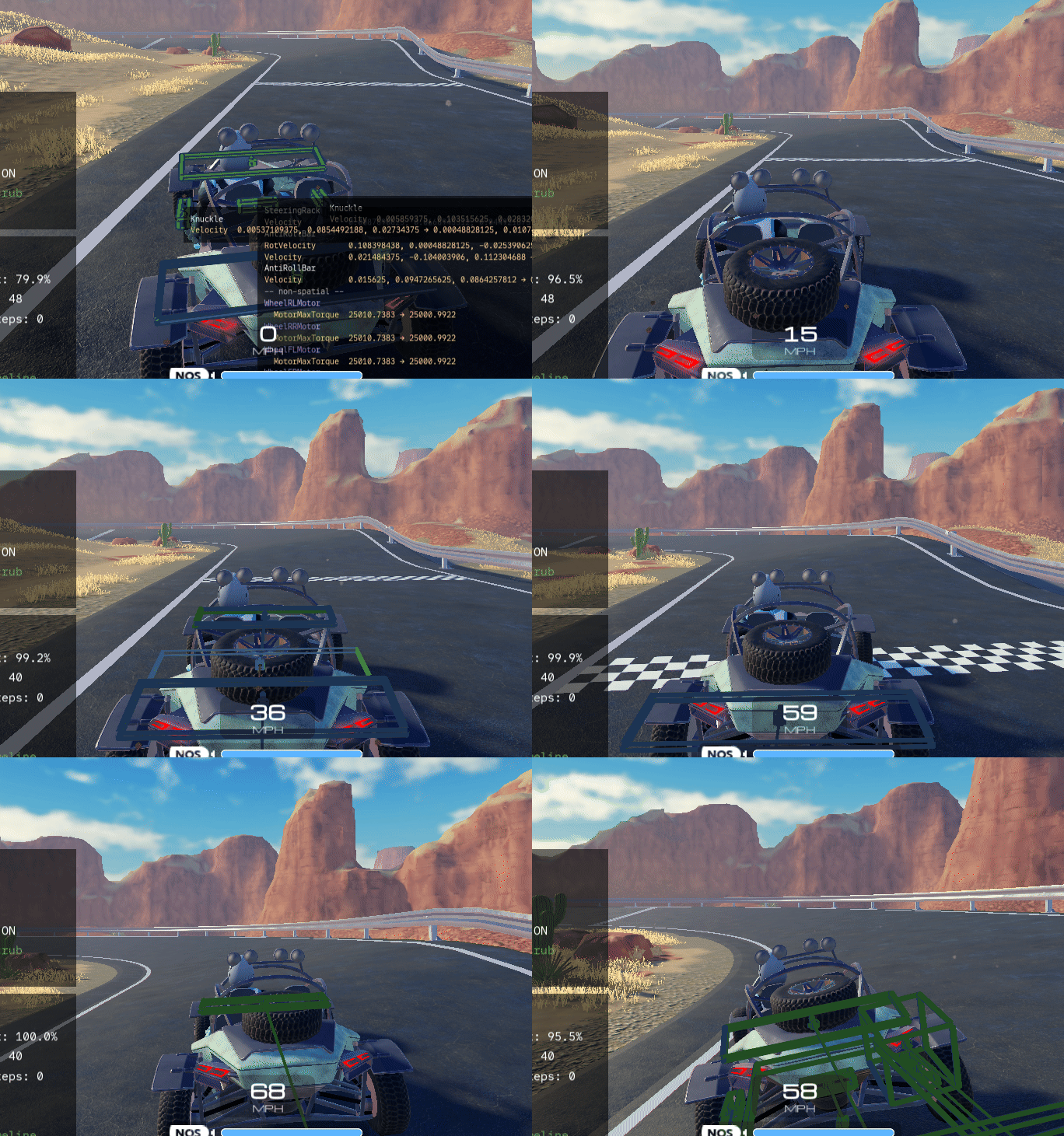
This tool provides incredible insight because it visualizes the “Time Travel” component. In the Racing Template, you can see constant micro-mispredictions—specifically on velocities—that don’t actually lead to deviating final positions. These are mathematical mispredictions currently innate to the physics engine.
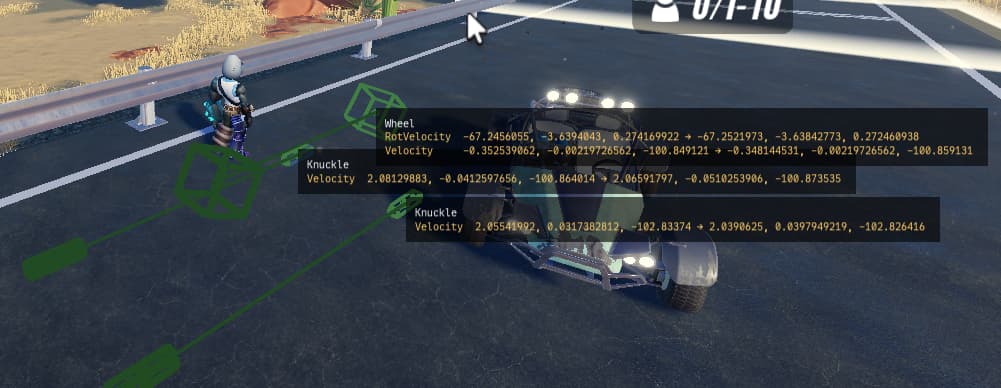
Even though these happen frequently, they don’t actually reduce the quality of the driving.
Misc Callouts
There is an insane amount of detail I’ve left out, but I want to highlight a few things currently on our minds:
- Resimulation Performance: This is a top internal priority. We have a working prototype for “dynamic input latency injection” that allows low-end devices to trade a bit of input lag for a reduced resimulation load.
- Determinism: Making complex vehicles deterministic involved quantizing positions and velocities. This is currently causing some drift in certain BodyMovers/Constraints; we are looking for a resolution.
- Visual Jitter: We are working on ways to reduce the visual “snap” when a significant correction occurs.
- Server-Side Rewind: For high-end shooters, we are missing the logic for latency-compensated hit detection. While you can implement this yourself with existing APIs, we want to create a built-in solution soon™.
Closing Thoughts
This has been one of the coolest features I’ve ever had the opportunity to work on—something I’ve wanted for Roblox since I joined over 12 years ago. It would have been impossible without the massive cross-functional team involved. This tech touches almost every component of the engine: Physics, Networking, Interactivity, DataModel, and Streaming… and I’m sure we’ll drag the Rendering team into it soon 
Please keep the feedback coming! We want to make this better and better, and we can’t wait to see what you build.
I’m hoping to sneak in some time to build a server-authoritative shooter myself!