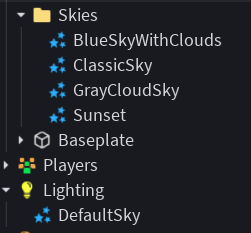
been tryna figure this out for 2 days now but how do i create a skybox changer that relocates a skybox from a folder and moves the old one into the folder, if there’s any other easier way please tell me! Im relatively new to scripting

1 Like
All you do is put your sky in ReplicatedStorage and put a local script in a button and when you click the button delete the current sky and move the other one to lighting
I don’t have any code to work with so I’ll leave it at that
1 Like
You can relocate Instances by modifying their Parent property!
local Skies = workspace.Skies
local Lighting = game:GetService("Lighting")

local function changeSky(sky: Sky)
	-- Clear any existing skies
	for _, object in Lighting:GetChildren() do
		if object:IsA("Sky") then
			object:Destroy()
		end
	end

	local newSky = sky:Clone() -- Clone the sky object, creating a new instance with idential properties
	newSky.Parent = Lighting -- Set new sky's parent to Lighting
end

changeSky(Skies.Sunset)
changeSky will clean any existing skies, clone the specified sky, and set the current sky to the clone. It creates a clone so it doesn’t the instances in your Skies folder. You can bind this function to a button like so:
local button: ImageButton -- set the button here
local sky: Sky -- set the desired Sky object when clicked

button.MouseButton1Click:Connect(function()
	changeToSky(sky)
end)
Exactly what they said.
Adding onto this, you could also create a new Sky under Lighting and put all of your skies in the Skies Folder, then change all of its properties like in the following example:
local Lighting = game:GetService("Lighting")
local ReplicatedStorage = game:GetService("ReplicatedStorage")
local skiesFolder = ReplicatedStorage.Skies
local sky = Lighting.Sky

local function changeSky(skyInstance: Sky)
	sky.CelestialBodiesShown = skyInstance.CelestialBodiesShown
	sky.MoonAngularSize = skyInstance.MoonAngularSize
	sky.MoonTextureId = skyInstance.MoonTextureId
	sky.SkyboxBk = skyInstance.SkyboxBk
	sky.SkyboxDn = skyInstance.SkyboxDn
	sky.SkyboxFt = skyInstance.SkyboxFt
	sky.SkyboxLf = skyInstance.SkyboxLf
	sky.SkyboxOrientation = skyInstance.SkyboxOrientation
	sky.SkyboxRt = skyInstance.SkyboxRt
	sky.SkyboxUp = skyInstance.SkyboxUp
	sky.StarCount = skyInstance.StarCount
	sky.SunAngularSize = skyInstance.SunAngularSize

	-- Optional: Change the name of the Sky
	sky.Name = skyInstance.Name
end

-- Example usage:
while task.wait(3) do
	-- Get a random Sky from the Skies folder
	local randomSky = skiesFolder:GetChildren[math.random(1, #skiesFolder:GetChildren()]
	changeSky(randomSky)
end
This involves a little more work though. I would recommend using their method. Still, this is another way to approach it if you want to keep all the Sky Instances in one place at all times and have a constant Sky Instance.