StreamingMesh models are not occluded

Currently, StreamingMesh models are not occluded when they are entirely hidden behind something.

This means that using StreamingMesh models at all has an unnecessarily steep detrimental impact on game performance, since they are visible even while occluded, while their fully rendered counterparts would not be.

If I turn off streamingmesh on these models, they are either not visible since they’re streamed out, or they are occluded.
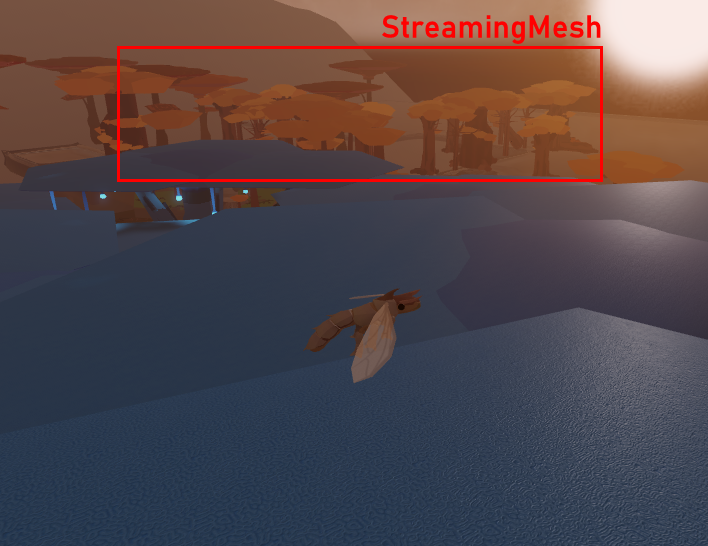
I’m using a custom system for LOD that I’d like to switch back to using streaming mesh to save CPU impact but if I do that I will be in a worse situation.

Expected behavior

I would expect the entire StreamingMesh to be treated as a single entity that can be occluded, like any basepart. Even if with lower precision, even AABB would be good enough.

8 Likes

This should probably be mentioned in occlusion culling post at least. I also discovered this the hard way.

This issue negates the benefit of using streaming meshes for landmark models. In the context of an open world like mine this has a very significant impact because most of the trees are part of the world’s visual gesture and cannot be omitted from streaming mesh without significant loss in the look and feel of the world.

Without streaming meshes the whole world that’s occluded is not rendered. With streaming meshes the major landmark trees are always rendered, which makes the use of streaming meshes much more impactful than they need to be.

1 Like

I hope this gets fixed, its would be really useful for low end devices.

Hi PeZsmistic,

Thank you for reporting this issue. Could you please confirm that you’re still experiencing this problem?

If so, could you please provide clear repro info (repro file + repro steps)? Being able to reproduce the issue ourselves helps significantly in how quickly we can fix it.

Best,
M0bsterLobster

1 Like

Very trivial to reproduce. The StreamingMesh outside of range is always visible when occluded while a fully loaded model occludes properly. Check visibility using wireframe mode. StreamingMeshOcclusionRepro.rbxl (57,5 KB)

Hi PeZsmistic,

I rolled out a feature to allow StreamingMeshes to participate in occlusion culling. Can you reload your client/studio and reevaluate?

Keeping in mind that the OC system uses an approximate bounding box for the StreaminMeshes - meaning that their occlusion will not be fine grained.

If you have scenes were you suspect this approximation to be especially poor, please provide them to me here or in a PM and I can evaluate them further

3 Likes

Fantastic, thanks! I’ll check it out a little later and see if there’s anything unexpected. That’s exactly the sort of limitations I expected and should be fine at scale.

1 Like

I had to roll back this feature because it caused a bug. I will keep the thread updated on when I can get a fix in

2 Likes

Occlusion culling for StreamingMesh should be enabled for client version 693 on Mac and Windows

3 Likes

Unfortunately I had to disable this again after a couple of days due to an increase in Mac crashes. I will keep this ticket updates about the status of this

4 Likes