No, I don’t mean UIButton, which is a GuiButton used to detect clicks.
What I’m referring to is input actions that behave differently depending on the region of the screen the mouse is in.
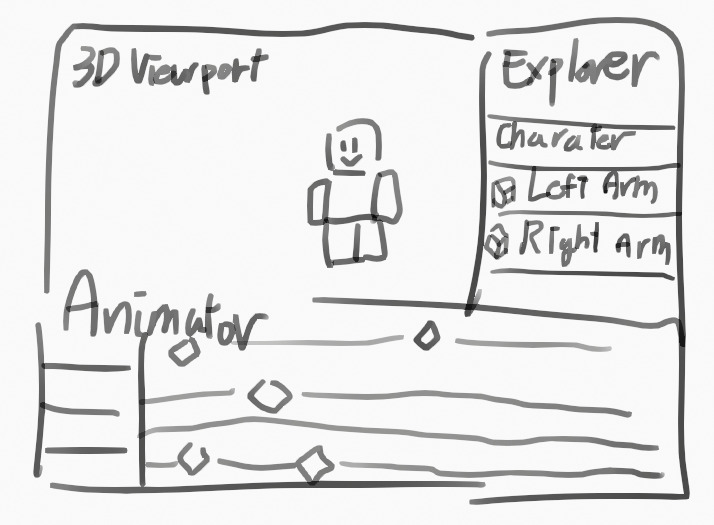
Let’s say there’s an animator experience where users can create animations during live gameplay:
- If the mouse is over the 3D viewport, pressing
Homeshould reset the camera’s position and rotation. - If the mouse is over the animation editor, pressing
Homeshould set the current frame to 1. - If the mouse is over the explorer, pressing
Homeshould select the top-most ancestor in the hierarchy.
This kind of behavior is also important for plugin development, where actions should only trigger when the mouse is inside a specific widget.
Right now, this kind of control is hard to implement.
Even though we have APIs like GuiBase2D.InputBegan, InputChanged, and InputEnded, they don’t integrate with CAS, meaning we can’t build a priority-based system based on mouse region.
You might suggest: “Just check if the mouse is inside a UI region and enable the corresponding ActionContext”
But the issue is:
Events like InputBegan, MouseEnter, and MouseLeave don’t respect rendering order.
Even if a GuiBase2D is visually behind another element, it still receives those events — which is not what most developers expect.
For example: When clicking on overlapping GuiButtons, only the front-most button receives events like MouseButton1Down, MouseButton1Click, and InputBegan (with an InputObject where UserInputType == MouseButton1). But with regular GuiBase2D elements, all of them receive the input — regardless of visual layering.
This makes it hard to detect which UI is actually on top.
And when floating widgets overlap, using InputBegan to implement region-specific actions can lead to input conflicts.

If the mouse is over both the floating explorer and animator, and they each handle Home using their own GuiBase2D.InputBegan,
then pressing Home will cause both to trigger, even if only the explorer is supposed to.
These are just some of the issues I’ve run into while trying to build floating widgets.
It’s definitely a bit complex and messy to handle right now,
but I think this is one of those areas Roblox will eventually need to improve.