Studio Hours is a productivity and analytics tool for Roblox developers. It’s mainly a Roblox Studio plugin, with an optional VS Code extension companion.
The goal is simple: help you and your team understand real work time, trends, and activity without inflated AFK stats.
It tracks live activity so your stats reflect true active work (not just time with Studio/VS Code open in the background).
Supports team workflows (invites, leaderboard, owner controls, restrictions)
Includes a VS Code companion for developers who script outside Studio
Core Features
Studio Plugin (Primary)
Personal dashboard (Today, Last 7D, Last 30D, All Time)
Visual graphs + breakdown cards
Team creation/join/invite flows
Team member leaderboard + summaries
Time restriction tools for teams
Global leaderboards with optional opt-out
Responsive docked UI designed for Studio workflows
VS Code Companion (Optional)
Active tracking while editing
Idle-aware detection
Syncs with the same Studio Hours account
Team insight compatibility where enabled
Team Web Dashboard & Insights
Team dashboard on the web — Studio Hours gives owners and members rollups, date ranges, and richer breakdowns (categories, place context) without living inside Studio.
Team insights, consent-first — when a team enables shared insights, each member must opt in for that specific team. Turning the feature on for Team A never implies consent for Team B.
In-depth metrics — trends and splits that match how Roblox work actually happens (active time, not “window open” time).
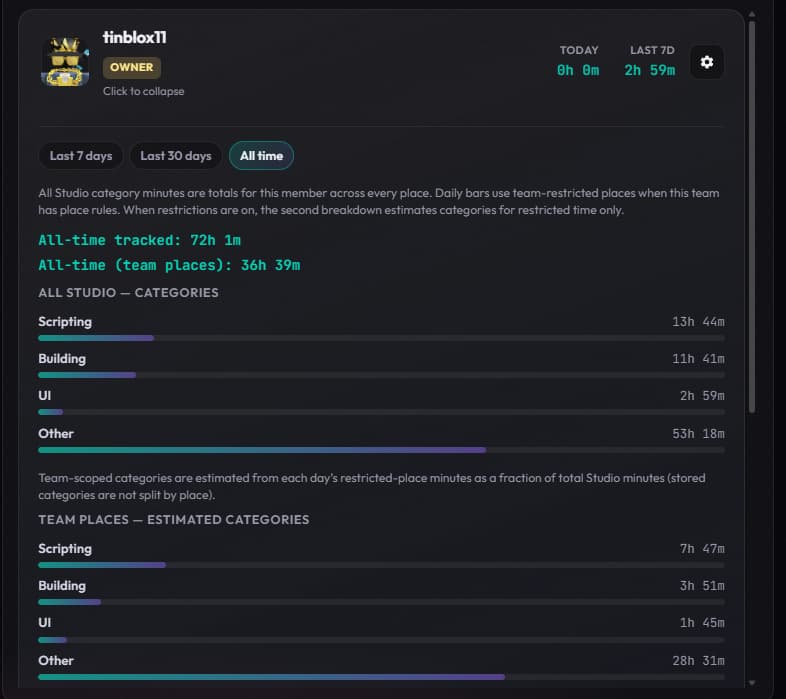
Tracking guardrails — team owners can set restrictions on how many hours count toward team totals (e.g. per day / week / month) from the plugin, so leaderboards and rollups stay fair and policy-aligned.
Image #3 shows a different team with Time Restrictions enabled
Privacy & Security (Quick FAQ)
No code content upload
No keystroke logging
Uses OAuth-based sign-in
Tracks activity state/timing, not your source text
Team insights are tied to team configuration/consent workflows
You can sign out / disable tracking
You can request deletion of your data
Data is encrypted in transit and sensitive session/auth data is protected at rest
See full details in the Privacy section on the Studio Hours website
Video Demo
Why I made this
Most trackers are either too generic or count time inaccurately. Studio Hours is designed specifically for Roblox workflows so solo devs and teams can measure real progress.
The core focus is live, active-data tracking so totals represent real productive time.
Feedback / Bug Reports
If you try Studio Hours, I’d love your feedback on current features and what you’d like to see next.
Feature requests and UX feedback are welcome
Bugs can be reported directly from Settings → Report a Bug
If you find it useful, dropping a on this post helps support the project and visibility.
So good project to see if people are actually spending time and working on the project. Definitely underrated so far. I’m excited to see how it developers after some time
That sounds like a window focus or docking issue. Is there a specific setting you’ve already checked to disable auto-opening, or is it just popping up because it’s docked to the same layout?
Added a new Team Dashboard on the site so teams can dig into member metrics, trends, and breakdowns in one place - plus the consent-first team insights flow and owner tracking limits I called out in the original post (see that section for the full write-up and links).
Still a free resource, you can access the dashboard from the links section at the top
This looks nice based on the previews, but I’m a solo developer. I shouldn’t need to use the website if I’m working alone! Besides, can’t you store this information in the game itself using ServerStorage? Why does it need a website to store that information?
As @mattqdev said, any information stored in ServerStorage or on your own machine will be unreliable, and others won’t be able to access it. It’ll also be inaccessible in other places (i.e. storing in ServerStorage would only store it for that place - as soon as you switch places or delete the StudioHours instance from SS, your data would be deleted). Plugin settings are also known to be unreliable since they may wipe, so using a site (with an offsite database) fixes all of that, and OAuth helps protect the security & integrity of requests.
It’s just for me though, I wouldn’t change my own data to make myself feel better.
I’ve never had plugin settings be erased randomly! Even when all my studio settings reset randomly, my plugin settings persisted. If I disable HTTP requests on the plugin, it should use plugin settings as a fallback. I really don’t need an external site just for tracking my own activity where nobody else needs to see it.
Plugin settings are unsafe for the same reason as the SS ones, they are also public and easy (harder than SS) to access and modify. So I can understand @tinblox11 choice to use database.
Anyway @tinblox11 there is something that i can’t understand: why if I use studio on the same place for almost 3 hours i get only 30 min on dev time? Time calculation is quite strange
Sorry for the late reply. Time is only accrued for active time spent in studio - idling is ignored, with the exception of the 3m idle timeout. You need to be actively moving in studio, editing a script, modifying instances, etc. in order for your minutes to go up
If you were active for those 3h and there’s an issue with the time calculations, feel free to send a bug report with your debug logs (which’ll allow me to verify everything in depth and find the issue. No sensitive information is stored, you can view these logs yourself) by heading over to the Roblox plugin —> Settings —> Report a Bug
Glad the tool’s been helpful - as for the team dashboard, I’m definitely open to suggestions! It’s especially helpful for studios who want to see how their team members are working and the hours they’re putting in (which comes in handy for handling hourly payment as well)


 Links
Links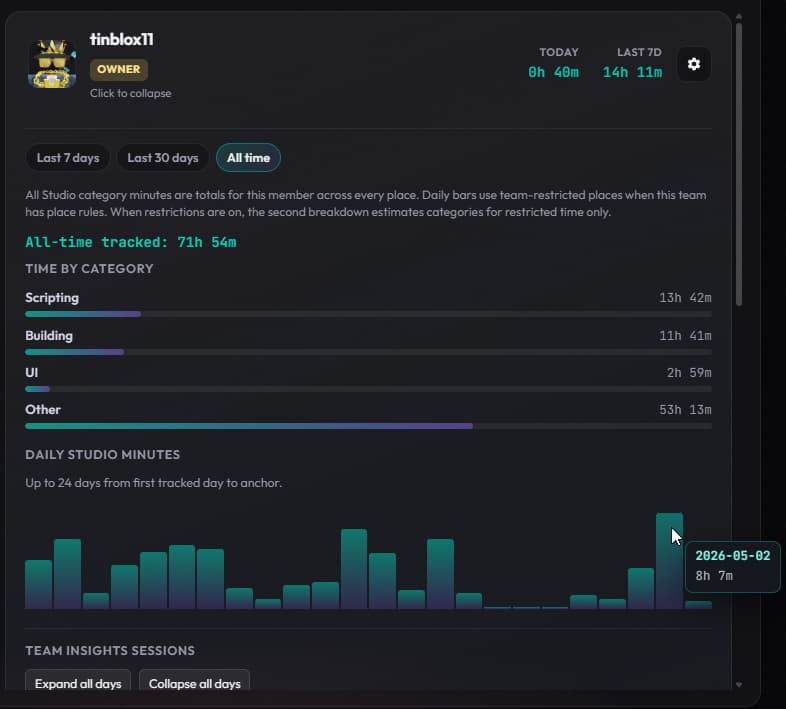

 Privacy & Security (Quick FAQ)
 on this post helps support the project and visibility.
