Howdy, so i want this, that when you click the Close button (btn) then the frame (frm) becomes invisible, and the Open (opn) button will become visible. The problem is that when you click the close button the frame becomes invisblle, but the open button doesnt show up, How do i fix it? Picture of the explorer: 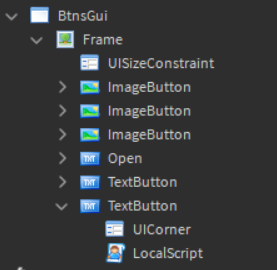
local btn = script.Parent
local frm = script.Parent.Parent
local opn = frm.Open


btn.MouseButton1Up:connect(function()
	if frm.Visible == true then
		frm.Visible = false
		if opn.Visible == false then
			opn.Visible = true
	end
	end
end)


opn.MouseButton1Up:connect(function()
	if frm.Visible == false then
		frm.Visible = true
		if opn.Visible == true then
			opn.Visible = false
		end
	end
end)
1 Like
Since the Open Button is inside the Frame itself, it’ll become invisible along with everything else as well
You could just put the Open Button inside the BtnsGui Gui itself, and not inside the Frame or loop through every Object inside the Frame:
local btn = script.Parent
local frm = script.Parent.Parent
local opn = frm.Open

btn.MouseButton1Up:connect(function()
	if opn.Visible == false then

		for _, Object in pairs(frm:GetChildren()) do
            if Object:IsA("ImageButton") or Object:IsA("TextButton") then
                if Object.Name == "Open" then
                    Object.Visible = true
                else
                    Object.Visible = false
                end
            end
	    end

	end
end)

opn.MouseButton1Up:connect(function()
	if opn.Visible == true then

		for _, Object in pairs(frm:GetChildren()) do
            if Object:IsA("ImageButton") or Object:IsA("TextButton") then
                if Object.Name == "Open" then
                    Object.Visible = false
                else
                    Object.Visible = true
                end
            end
	    end

	end
end)
1 Like
