About
Roblox’s default replication has several limitations that make responsive multiplayer gameplay difficult to achieve. By default, physics is replicated at 20hz, and all characters are subject to a large, non configurable interpolation delay thats designed primary for mobile devices on low bandwidth connections.
NPC replication is especially inefficient. Roblox often triggers excessive recv traffic for parts moved on the server - sometimes 10x higher than an optimized custom solution, and can also incur unnecessary send usage that is 100x more than normal. This wastes bandwidth and reduces performance.
Chrono solves all of these problems, while also improving developer experience by:
- Bypassing roblox interpolation delay by manually forwarding cframe data to other players and creating a configurable, custom dynamic interpolation delay
- Providing access to historical snapshot data and exposing interpolation delay, for far more accurate lag compensation
- Optimizing server controlled entity replication by placing server controlled entities into a camera container on the server, stopping Roblox’s replication completely. Chrono then sends its own compressed replication data using a fraction of the bandwidth
- Chrono’s API allows developers to create real time debuggers that hooks onto its snapshot and latency system, letting you view exact replication data, packet loss, and per player interpolation states.
Chrono:

Roblox:

Performance
Chrono is made with performance in mind and designed to have high replication efficiency.
It achieves this with the following optimizations
- Batching - coalesces snapshots into a single buffer to reduce overhead
- Serdes - packs data into buffers to be efficiently sent
- Proximity based replication - replication frequency scales by distance
- Movement aware replication - no packets are sent when a player is stationary and freezes the interpolation buffer to preserve accurate latency statistics
Credits to Pogo for creating BetterReplication which inspired this project.
Benchmarks are available here here
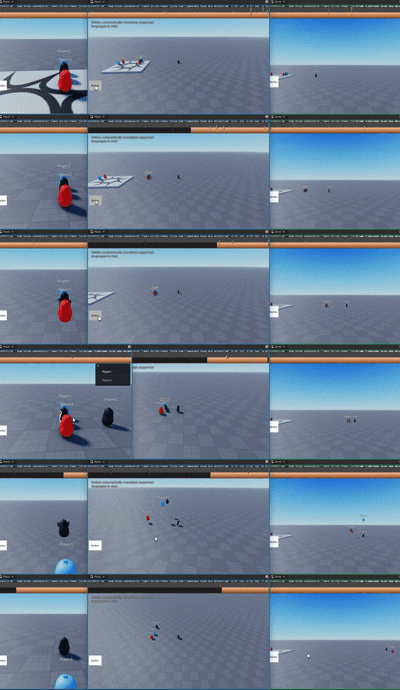
Here is another visual comparison between Roblox, Chrono and BetterReplication
Red = Roblox
Blue = Chrono
Black = BetterReplication
Basic Usage
--Client
local ReplicatedStorage = game:GetService("ReplicatedStorage")
require(ReplicatedStorage.Packages.chrono).Start()
--Server
local ReplicatedStorage = game:GetService("ReplicatedStorage")
require(ReplicatedStorage.Packages.chrono).Start()
Ragdolls
Many people do not know how to get working ragdolls with custom replication. Here is an example implementation: ragdoll.luau by @Tazm0ndo
Credits
- @haotian2006, 2nd maintainer of chrono, primarily working on improving the npc system, bug fixes and more
- ffrostfall for improving repo set up and packaging
- Azim_us for moral support
Change Log
v1.2.1 (2025-09-18)
- Fixes interpolation buffer being massively artificially increased when player begins moving after a period of inactivity
- Adds custom character support decoupling from Roblox’s
player.Characterand also allowing players to switch characters during runtime viaSetCharacter- Adds configuration for sending Y-rotation vs full rotation
- More generic bug fixes
v1.1.0 (2025-08-26)
- Add replication rules for filtering players to replicate to (
SetReplicationRule,GetReplicationRule)- Add npc registration with initData
- Add npc registration with provided model option
- Add events
NpcAdded,NpcRemoved- Add method for pausing character interpolation via
TogglePlayerReplication- Exposed player replicators for DISABLE_DEFAULT_REPLICATION
- Add method to modify chrono config during runtime (Before Chrono.Start() is called)
- Disabled warnings that spammed the output by default. Can show warnings only when experiencing bugs
- Fixed memory leak with grid not cleaning up and characters not being cleaned up
- Fixed bug where afking causes snapshot implementation to break
- Fixed bug where joining causes teleportation when player idles
- Fixed rig/replicator not being moved when HRP was not the primarypart when default replication is disabled
- Optimized npc creation
- Optimized serialization