
Acquire Designer Pro
Designer Pro will be receiving continuous free updates and bug fixes for its entire lifetime.
Until now, plugins for designers had often required users to buy multiple different plugins to have a full-feature experience, or had overly high price points that didn’t match the quality of the product. UI Designer Pro will be the solution to this problem. Created by an actual UI designer with experience on the platform, this plugin aims to deliver powerful and high quality solutions to the problems designers face in studio.
( Design inspiration and credits to [Zack - Roblox] Zac1kio, and his creation [Blob. Lite] ).
Core Features & Technical Overview
1. Visual Layout Order Editor
- Overview: Provides an interactive node-based interface to evaluate and modify the
LayoutOrderof UI elements directly, eliminating the need to manually alter properties in the properties window.

2. Scale ↔ Offset Conversion Engine
- Overview: Converts UI
SizeandPositioncoordinates between Relative (Scale) and Absolute (Offset) values. This utility also supports complex conversions for secondary elements likeUIStroke(thickness) andUICorner(radius).

3. Boundary Alignment & Offset Tools
- Overview: Snaps selected UI elements directly to parent container boundaries while allowing for the application of precise, pixel-level offsets.

4. Automated Aspect Ratio Calculator
- Overview: Evaluates the real-time physical proportions of selected UI elements and dynamically updates
UIAspectRatioConstraintvalues to maintain modified aspect ratio constraints during edit time.

5. Bounding Frame Generator
- Overview: Takes the absolute bounds (size and position) of multiple selected UI objects to generate and wrap them in a correctly proportioned container frame.
- Demonstration: Video Demo

6. Global Default Property Manager
- Overview: Allows developers to predefine custom property profiles that are automatically assigned to newly instantiated GUI elements. Supports all GUI instance classes, including
Frame,ImageLabel,UIShadow,TextButtonetc, this feature will dynamically update with roblox as the api is modified, meaning this feature will always remain up-to-date.

7. Anchor Point & Position Modifier
- Overview: Allows customization of
AnchorPointcorresponding withPositioncoordinates, applying anchor point changes without modifying the position.

8. Adaptive Theme System
- Overview: Features a customizable styling engine to match your interface preferences and integrate with Roblox Studio’s light and dark themes.

9. Absolute Dimension Preservation (Maintain Size)
- Overview: Retains the exact absolute size (pixels) of a GUI object when reparenting it to a container that utilizes scale coordinates, preventing unintended resizing.

10. Equidistant Offsetting
- Overview: Configures and applies uniform offsets to instances from their parent containers using either scale or pixel-based calculations.

11. Custom Viewport Handles
- Overview: Replaces default studio handles with specialized manipulation handles inside the workspace viewport for manual scaling and rotation.


12. Precision Nudge Tool
- Overview: Enables discrete incremental shifts of selected UI instances using keyboard shortcuts, based on user-defined step sizes (Pixels).

13. Zoom & Pan
- Overview: Isolates and magnifies selected GUI elements to enable higher-precision detailing and alignment within the viewport.
- Demonstration: Video Demo

14. Asset Manager
- Overview: A localized database within the plugin to organize, store, and reference assets such as audio files, decals, and images across multiple projects.
- Demonstration: Video Demo

15. Device Viewer
- Overview: Gives the user the ability to hotswap between different device views, such as mobile, desktop, vr & more.

Roadmap (Planned Features)
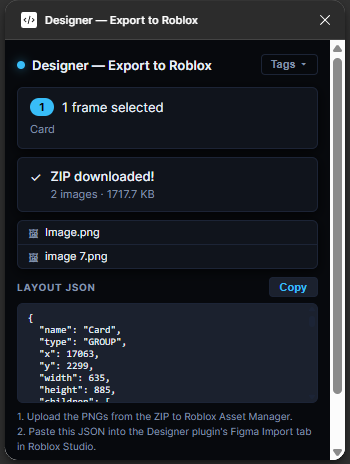
Figma Importer
- Overview: This Roblox Studio is bundled with a figma-plugin, this will allow the user to convert their figma designs into usable roblox instances, you can use this figma plugin for free, but it won’t be of any use unless paired with the roblox studio plugin, as our conversion process is internally different and is not cross-compatible with other importers.

On-screen macros
- Overview: This feature will be integrated into the existing viewport handles, what it will introduce is a button to open a list of quick-actions to allow the user to manage their ui right in the viewport, without having to jump back into the plugin widget window to do a certain action.
Support & Maintenance
Regular maintenance updates, optimizations, and bug fixes are deployed weekly.
- Reporting & Feedback: For bug reports, performance issues, or feature requests, please submit them via Discord at: oapa.
- Update Schedule: Maintenance patches and updates are regularly pushed on Fridays at 6:00 PM Eastern Standard Time (EST).
